Best USB-Port UPS Backups for Home Office and Devices
If you need a reliable uninterruptible power supply (UPS) with USB charging ports, these models provide battery backup, surge protection, and convenient USB charging for phones, tablets, and peripherals. They’re suited for home offices, streaming setups, gaming corners, and small business workstations. The following selections balance affordable options with essential features like AVR, multiple outlets, and easy-to-read status indicators.
| Product | Type | Best For | Key Benefit |
|---|---|---|---|
| APC BE600M1 | Line-interactive/surge | Home office essentials | Compact backup with two USB charging ports |
| CyberPower CP1500AVRLCD3 | Interactive with LCD | Mid-range workstations | Large outlet count and AVR with LCD readout |
| APC BR1000MS | Sinewave UPS | Desktops and networking gear | 12-minute runtime at moderate load, sinewave power |
| CyberPower SL950U | Standby UPS | Slim setups | Compact profile with USB charging and ample outlets |
| APC BVK750M2 | Line-interactive | Budget-aware home offices | Balanced surge protection and USB charging |
APC BE600M1 UPS Battery Backup

APC BE600M1 provides short-term power during outages to keep a computer, Wi-Fi router, and desk devices online and ready for safe shutdown. It offers 23 minutes of runtime at 100W and includes full-battery backup outlets plus surge protection. This model is best for single-workstation setups or small home offices where compact size matters and USB charging is convenient for mobile devices. A limitation is that runtime will drop quickly at higher loads, so plan for light to moderate usage.
CyberPower ST625U Standby UPS

CyberPower ST625U offers 625VA/360W standby power with eight outlets and two USB charging ports. It’s compact and suitable for home offices, gaming consoles, and routers. It uses simulated sine wave output, which is adequate for many common devices but may not be ideal for high-wattage or sensitive electronics under heavy load. Choose this if you want a simple, budget-conscious solution with USB charging on the go.
CyberPower CP1500AVRLCD3 Intelligent UPS

CyberPower CP1500AVRLCD3 is a 1500VA/900W intelligent UPS with 12 outlets, AVR, and a color LCD panel showing real-time battery and power conditions. It includes USB ports (Type-A and Type-C) for charging and powering devices. It is best for mid-sized workstations, home networks, and multiple peripherals that require stable power delivery and clear status information. A potential limitation is the larger footprint compared to compact models.
APC UPS Back-UPS Pro BR1000MS
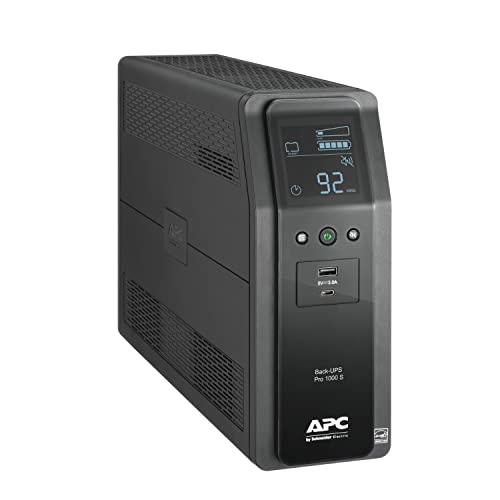
APC BR1000MS provides 1000VA/600W sinewave backup with AVR, 10 outlets, and USB-C plus USB-A charging ports. It’s designed to keep computers, NAS devices, TVs, and routers powered during outages with cleaner power. It’s best for users needing higher wattage support and better power quality. A caution is that it’s larger than ultra-compact models, which may affect placement in small spaces.
APC BVK750M2 UPS
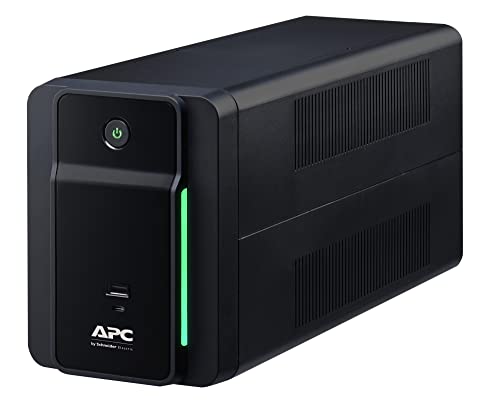
APC BVK750M2 offers 750VA/410W line-interactive protection with four outlets, all providing battery backup with surge protection. It includes two USB charging ports (Type C and Type A). This model is suitable for budget-minded buyers who want USB charging and reliable surge protection for a compact home office. The trade-off is fewer outlets and moderate wattage, which may not cover high-power devices simultaneously.
Buying Guide
What size UPS do you need? Start with estimated total wattage of devices you intend to power during an outage, then choose a UPS with at least 20–40% more capacity to handle surges and startup surges. If you have a NAS, router, and a desktop, models in the 1000VA–1500VA range are common sweet spots.
How many outlets and how are they arranged? Look for a mix of battery-backed outlets and surge-only outlets. Large plugs and power bricks benefit from extra spacing between outlets to prevent blocking adjacent ports.
Is AVR important for you? Automatic Voltage Regulation corrects minor voltage swings and helps protect sensitive electronics. AVR is especially valuable in areas with unstable power or frequent brownouts.
What about USB charging and data protection? USB ports on the UPS can keep tablets and phones charged while the UPS backs up critical devices. Some units also provide USB-C for charging newer devices and software-enabled monitoring features.
Power quality and monitoring features matter. A model with an LCD or color display makes it easier to monitor runtime, load, and battery health at a glance. If you manage multiple devices, a larger LCD panel can save time during outages.
Size, noise, and placement. Consider the footprint and whether the UPS will sit on a desk or under a desk. Some larger models generate noticeable fan or transformer noise under load; plan accordingly.
Frequently Asked Questions
Do all UPS units have USB charging ports?
Many UPS units include USB ports for charging devices. Availability varies by model; check product specs for exact USB type and power output.
What is AVR and when should I need it?
Automatic Voltage Regulation corrects small fluctuations in power so connected devices receive stable voltage, reducing wear and unexpected shutdowns.
How long will a UPS run my devices?
Runtime depends on battery capacity and load. Higher wattage devices run longer on higher-capacity models; smaller devices will run longer on compact models.
Can I use a UPS for a home network and gaming setup?
Yes. For networking gear, PCs, and consoles, choose a UPS with sufficient outlets and enough wattage to cover peak power draws during outages.
Are line-interactive UPS models better than standby models?
Line-interactive UPS units generally offer better protection and longer runtimes for everyday office equipment, while standby models are often smaller and more budget-friendly.