Best Remote Power Switch Network Options for Reliable Online Hardware Management
Answering the buyer’s need for dependable remote power control, these devices enable auto-reboot, scheduled cycling, and monitor-based power management for networked equipment. They are best suited for IT admins, small offices, home labs, and home users who want to reduce downtime for modems, routers, cameras, NAS, and other connected devices. The top picks below emphasize automatic self-healing, cloud or app control, and easy integration with existing networks.
| Product | Best For | Key Feature |
|---|---|---|
| MSNSwitch2 UIS-722b | Small office IT admins | Two independent outlets with internet connectivity monitoring and auto-reboot |
| ezOutlet5 EZ-72b | Home networks with Wi‑Fi | Single outlet with automatic reboot via LAN or Wi‑Fi |
| ezOutlet5-2R EZ-73a | Home and small business | Dual outlets with automatic reboot over LAN/Wi‑Fi |
| Dataprobe iBoot-G2 | Remote teams needing cloud access | 1 outlet, web-based control, free cloud service |
| MSNswitch MAX UIS-801bc | Users needing multi-device uptime | 2 outlets, auto reboot, power metering, cloud/API control |
MSNSwitch2 Internet Enabled IP Remote Power Switch

This model provides two independent AC outlets with internet-connected reboot capabilities. It monitors connectivity and can cycle one or both outlets automatically when the connection is lost. It supports user-definable scheduled power cycling and is designed for rebooting remote equipment such as modems, routers, DVRs, and industrial devices. Best for network closets or small office setups where multiple devices require outages to be handled remotely.
Best for: IT admins managing small networks who want automatic self-healing and straightforward scheduling. Limitations: only two outlets; upgrade path may be needed for more outlets in larger deployments.
ezOutlet5 EZ-72b – Internet Enabled IP & Wi‑Fi Remote Power Switch
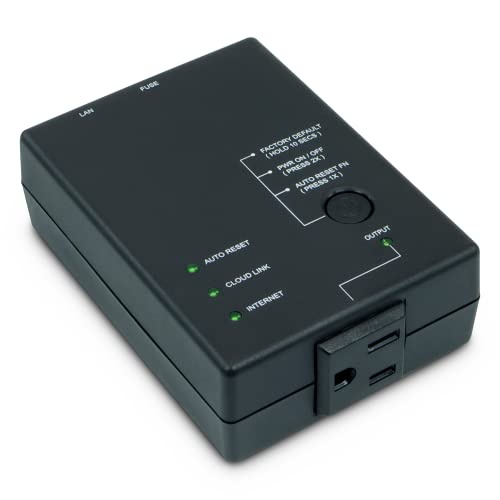
Designed for single-outlet control with remote reboot, this device connects via 2.4 GHz Wi‑Fi or 10/100 Ethernet. It automatically restarts connected equipment when the broadband connection is lost and supports control through iOS, Android, cloud, web, and Google Home. Ideal for home networks or small offices that rely on consistent modem/router uptime.
Best for: Home users seeking easy Wi‑Fi setup and cloud/app control. Caution: single outlet means you’ll manage only one device per unit, which may require multiple units for multi-device setups.
ezOutlet5-2R – Dual Outlet Internet Enabled IP & WiFi Remote Power Switch

This dual-outlet device extends the concept with two controllable outlets connected to a LAN via 2.4 GHz Wi‑Fi or 10/100 Ethernet. It monitors internet connectivity and cycles power when broadband is interrupted. It’s suitable for households or small offices running multiple network devices that could benefit from automatic reboots.
Best for: Users who need two independent control points in a compact form. Limitations: each outlet is separate, so coordinated reboot timing may require careful configuration of schedules.
ezOutlet5 IP Enabled Remote Power – Ping Auto Reboot
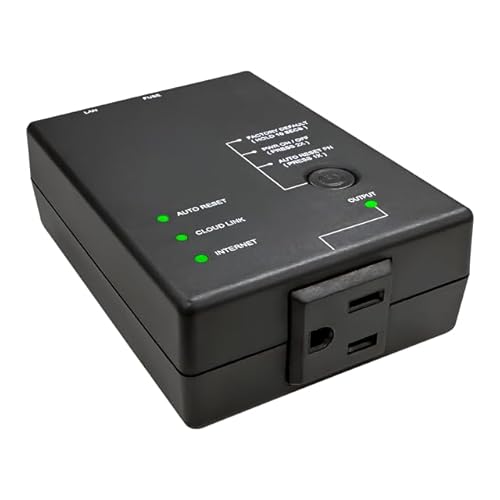
This single-outlet device integrates network self-healing with ping-based auto reboot. It supports Ethernet and Wi‑Fi, and provides cloud and app management. It is useful when you need a simple watchdog-style reboot for a specific device such as a DVR, camera, or network switch to maintain uptime.
Best for: Scenarios focusing on a single critical device requiring automatic reboot on ping failure. Limitation: one controlled outlet may require additional units for broader setups.
Dataprobe iBoot-G2 Basic Network Power Switch
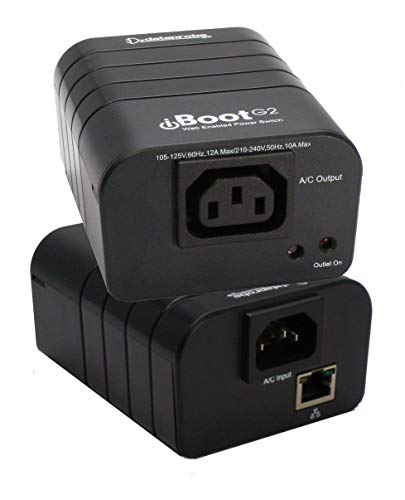
The iBoot-G2 provides remote power control via web browser or Dataprobe’s cloud service. It is a single-outlet solution that emphasizes easy plug-and-play setup and cloud-based management for centralized control of multiple devices. This can be a practical choice for remote hands and offsite gear management.
Best for: Remote teams needing centralized, cloud-based management for one device. Caution: with a single outlet, plan for expandability if you have more devices to manage.
MSNswitch MAX 2-Outlet – Remote Power Switch

MSNswitch MAX offers two outlets with auto reboot, power metering, surge protection, and noise filtration. Control is available via smartphone app, cloud, or API. This model is designed for better visibility into power usage while helping minimize downtime by promptly rebooting non-responsive equipment.
Best for: Operators who value power monitoring alongside reboot capabilities. Limitation: features rely on cloud/API access which may require network reachability and account setup.
Buying Guide
What should I consider when selecting a remote power switch?
- Number of outlets: Determine if you need 1, 2, or more controlled outlets based on equipment count.
- Connection type: Wi‑Fi versus Ethernet can affect reliability; Ethernet is typically more stable for critical devices.
- Auto reboot behavior: Look for devices with continuous monitoring, ping checks, or uptime monitoring to trigger automatic cycles.
- Cloud and app control: Check whether cloud access and smartphone apps meet your team’s workflow and security requirements.
- Power metering and safety: If you need visibility into energy usage or surge protection, choose models offering metering and electrical protection.
- Security and access: Consider authentication methods, API support, and how you manage permissions for multiple users.
What’s the best setup for a mixed network?
For a mixed network with modems, routers, cameras, and a NAS, a combination of a dual-outlet device and a single-outlet watchdog can provide redundancy. Use a two-outlet switch for a modem/router pair and a separate single-outlet switch for a critical device that needs immediate reboot if it becomes unresponsive.
How do I manage remote power at scale?
Opt for devices with cloud management and API support. Group devices by site or function, create consistent reboot schedules, and implement simple monitoring to alert your team when a device reboots unexpectedly.
How important is outage rediness?
Outage readiness depends on device choice and network health monitoring. Devices with auto-reboot and connectivity checks can reduce downtime, but ensure you have enough outlets and a straightforward way to re-establish power to all critical devices after an outage.
What about security?
Prioritize devices with secure cloud access, robust authentication, and documented API access controls. Regularly review allowed IPs and user access to minimize exposure to unauthorized control commands.
FAQ
- Q: Can these switches reboot remotely without manual intervention? A: Yes, most models offer automatic reboot when connectivity or device responsiveness fails.
- Q: Do these devices require a dedicated app to operate? A: Many support apps, web interfaces, or cloud dashboards, but some also offer local web control without apps.
- Q: Can I monitor power usage from these devices? A: Some models include power metering and surge protection, while others focus on reboot capabilities only.
- Q: Is it safe to expose these devices to the internet? A: Use proper authentication, strong passwords, and API access controls to minimize risk; isolate critical devices when possible.
- Q: Can I manage multiple devices across locations? A: Cloud-enabled models with APIs allow centralized management across devices and sites.
- Q: Do I need professional installation? A: Most units are plug-and-play; ensure the outlets and power needs match the devices you plan to control.