Best Power Center Surge Protectors for Clean, Safe, Multi-Device Setups
Answer: If you need a single surge-protected hub that can power a full desk or entertainment system, a power center surge protector with multiple outlets and USB ports is ideal. These units organize cables, protect devices from spikes, and offer flexible placement for home offices, dorm rooms, and living rooms. The top picks below are best for gamers, home theater enthusiasts, students, and professionals who require many outlets and smart charging in one compact tower or strip. The table summarizes key options to compare at a glance.
| Product | Total Outlets | |||
|---|---|---|---|---|
| JACKYLED 18-In-1 Tower | 12 AC, 6 USB | 6 (2 USB-C) | Independent per-layer switches, space-saving vertical design | Large setups with many devices |
| SUPERDANNY 28-In-1 | 22 AC, 6 USB | 6 (5 USB-A, 1 USB-C) | Flat plug, wide spacing, high joules protection | Gaming rooms and home theaters |
| ALESTOR 12-Outlets | 12 AC, 4 USB | 4 (1 USB-C) | 2700 Joules, smart fast charging | Frequent device charging and high surge protection |
| Monster Vertex | 6-10 AC, 2 USB-A, 1 USB-C | 3 USB ports | Detachable magnetic USB hub, Power Delivery USB-C | Apartment life with modular USB access |
| POWSAV 18 Outlets | 18 AC, 4 USB | 4 USB | 2-level surge protection circuit, flat plug | Desk setups needing many outlets |
JACKYLED 18-In-1 Tower Power Strip

The JACKYLED tower combines 12 widely spaced AC outlets with 6 USB ports (including 2 USB-C) in a vertical design. It supports a total output of up to 1625W/13A and includes 1050J surge protection. This configuration is best for large gaming setups, media centers, or home offices with many devices plugged in simultaneously. The independent switches on each level help conserve energy by turning off idle devices. A potential limitation is that cable management relies on the user’s organization; the unit’s height may require clearance on desks or shelves.
SUPERDANNY 28-In-1 Surge Protector

The SUPERDANNY surge protector offers 22 AC outlets plus 6 USB ports across four rows, with a 1875W/15A rating and 2100 Joules of protection. The wide spacing helps prevent bulky adapters from blocking adjacent outlets, making it ideal for home theaters, gaming setups, or dorm rooms where many devices share a single strip. Note: side outlets cannot rotate, which may affect placement in tight spaces or behind furniture.
ALESTOR 12-Outlets With USB

The ALESTOR unit features 12 AC outlets and 4 USB ports (including a USB-C) backed by 2700 Joules of surge energy. It supports 120V to 240V circuits and uses smart charging to optimize USB output. It is well-suited for users who need substantial outlet capacity and reliable surge protection for a workstation, with a caution that the USB-C port’s power delivery can vary by device compatibility.
POWSAV 18-Outlet Surge Protector
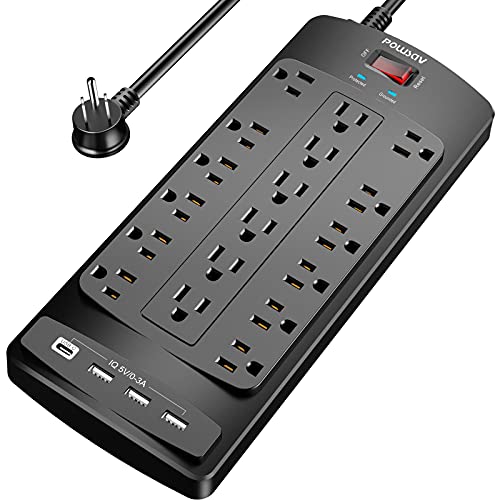
POWSAV combines 18 outlets with 4 USB ports and a 2100 Joules energy absorber. The flat plug and six-foot cord are designed for easy placement behind desks, couches, or beds. This model suits users who need numerous outlets in cramped spaces, though it’s best used where outlets are accessible to spread cords without interference.
UWIWUTEI 16-In-1 Tower

The UWIWUTEI power strip tower extends to 12 AC outlets and 4 USB ports in a 16-in-1 setup, with a 6-foot cord and a 45° angled design to minimize outlet blockage. It emphasizes fast charging (USB-C up to 3.4A) and a compact wall-friendly profile. It’s a good pick for students or compact home offices that require many ports without bulk, though keep an eye on outlet spacing in unusually large adapters.
Buying Guide
What should you look for in a power center surge protector?
Key factors include total joules for surge protection, number and spacing of outlets, USB port configuration (USB-A vs USB-C), and whether the unit offers per-outlet switches. Consider if you need a tower design to save desk space or a flat-plug strip for behind furniture. Look for UL or ETL safety listings and a predictable total power rating (watts) that matches your device load.
Outlet spacing and plug compatibility
Wide spacing helps accommodate bulky adapters and docking stations. If you have large power bricks, choose a model with clearly separated outlets and, if possible, rotating or differently oriented outlets. For flat-wall placement, a low-profile or flat-plug design reduces obstruction behind furniture.
USB charging considerations
USB ports on power centers vary in total amperage and per-port output. USB-C ports are ideal for newer devices and provide faster charging when supported. If you rely on many USB devices, ensure the combined USB output meets your needs and that USB-C charging uses Power Delivery if fast charging is a priority.
Surge protection and energy handling
Look for joule ratings (e.g., 2100–2700J) and a level of protection that aligns with your devices. Higher joules generally indicate stronger protection for electronics like computers, TVs, and game consoles. Consider additional features like automatic reset, overload protection, and indicator lights to monitor status.
Space, placement, and cable management
Tower designs save desk space and keep cords organized. Flat-plug options help fit behind furniture. If you need to mount or detach USB hubs, check whether the unit includes magnetic mounting or detachable sections for flexibility in placement.
Which product is best for you?
- Best for large desks with many devices: JACKYLED 18-In-1 Tower or SUPERDANNY 28-In-1
- Best for compact spaces with strong surge protection: ALESTOR 12-Outlets
- Best for modular USB access in apartments: Monster Vertex
- Best for high outlet count at a good value: POWSAV 18 Outlets
FAQ
- Do power center surge protectors protect computers and TVs? Yes, provided they have adequate joule ratings and proper overload protection.
- Is USB-C charging common on these devices? Many include USB-C ports, with some offering Power Delivery for faster charging.
- Can I mount a power center on a wall? Some models are designed for desk use with space-saving towers; wall mounting depends on design and included hardware.
- What happens if a surge occurs? A surge protector diverts excess voltage to protect connected devices; indicator lights help show protection status.
- Do these devices consume power when turned off? Some have per-outlet switches to cut power to idle devices and save energy.
- Are there safety certifications to look for? Yes—check for UL or ETL listings and compliance with regional electrical standards.