Best Pop Up Tower Socket Solutions for Kitchen, Office and Conference Tables
Looking for a clean, clutter-free way to power devices on countertops, desks, or conference tables? A pop-up tower socket offers a hidden, reliable power hub with multiple outlets and USB ports. These units are ideal for homeowners and office workers who want easy access to electricity without sacrificing surface space. The top picks below are tailored for different spaces and device needs, from high-capacity kitchen islands to compact desks. The table also highlights who benefits most from each option and why it stands out.
Summary at a glance: the best five pop-up towers chosen for variety in outlets, USB ports, wireless charging, and compatibility with countertops. The table compares key features to help you decide quickly.
| Product | Outlets | USB/Power | Special Feature | Best For |
|---|---|---|---|---|
| Pop Up Electrical Outlet for Countertop | 3 AC | 2 USB | Retractable design, 1875W, 16AWG cord | Busy kitchen islands or desks |
| Automatic Pop Up Outlet for Countertop | 4 AC | 2 USB A, 2 USB C | ETL listed, easy install | Modern workbenches and conference spaces |
| Kungfuking Pop Up Outlet for Countertop | 3 AC | 1 USB-A, 2 USB-C | PD 20W, sleek dark finish | Minimalist countertops |
| Pop Up Outlet for Countertop (White) | 3 AC | 2 USB | Hidden, flush when closed, aluminum body | Clean desk surfaces |
| Pop Up Power Tower with Wireless Charging | 4 AC | USB-C & USB-A, wireless pad | Wireless charging pad, surge protection | Multi-device workflows |
Pop Up Electrical Outlet for Countertop with 3 Outlets & 2 USB Ports
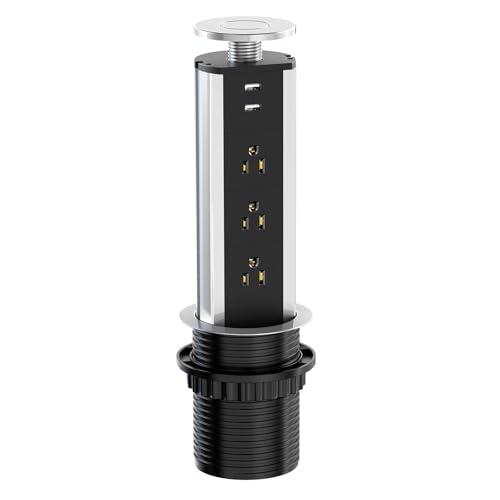
This unit uses a retractable pull-and-pop mechanism to keep surfaces uncluttered. It provides three AC outlets and two USB ports, enabling simultaneous charging for multiple devices. The 16 AWG copper cord supports up to 1875W, suitable for common kitchen appliances and office devices. Best for: kitchens and desks where quick access is needed without a visible power strip. Limitation: the inside is not water-resistant, so protect from spills near sinks or damp areas.
Automatic Pop Up Outlet for Countertop with 4 AC Outlets and USB Ports

This model features four AC outlets plus two USB ports (A and C), with a straightforward installation process designed for quartz or granite countertops. It delivers up to 1875W and supports simultaneous USB-A and USB-C charging. Best for: modern workstations and conference desks needing multiple ports in a single, hidden unit. Caution: the socket interior is not waterproof; keep away from water spray and spills.
Kungfuking Pop Up Outlet with USB-C PD and USB-A Ports

This countertop outlet blends a modern look with practicality. It offers three AC outlets and USB ports, including USB-C PD up to 20W. The retractable design keeps the surface tidy, and the dark finish complements contemporary countertops. Best for: minimalist kitchens and offices. Limitation: USB-C PD may require compatible devices to realize full 20W charging speed.
Pop Up Outlet for Countertop with Two USB Ports (White)

This white model provides 3 AC outlets and two USB ports, all housed in a flush, hidden design. It has a 5.5-foot grounded cord for flexible placement. Choose this if you want a bright, unobtrusive look that blends with most decors. Caution: the unit is designed for standard desk and counter depths; verify the hole cutout accommodates your furniture.
Pop-Up Tower Socket With Wireless Charging and USB Ports (Grey)

This option adds a 15W wireless charging pad on top in addition to four AC outlets and multiple USB ports, including USB-C. The pneumatic lift and retractable design keep surfaces clean when not in use. Best for: multi-device setups where wireless charging adds convenience. Limitation: wireless charging is only effective for compatible devices and may be slower for some phones.
Buying Guide
What should I look for in a pop-up tower socket?
- Outlets vs. devices: Choose based on how many devices you regularly power. If you have multiple laptops and phones, a unit with 4+ AC outlets and both USB-A and USB-C ports is ideal.
- Power rating: Ensure the unit handles your typical usage. A common standard is 125V/15A (1875W). Avoid units with lower ratings if you power high-draw appliances.
- Installation and fit: Check the hole size and countertop material. Some models require quartz or granite compatibility, while others fit wood furniture with simple cutouts.
- Safety: Look for UL/ETL listings and flame-retardant housings. Water exposure is a concern in kitchens; choose models with protective features or avoid near sinks.
- Wireless charging: If you want cable-free charging, consider models with an integrated wireless pad. Confirm compatibility with your devices (Qi standard is common).
- Finish and design: Aesthetic matters on visible surfaces. Dark finishes, white, or brushed aluminum options can blend with most decors.
Practical tips
- Measure your available surface area before purchase to ensure a flush, unobtrusive fit.
- Plan cord routing to avoid tripping hazards and keep doors or drawers unobstructed.
- Protect exposed ports from water spray in kitchen and workshop settings.
FAQ
- Are pop-up outlets safe for kitchens? Yes, when installed properly and kept away from direct water exposure. Choose models with appropriate safety ratings.
- Can I install these myself? Many are designed for straightforward cutouts, but check installation instructions for hole size and mounting requirements.
- Will a pop-up outlet power a high-watt appliance? Most units support up to about 1875W; verify your appliance’s wattage to avoid overloading.
- Do these include wireless charging? Some models include a wireless charging pad; others focus on USB ports only. Look for “wireless charging” in features if needed.
- What is the benefit of USB-C PD on these devices? USB-C PD delivers faster charging for compatible devices and can power laptops and phones more efficiently.
- Can these be used on conference tables? Yes, several models are designed for desks and conference surfaces to support meetings and shared devices.