Best Point to Point Wireless Bridge Kits for Extending Your Network
Answering your search for a reliable point-to-point wireless bridge kit, these selections are ideal for establishing long-distance links between buildings, barns, or remote workplaces. Each option supports outdoor use, simple setup, and scalable networking. This guide highlights five kits that balance performance, ease of use, and durability. It’s best to choose based on distance, environmental exposure, and whether you prefer a cloud-managed approach or a straightforward plug-and-play setup for quick deployments.
Summary table of chosen products:
| Product | Best For | Range | Key Benefit |
|---|---|---|---|
| TP-Link Omada Bridge Kit (EAP211-Bridge Kit) | Managed networks | Up to 1 km | OMADA cloud management & auto-pairing |
| TP-Link Omada Bridge Kit (EAP215-Bridge Kit) | Stable, scalable deployments | Up to 5 km | Pre-configured for plug-and-play setup |
| UeeVii CPE450 Wireless Bridge Kit | Outdoor long-range bridging | Up to 3 km | WiFi 6 router integration option |
| UeeVii Dual-Band Wireless Bridge Router Kit | Versatile networks & ease | Up to 5 km | All-in-one kit with dual-band router |
| KuWFi CPE120 2-Pack | Budget outdoor bridging | Up to 1–1.5 km | LED display and multi-mode support |
TP-Link Omada Point to Point Bridge Kit (EAP211-Bridge KIT)
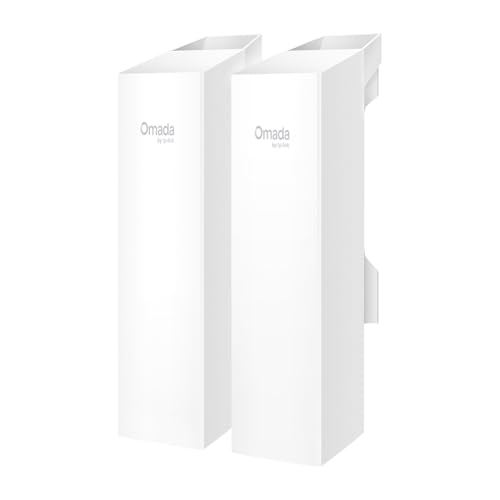
Best for network managers who want unified control. This kit leverages the TP-Link Omada cloud platform, providing centralized management of CPEs, access points, switches, and gateways. It supports auto-pairing and quick setup, reducing deployment time. The 5 GHz link reaches up to 867 Mbps under optimal conditions, enabling reliable PTP or PtMP links.
Who it’s best for: IT teams or advanced home users who value scalable, cloud-managed infrastructure. Limitations: While configuration is streamlined, some users may prefer non-cloud setups for isolated networks or strict air-gapped environments.
TP-Link Omada Point to Point Bridge Kit (EAP215-Bridge KIT)

Designed for larger spaces or multi-building setups, this kit emphasizes the Omada ecosystem with cloud-based management. It offers a 5 GHz link with robust throughput, ideal for businesses or campuses needing reliable PtP and PtMP configurations. The kit simplifies deployment with pre-configuration and auto-pairing features, making it a strong choice for professional networking projects.
Who it’s best for: Organizations seeking easy expansion within a cloud-managed network. Limitation: Requires compatible Omada hardware/software for full features; standalone operation is more limited.
UeeVii CPE450 Wireless Bridge Kit

Best for outdoor networks needing a strong bridge with router integration. The CPE450 kit includes an outdoor wireless bridge and WR3000K WiFi 6 router, enabling point-to-point expansion to remote locations like shops, barns, or outbuildings. It provides dual 100 Mbps ports for stable wired connections and supports reliable long-distance bridging. Caution: The kit’s performance depends on environmental factors such as line-of-sight and interference.
Who it’s best for: Users wanting a single-solution outdoor bridge with an integrated router. Limitation: The dual 100 Mbps ports may bottleneck high-throughput devices on very long links.
UeeVii Dual-Band Wireless Bridge Router Kit

Best for flexible, all-in-one network expansion. This kit combines a dual-band wireless bridge with a WR3000K router, enabling expansion to barns, shops, or remote locations without expensive cabling. It emphasizes plug-and-play functionality and multi-mode operation, including point-to-multipoint setups. Limitation: Higher-capacity setups may require additional access points for seamless coverage across multiple sites.
Who it’s best for: Homeowners or small businesses needing quick, adaptable expansion with minimal configuration. Caution: While easy to install, complex network topologies may need more advanced planning.
KuWFi CPE120 2-Pack Outdoor Wireless Bridge

Best for budget-conscious deployments with straightforward operation. The CPE120 kit offers up to 300 Mbps and a 1 km transmission range, using LED indicators for easy setup. It supports AP and Bridge modes and is weatherproof for outdoor use. Limitation: Performance may be modest on longer links or through cluttered environments.
Who it’s best for: DIY enthusiasts or small outdoor projects where cost and simplicity matter. Choose this if you only need basic bridging without enterprise-level features.
Buying Guide: How to Choose a Point-to-Point Wireless Bridge Kit
- Distance and line of sight: Longer links require higher frequency stability and sometimes directional antennas. Check reported ranges and real-world conditions such as trees, buildings, and terrain.
- Management style: Cloud-based (Omada) options provide centralized control across multiple sites, while plug-and-play kits suit simpler deployments without ongoing management needs.
- Throughput needs: If you transfer video or large datasets, prioritize higher Mbps ratings and low latency. Consider whether you need 2.4 GHz, 5 GHz, or dual-band support.
- Power and installation: See whether PoE or DC power is required, and confirm weatherproof ratings (IP65 or higher) for outdoor placement.
- Ports and devices: Dual Gigabit ports help connect cameras, switches, or additional routers. Plan for future expansion when selecting a kit.
- Cost vs. features: Higher-end kits offer cloud management and longer ranges, but a budget option may be sufficient for small or temporary setups.
FAQ
- What is a point-to-point wireless bridge kit? It is a pair of devices that create a direct wireless link between two locations, enabling network connectivity across distances without wired cabling.
- Do I need cloud management for these kits? Cloud management is optional. It provides centralized control for multiple devices, but many kits function well as standalone bridges for small sites.
- Can these kits work for surveillance camera networks? Yes, many kits are designed for stable long-range links suitable for camera backhaul, provided you match throughput and latency needs.
- What affects the real-world range? Line of sight, interference, weather, and antenna quality influence actual performance more than nominal specs.
- Are outdoor-rated kits weatherproof? Most listed kits offer IP65 or similar protection, but always verify suitability for your climate and installation height.
- Is a longer range always better? Not always. Longer ranges can reduce throughput and reliability in cluttered environments. Choose a kit balanced for your site layout.