Best M.2 PCIe RAID Cards for High-Speed NVMe Arrays
Answering your search, these M.2 PCIe RAID cards let you assemble fast NVMe drives into a single, high-throughput storage array. They are best for power users, workstation builders, and IT teams who need large, scalable, and reliable SSD performance. This guide highlights five strong options, explains who each is best for, and notes practical considerations like motherboard support and RAID capabilities.
| Product | Interface | Slots | Best For |
|---|---|---|---|
| ASUS Hyper M.2 x16 Gen5 Card | PCIe 5.0/4.0 | 4 M.2 | High-end AMD/Intel builds requiring Gen5 speed |
| ASUS Hyper M.2 X16 PCIe 3.0 X4 Card (V2) | PCIe 3.0 | 4 M.2 | Intel VROC or Ryzen Threadripper setups |
| StarTech Dual M.2 PCIe SSD Adapter | PCIe 3.0 | 2 M.2 | Compact, flexible M.2 expansion |
| GLOTRENDS PA21 Dual M.2 NVMe to PCIe 4.0 X8 | PCIe 4.0 | 2 M.2 | Soft RAID, affordable dual-drive RAID |
| GLOTRENDS PA41 Quad M.2 NVMe to PCIe 4.0 X16 | PCIe 4.0 | 4 M.2 | Quad-drive RAID, PCIe 4.0 power-user builds |
Notes: This guide uses a range of products that support multiple M.2 NVMe drives for software or hardware RAID configurations. Availability and exact features can vary by motherboard compatibility and BIOS/firmware. The sections below compare how each card fits common buyer goals, from raw speed to ease of setup and cost efficiency.
ASUS Hyper M.2 x16 Gen5 Card

The ASUS Hyper M.2 x16 Gen5 Card is designed for high-throughput NVMe arrays in AMD and Intel platforms. It supports up to four PCIe 5.0/4.0 M.2 drives with a theoretical bandwidth up to 512 Gbps, enabling smooth data transfers for demanding workloads. The card includes a two-phase power solution and a large heatsink with thermal pads and an active fan to minimize throttling and maintain reliability. Best for: builders needing Gen5/Gen4 speed in a four-drive M.2 RAID setup. Caution: Power and cooling requirements are higher, and some motherboards may require BIOS adjustments for full compatibility.
ASUS Hyper M.2 X16 PCIe 3.0 X4 Card

This PCIe 3.0 model is Intel VROC-ready and supports four NVMe M.2 drives, enabling aggressive RAID configurations on Intel VROC or AMD Ryzen Threadripper platforms. It uses a two-phase power solution with up to 14W output and supports up to 128 Gbps transfer speeds in practical configurations. Best for: users with Intel VROC or Threadripper systems seeking a reliable 4-drive M.2 RAID solution. Caution: Gen4/3.0 speeds limit peak bandwidth compared with Gen5 options.
StarTech.com Dual M.2 PCIe SSD Adapter Card

StarTech’s Dual M.2 PCIe adapter delivers two NVMe or AHCI M.2 drives via a PCIe 3.0 interface. It supports speeds up to around 3 GB/s per drive in ideal conditions and is tested for broad compatibility with 2242/2260/2280 formats. Best for: those who need a simple, cost-effective dual-drive M.2 expansion with broad OS support. Caution: No hardware RAID; software or motherboard-based RAID is required.
GLOTRENDS PA21 Dual M.2 NVMe to PCIe 4.0 X8
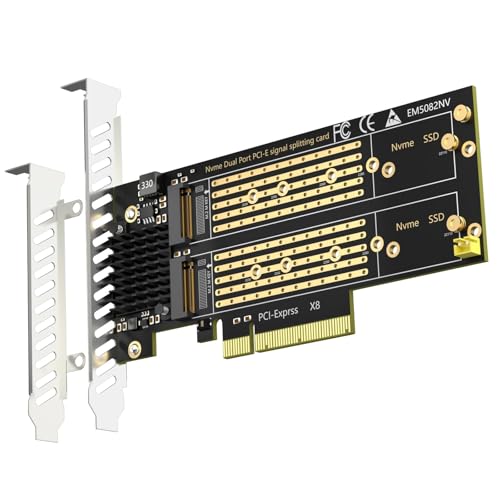
GLOTRENDS PA21 provides a two-drive M.2 NVMe solution on PCIe 4.0 X8. It supports 22110/2280/2260/2242 M.2 NVMe SSD sizes and enables soft RAID via OS tools on Intel/AMD platforms. Note that BIOS or motherboard PCIe bifurcation setup may be required. Best for: users seeking a budget-friendly dual-drive RAID option with OS-level RAID control. Caution: No hardware RAID—rely on software RAID via OS or motherboard features.
GLOTRENDS PA41 Quad M.2 NVMe to PCIe 4.0 X16
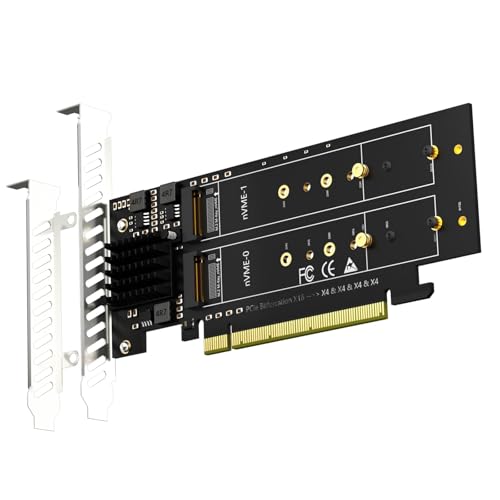
PA41 supports four M.2 NVMe drives on a PCIe 4.0 X16 interface, enabling a true quad-drive array with soft RAID options via OS. It requires PCIe bifurcation support in the motherboard BIOS and warns about mode limitations that can affect the number of recognized drives on some slots. Best for: high-capacity, four-drive M.2 RAID builds where motherboard support is available. Caution: Some motherboards may limit how many drives are recognized in certain bifurcation modes.
Buying Guide
What should you consider when choosing an M.2 PCIe RAID card?
- Number of M.2 slots vs. drive counts: Do you need 2, 4, or 8 NVMe drives? This determines whether you choose a dual, quad, or higher-slot card.
- PCIe generation and bandwidth: Do you require PCIe 5.0/4.0 or is PCIe 3.0 sufficient for your workload?
- Hardware RAID vs. software RAID: Do you prefer motherboard/OS RAID control or a hardware RAID controller? Hardware RAID can simplify setup and performance predictability.
- Motherboard compatibility: Does the motherboard support PCIe bifurcation, BIOS options, and enough PCIe lanes to avoid bottlenecks?
- Power and cooling: Do you have adequate chassis power and airflow for multiple NVMe drives, especially with Gen5 cards?
- Drive sizes and formats: Are you using 22110, 2280, or other M.2 lengths? Confirm compatibility with the card’s supported sizes.
- BIOS/firmware requirements: Some configurations require VROC licenses or specific BIOS settings to enable full RAID functionality.
Frequently Asked Questions
- What is the difference between hardware RAID cards and software RAID via OS?
– Hardware RAID cards handle RAID processing on the card itself, offering potentially faster and more consistent performance. Software RAID relies on the operating system and motherboard features for RAID, which can be flexible but may vary in performance. - Do I need bifurcation support on my motherboard for multi-drive M.2 arrays?
– In many quad- or dual-drive configurations, PCIe bifurcation is required to split a single PCIe slot into multiple x4/x8 lanes. Check your motherboard manual for supported bifurcation modes. - Is Gen5 speed worth it for all workloads?
– Gen5 provides higher theoretical bandwidth, which helps in sustained, parallel NVMe workloads. For typical consumer tasks, Gen4 or Gen3 cards may be more cost-effective. - Can I mix NVMe drives of different lengths (e.g., 22110 and 2280) on the same card?
– Many cards support multiple sizes, but always verify the specific model’s compatible drive dimensions to avoid installation issues. - Will software RAID perform as well as hardware RAID on large arrays?
– Software RAID can be effective, especially for modest arrays, but hardware RAID generally offers more predictable performance under heavy load. - Do these cards require external power?
– Some high-end Gen5 or multi-drive cards use an auxiliary power connector or rely on motherboard power management; check each product’s power specs to ensure your build can supply it.