Best in-Wall TV Power Kit Solutions for Clean, Safe Cable Management
Answering the common need for a neat, pro-looking TV setup, these in-wall power kits hide wires and provide safe, easy power access. They’re best for homeowners and renters who want a tidy wall-mounted TV area, with options suited to different outlet counts and USB charging needs. Below, five top picks show varied configurations and installation styles to fit most rooms and wall depths. A quick buying table in the introduction helps compare essentials at a glance.
| Product | Outlets | USB Ports | Cord Length | Notes |
|---|---|---|---|---|
| Mount-It! Triple Outlet Kit | 3 outlets | No | 9 ft | Great for large displays |
| Naerza In-Wall Kit | 2 outlets | No | 9 ft | All-in-one concealment |
| Celendor In-Wall Kit | 2 outlets | USB-C / USB-A | 9.8 ft | Smart charging options |
| Mount-It! Dual Outlet Kit | 2 outlets | USB-A / USB-C | 9 ft | Balanced power + USB |
| Legrand On-Q CPT306WV1 | 2 outlets | Low voltage only | 6 ft | UL listed, flexible |
Mount-It! In-Wall Power Kit With Triple Outlet
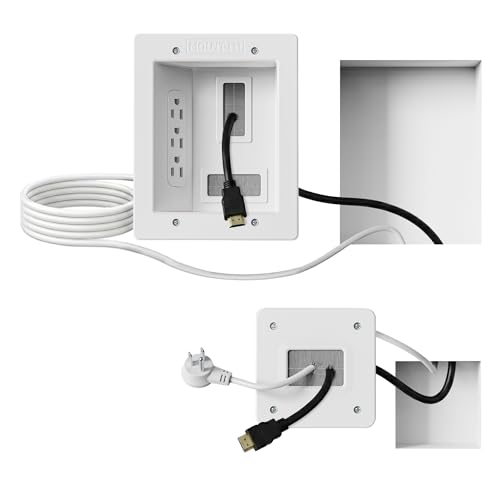
The Mount-It! in-wall kit is designed for larger entertainment setups where multiple cables must vanish behind the wall. It provides a recessed opening to run HDMI, Ethernet, and AV cables while delivering three power outlets. This makes it a strong choice for people who want a clean, modern look without trading plug availability. Best for living rooms or home theaters that require more socket capacity behind the TV.
Who it’s best for: buyers needing extra outlets behind a mounted TV and straightforward DIY installation. Why selected: robust outlet count supports a multi-device setup, with a plug-in system that avoids hard-wiring. Cautions: ensure your wall depth supports the receptacle box and that you follow the included saw template for a safe install.
Naerza In-Wall Cable Management Kit
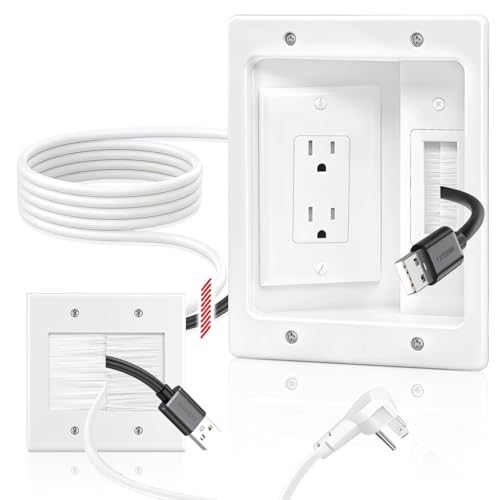
The Naerza kit focuses on a neat, all-in-one concealment solution for wall-mounted TVs and entertainment systems. It hides power cords, HDMI, Ethernet, and A/V cables inside the wall, delivering a clean look with straightforward installation. The two-outlet design provides essential power access while keeping cables out of sight. Best for mid-size setups and small-to-medium living spaces.
Who it’s best for: buyers prioritizing a simple, all-in-one concealment approach. Why selected: includes clear installation steps and wing-shaped clips for a secure fit. Cautions: verify wall depth and tool needs; some installations may require additional guidance for cable routing.
Celendor In-Wall Cable Management Kit
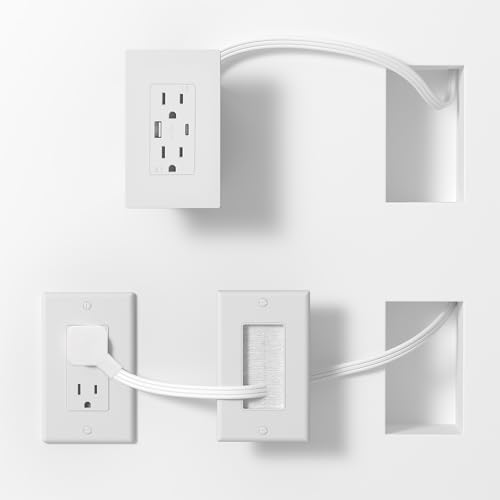
Celendor emphasizes smart charging alongside hidden power. The kit relocates outlets for convenient placement and includes a 9.8-foot cord to reach distant outlets. It supports two standard outlets plus USB-C and USB-A ports, delivering balanced charging for multiple devices. Best for homes with a mix of phones, tablets, and laptops that charge simultaneously behind a mounted TV.
Who it’s best for: households with multiple USB devices requiring fast, efficient charging. Why selected: built-in smart charging optimizes current for each device, reducing risk of overcharge. Cautions: check your wall depth and ensure the included power arrangement aligns with local electrical codes.
Mount-It! Dual Outlet In-Wall Kit

This Mount-It! model pairs two outlets with USB-A and USB-C ports, providing flexible charging and power for mid-size entertainment centers. Its deep recessed opening accommodates multiple cables, helping keep wires out of sight behind the wall. Best for setups that need balanced power and charging without overloading a single outlet.
Who it’s best for: users who want USB charging along with two outlets in a tidy wall box. Why selected: convenient power plus USB access in a plug-in system. Cautions: confirm wall depth and that the included tools are appropriate for your drywall thickness.
Legrand On-Q In-Wall Kit CPT306WV1

The Legrand On-Q CPT306WV1 kit offers a sturdy, UL-listed option for hiding TV and display cables behind the wall. It includes a recessed outlet module and a six-foot power cord, with a focus on compatibility and easy retrofitting for various entertainment centers. Best for users seeking a UL-listed, reliable solution that supports a clean, concealed wall setup.
Who it’s best for: buyers wanting a trusted, compliant option with flexible power-outlet compatibility. Why selected: known for solid installation practices and a design that blends with many decors. Cautions: longer cable options may be limited by the six-foot power cord; plan cord routing accordingly.
Buying Guide: Key Considerations For In-Wall TV Power Kits
- Outlets and USB: Match the number of outlets and USB ports to your device count. More outlets protect against daisy-chaining power adapters and keep table surfaces clear.
- Cord length and wall depth: Ensure the included cord reaches your preferred outlet location and that your wall cavity depth accommodates the recessed box and wiring paths.
- DIY install vs. professional: Most kits are plug-in and intended for DIY setups, but verify local electrical codes and whether a permit is needed in your area.
- Smart charging features: If you have multiple USB devices, a kit with smart charging can optimize current to each device and protect batteries over time.
- Low voltage management: Look for integrated brush plates or pass-throughs that hide not only power but HDMI, Ethernet, and audio cables behind the wall.
- Finish and aesthetics: White or neutral finishes typically blend with most decors; consider color-matching for a seamless look.
- Warranty and safety: Check UL listings or local safety certifications and whether the kit includes all mounting hardware and templates for a safe install.
Frequently Asked Questions
- What is an in-wall TV power kit? A kit that relocates power and low-voltage cables behind the wall, offering recessed outlets and cable pass-throughs for a clean TV setup.
- Are these kits safe for renters? Yes, most are plug-in, non-hard-wired systems designed for temporary or semi-permanent installations with minimal wall damage.
- Do these kits support USB charging? Some models include USB-A and USB-C ports for charging devices behind the wall.
- Will they work with any wall type? Most require standard drywall with sufficient depth; always verify wall depth and stud layout before installation.
- Can I install these myself without an electrician? In many cases, yes, but follow the manufacturer’s instructions and local electrical codes; use a template and saw provided if included.
- What should I consider when choosing a kit? Outlet count, USB charging needs, cord length, wall depth, and whether you need additional pass-throughs for HDMI or Ethernet cables.