Best Flush Mount Desk Outlet Solutions for a Clean, Organized Workspace
If you need a neat, sturdy flush-mount desk outlet, these products deliver recessed power access with USB charging and multiple outlets. They’re ideal for conference tables, office desks, side tables, and furniture with limited under-desk space. The top picks below are best for different setups: executives seeking sleek integration, shared desks needing multiple ports, and compact tables requiring a slim profile. See the quick comparison table for at-a-glance details.
| Product | Brand | Best For | Key Benefit |
|---|---|---|---|
| Recessed Power Strip, Flush Mounted Drawer Outlet | VILONG | Desks with USB-C PD | 20W PD USB-C + 20W USB-A fast charging |
| 2 inch Desk Power Grommet Outlet | VILONG | Grommet desks | Compact flush-mount with 20W USB-C PD |
| CCCEI Recessed Power Strip with Outlet and USB C Ports | CCCEI | Slim, hidden charging | Two USB-C ports and two outlets in a slim build |
| HHSOET 14 in 1 Fast Charging Recessed Power Strip | HHSOET | High-port versatility | Six AC outlets, four USB-A, four USB-C |
| CCCEI Recessed Power Strip with 20W USB C Port | CCCEI | End tables and side tables | PD USB-C and QC USB-A with 10A outlet |
| HEZI Recessed Power Strip | HEZI | Conference desks | 3 outlets plus USB-C and USB-A fast charging |
Recessed Power Strip With USB-C PD And USB-A Fast Charging

This recessed desk outlet combines two fast-charging USB-C PD 20W ports with USB-A fast charging and two standard AC outlets. It is best for desks or conference tables where a single flush-mount unit must power multiple devices without clutter. The design supports a nearly flush install after mounting, reducing cable tangles and keeping surfaces clear. Best for: individuals with USB-C devices and tablet or phone charging needs right at the desk edge. A limitation: USB-C PD is shared when multiple ports are used simultaneously, which may slightly reduce per-port speed.
2 Inch Desk Power Grommet Outlet With 20W USB-C

This compact desk grommet outlet is designed to sit flush in a small hole, keeping cords organized and reducing bulky adapters. It features a 20W USB-C PD port and a QC3.0 USB-A port, plus a 6-foot extension cord. Best for: small or shared workspaces where surface space is precious and you want a clean, organized look. Caution: the round grommet requires proper hole sizing during installation.
CCCEI Recessed Power Strip With USB-C And Outlets

This slim, flush-mount unit provides 18W QC 3.0 USB-A and 20W PD USB-C along with two standard outlets. It aims to minimize desk clutter by enabling deep access to outlets beneath the surface. Best for: desks or nightstands that require hidden charging with a mix of USB-C PD and USB-A. Limitation: the product notes that laptops may not be supported as a primary use case due to port power distribution and port types.
HHSOET 14 in 1 Flush Mount Recessed Outlet

With a dual-sided jack design and six AC outlets, this model expands charging possibilities in a single, hidden unit. It includes PD 20W USB-C and QC 3.0 18W USB-A ports, plus a six-foot power cord and a 6-foot extension. Best for: desks or conference tables needing plenty of charging options without multiple adapters. Caution: higher port density can draw more current, so avoid heavy loads on all ports at once.
CCCEI Recessed Power Strip With 20W USB-C Port
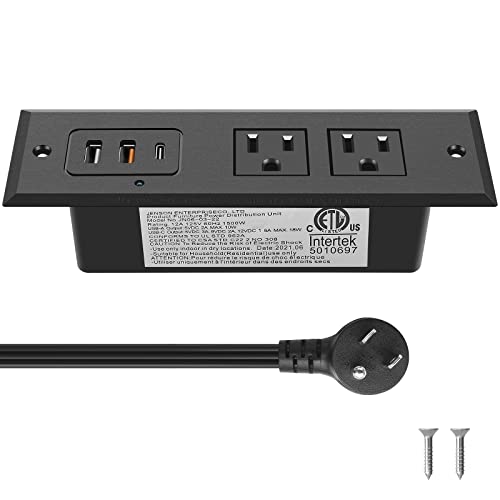
This recessed unit provides PD USB-C and QC USB-A along with two standard sockets and a 6-foot 45-degree flat plug extension. It’s well-suited for end tables or side tables where a slim, hidden charging station is desired. Best for: spaces where a balanced mix of USB-C PD and USB-A with a traditional outlet is needed. Limitation: the design emphasizes compactness, so it may not support many devices at peak speeds when all ports are used simultaneously.
HEZI Recessed Power Strip With 3 Outlets And USB Ports

This desk outlet combines three AC outlets with USB-C and USB-A fast charging, suitable for conference rooms and office desks. It supports PD 20W USB-C and QC 3.0 USB-A alongside a 6-foot cord. Best for: larger desks or shared tables that require multiple charging points without visible cords. Caution: ensure the opening area under the surface can accommodate the unit’s height after installation.
Buying Guide: Key Purchase Considerations
- Power availability: Check total watts and amperage to ensure the unit can handle all devices you plan to plug in.
- USB charging standards: USB-C PD ports offer faster charging for modern devices; consider QC 3.0 USB-A for legacy devices.
- Flush-mount depth and opening size: Ensure the desk surface thickness and available cutout will fit the unit you choose.
- Port mix: Decide between more USB-C ports vs. more standard outlets based on your devices.
- Cable management: Look for models with longer cords and tidy plug placement to minimize desk clutter.
- Installation notes: Some units require trimming or custom cutouts; confirm your furniture can support this.
Practical Buying Tips
- Choose a model with PD USB-C when you regularly charge tablets or newer smartphones.
- For shared desks, select units with multiple ports that balance fast charging and typical outlets.
- Avoid overly tall flush-mount units on ultra-thin surfaces to prevent a raised edge after installation.
Frequently Asked Questions
- What is a flush mount desk outlet?
It is a power strip designed to sit nearly flush with the desk surface, reducing clutter and exposing cords minimally. - Do these units require professional installation?
Most can be installed with basic DIY tools; follow provided cutout measurements and mounting screws. - Is USB-C PD necessary for every device?
PD is beneficial for newer devices; USB-A ports remain useful for older gadgets. - Can I install multiple outlets on a single desk?
Yes, but ensure total power draw stays within the unit’s rating and your circuit capacity. - Will these units be compatible with all desks?
Most are designed for standard desk holes or surface openings; verify dimensions and surface thickness before purchase. - Are these outlets surge-protected?
Some models list surge protection features; review individual product specs for exact protection levels.