Best DIN Rail AC UPS for Reliable Power Onsite
When choosing a DIN rail UPS for industrial or commercial environments, you want reliable power backup that fits neatly on standard DIN rails and supports your equipment without fuss. This guide highlights five well-suited options for different needs—ranging from compact panel-mount UPS to compact DIN rail power solutions. It explains who each product is best for, what makes it stand out, and any potential limitations to consider. The selections emphasize clear, decision-friendly language to help buyers compare features quickly and accurately.
| Product | Best For | Key Benefit |
|---|---|---|
| APC DIN Rail Panel Mount UPS (B00P9XV4E4) | Industrial control panels needing secure hard-wire input/output | Sine-wave output and standard battery for critical loads |
| SolaHD SDU850B (B0DPCF7B6C) | Compact DIN rail setups needing 850VA backup | DIN-rail mount with 120 VAC output |
| ALTECH CBI126A (B015C3O4KQ) | All-in-one DIN rail UPS for small to mid-size loads | Integrated AC/DC with 12 VDC output option |
| Apc Industrial Panel And DIN Rail UPS (B00BY0FXC0) | Panel-mount can handle higher wattage | Reliable power with standard RS-232 communications |
| Mean Well DRS 480W 48V DIN Rail UPS (B0CXHYD9GW) | Industrial environments needing robust protection | Integrated charging, monitoring, and protection features |
APC DIN Rail Panel Mount UPS With Standard Battery

This APC unit is designed for hard-wire DIN rail installations with a 120 V input and 120 V output. It features a sine-wave output and a standard battery, making it suitable for sensitive equipment that requires clean, stable power. Best for control panels or industrial devices that demand reliable backup and a compact footprint. A potential limitation is its reliance on a hard-wire connection, which may require professional wiring.
SolaHD SDU850B DIN Rail UPS
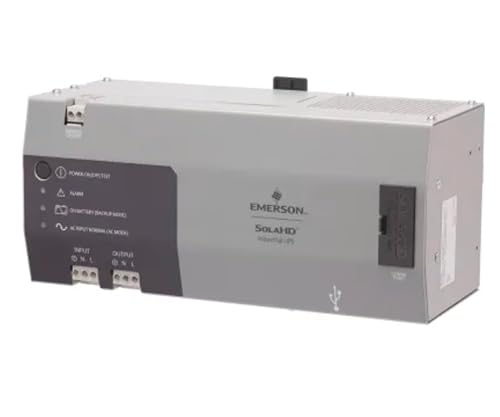
The SolaHD SDU850B offers an offline DIN rail mount with 850 VA and 120 VAC output. It’s well-suited for compact DIN rail installations that require a lightweight, space-saving UPS with quick battery recharge. Best for small to mid-size loads in control cabinets. A caution: it provides offline protection, which may be less resilient during longer outages compared to online UPS options.
ALTECH CBI126A All‑in‑One DIN Rail UPS

The ALTECH CBI126A provides an all-in-one solution with 12 VDC output capability, making it versatile for mixed-load instrumentation along a DIN rail. Best for installations that need both AC input and DC output in a compact package. It’s a strong pick for equipment that benefits from a single, integrated power solution. Limitation: single output channel may limit how many devices you can back up simultaneously.
APC Industrial Panel And DIN Rail UPS

This DIN rail UPS emphasizes value, offering robust power management with RS-232 communications for panel control. Best for installations that prioritize budget alongside reliability. Use caution if you require multiple independent outputs, as the listed data emphasizes a single primary output connection.
Mean Well DRS 480W 48V DIN Rail UPS

The Mean Well DRS 480W 48V DIN Rail UPS integrates AC-DC conversion, battery charging, and status monitoring with a DIN rail footprint. Best for equipment requiring a compact, multifunction power module with solid protection features and robust operating range. A note: data highlights 48 VDC output, which may influence compatibility with 12/24 V DC devices unless additional conversion is used.
Buying Guide
- What is a DIN rail UPS? A DIN rail UPS is a power backup device designed to mount on standard DIN rails used in electrical enclosures. It protects equipment from power interruptions by providing battery-backed AC or DC power to critical loads.
- What load can you back up? Check the VA rating and the actual wattage of the devices you plan to protect. Choose a unit with a comfortable margin above your total load to avoid overload during outages.
- Output type and compatibility Decide between sine-wave, modified sine-wave, or pure sine-wave outputs. Sensitive equipment (servers, drives, PLCs) often benefits from true sine-wave output for clean power delivery.
- Battery runtime and recharge Consider typical backup duration and how quickly the battery recharges after an outage. Short runtimes may be insufficient for longer outages; longer runtimes increase footprint and cost.
- Mounting and connectivity Ensure the unit fits your cabinet and has the necessary interfaces (RS-232, USB, USB-C, or Ethernet for monitoring). Hard-wire inputs are common in industrial settings and may require professional wiring.
- Protection features Look for short-circuit, overload, over-voltage, and over-temperature protections. Integrated alarms or status indicators help with quick diagnostics in field use.
- Environmental considerations Operating temperature and venting affect performance and longevity. Choose a unit rated for your ambient conditions.
Frequently Asked Questions
- Q: Do I need online or offline UPS for DIN rail? Online UPS provides continuous power through the inverter, offering better protection for sensitive loads. Offline (standby) UPS are simpler and cost less but may not protect against all power disturbances.
- Q: Can I mix multiple DIN rail UPS units? Yes, but ensure the total load does not exceed the combined ratings and that each unit can independently protect critical devices.
- Q: How do I know which outlets or connectors I need? Identify the devices to back up and their plug types. Some DIN rail UPS units use hard-wire outputs for clean, panel-based wiring in industrial enclosures.
- Q: What maintenance is required? Regularly check battery health, inspect connections, and verify alarms. Replace batteries per manufacturer guidance to maintain backup performance.
- Q: Is a higher VA rating always better? Not necessarily. Match VA to your load and consider headroom for future expansion and peak loads.