Best 30 Outlet Power Strips for Home, Office and Gaming Setups
Answering the question “which 30-outlet power strip is right for me?” this guide highlights five solid options that balance outlets, USB charging, surge protection, and space efficiency. Ideal for power-hungry setups like gaming rigs, home offices, dorm rooms, and media centers, these picks help reduce clutter while keeping devices powered. The top picks here are best for multi-device environments, with notes on who benefits most from each design and reminder to consider outlet spacing, cord length, and built-in protection.
| Product | Outlets | USB Ports | Surge (Joules) | Cord Length |
|---|---|---|---|---|
| SUPERDANNY 28-in-1 | 22 AC | 6 USB | 2100 | 6.5 ft |
| QINLIANF 24+ USB | 24 AC | 4 USB | 4100 | 6 ft |
| Solidock 20+ USB | 20 AC | 6 USB | 2700 | 6 ft |
| DEPOW 24+ USB | 24 AC | 6 USB | 3400 | 8 ft |
| POWSAV 18+ USB | 18 AC | 4 USB | 2100 | 6 ft |
Below you’ll find five detailed product sections, followed by a practical Buying Guide and FAQ to help you compare quickly and choose the best option for your space and devices.
SUPERDANNY 28-In-1 Power Strip Review

The SUPERDANNY power strip offers 22 grounded outlets plus 6 USB ports, delivering up to 1875W/15A and 2100 Joules of surge protection. It suits large home theater setups, gaming rooms, or dorm desks where many devices require power from a single hub. Best for users who need separate USB charging without adapters, and who can accommodate four non-rotating side outlets.
Best for: gamers or media centers with lots of adapters and USB devices. Why selected: high outlet count and smart USB charging support many devices simultaneously. Limitation: side outlets cannot rotate, which can affect plug arrangement in tight spaces.
QINLIANF Surge Protector Power Strip

The QINLIANF model features 24 AC outlets and 4 USB ports with a 4100 Joules surge rating. It includes a 6-foot flat plug heavy-duty cord and an overload protection system designed to protect multiple devices at once. This option is ideal for multi-device workstations, computer desks, or dorm setups where many plugs are needed without sacrificing USB charging.
Best for: users who need a dense outlet layout and strong surge protection. Why selected: a high outlet count paired with smart USB charging. Limitation: USB-C port is present but with noted charging limitations for certain voltage ranges.
Solidock 20-Outlet Power Strip With USB

Solidock combines 20 AC outlets with 6 USB ports and a 6-foot heavy-duty cord. It supports wide spacing and a 2700 Joules surge rating, making it a solid choice for office desks, dorms, or gaming stations where bulky adapters are common. The USB-C ports deliver up to 18W for fast charging.
Best for: users needing space between outlets and USB-C fast charging. Why selected: 3-side design increases outlet accessibility. Limitation: overall count is lower than some 24- or 28-outlet models.
DEPOW Surge Protector Power Strip (24+ USB)

DEPOW’s surge protector offers 22 AC outlets and 6 USB ports, with 2100J surge protection and an 8-foot extension cord. It’s designed for gaming rooms, offices, and home entertainment centers where a single hub must power many devices. The device includes three USB-C ports for modern devices and a clear LED indicator system.
Best for: users who want a long reach and multiple USB-C ports. Why selected: versatile USB charging alongside high outlet density. Limitation: some users may prefer a shorter cord for tighter spaces.
POWSAV 18-Outlet Surge Protector
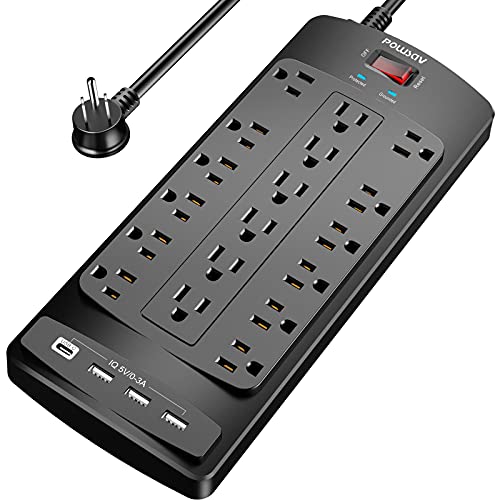
POWSAV provides 18 outlets and 4 USB ports with a 2100 Joules rating. Its 6-foot flat plug and organized layout suit computer desks, study areas, or small home offices where a compact yet capable power hub is needed. It’s best for medium-duty setups that don’t require the maximum outlet count.
Best for: compact but capable multi-device desks. Why selected: balance of outlets, USB charging, and a flat plug for tight spaces. Limitation: fewer outlets compared to 24+ outlet models.
Generic 30-In-1 Wall-Mount Power Strip
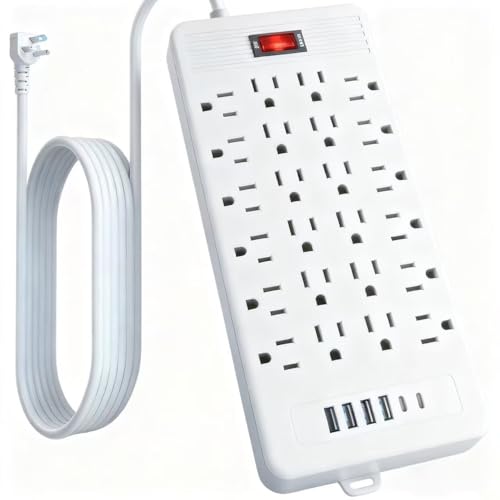
This wall-mountable option emphasizes 24 AC outlets with 4 USB ports and 2 Type-C ports, designed for office, home, factory, or school installations. It uses a vertical outlet layout to save space and includes a 5-foot to 10-foot extension option and a built-in handle for portability.
Best for: spaces needing wall-mounting and high device density. Why selected: flexible extension and practical design. Limitation: product labeling may vary on surge protection specifics compared to dedicated models.
Buying Guide: 30-Outlet Power Strips
- Outlet density and spacing: If bulky adapters are common, choose models with wider outlet spacing or a 3-sided design to reduce blocking.
- USB charging: Look for USB-C ports and smart charging with sufficient total amperage to support multiple devices without bottlenecks.
- Surge protection rating: Higher joules offer better protection for sensitive electronics; match to your device value and risk of surges in your area.
- Cord length and portability: Longer cords add reach but can create clutter; consider whether wall-mounting or a shorter cord better fits your space.
- Weight and construction: Metal housings provide durability for garages or workbenches; plastic housings can be lighter and cheaper but may be less rugged.
- Safety certifications: UL, ETL, FCC, and RoHS certifications indicate adherence to safety standards; verify these in product listings.
FAQ
- Q: Do I need a 30-outlet power strip for a typical home setup? A: Most homes don’t require 30 outlets at a single hub, but large multi-device areas like gaming rooms or home offices with many peripherals benefit from high outlet counts and USB ports.
- Q: How many USB ports should I expect on a high-capacity strip? A: Higher-end models commonly offer 4–6 USB ports, including USB-C, to support phones, tablets, and peripherals without extra adapters.
- Q: Is surging protection essential for a gaming PC? A: Yes. A higher joule rating improves protection during spikes, protecting PCs, monitors, and accessories.
- Q: Can I mount these strips on walls or desks? A: Many models support wall mounting or under-desk placement; check mounting options in the product description.
- Q: Should I prioritize more outlets over longer cords? A: Prioritize based on your space. Longer cords offer reach but can add clutter; wall-mountable options reduce the need for long cords.
- Q: Are there safety concerns with multiple strips in a single setup? A: Avoid daisy-chaining power strips; use one high-quality strip per power zone and ensure total load does not exceed the rated capacity.