Best 140mm RGB Case Fans for Quiet, Colorful Cooling
If you’re upgrading a PC build and want strong airflow with vibrant ARGB lighting, these 140mm RGB fans suit a range of use cases—from silent everyday computing to high-performance cooling for gaming rigs. The top picks below are ideal for users who value lighting familiarity, ease of motherboard control, and solid performance. The buyers here range from casual PC builders to enthusiasts who want daisy-chain capability and multi-color lighting. A quick summary table follows to help you compare at a glance.
| Product | Best For | Key Benefit |
|---|---|---|
| Thermalright TL-C14C-S X3 ARGB | All-round performance with strong lighting | Automatic PWM with ARGB sync |
| ARCTIC P14 Pro Reverse A-RGB (3 Pack) | Glass-front builds and radiators | Reverse airflow with wide speed range |
| Corsair RS140 ARGB (Dual Pack) | Simple daisy-chain control | Easy multi-fan ARGB setup |
| Corsair RS140 ARGB (Single Pack) | Single-fan upgrades | Same ARGB experience, flexible install |
| be quiet! Light Wings 140mm ARGB (3-Pack) | Premium lighting and broad color modes | Three fans with hub and ARGB lighting |
Thermalright TL-C14C-S X3 ARGB 140mm Case Fans

- Size and power: 140×140×25mm, 1500 RPM±10%, 26.4 dBA max, 1.93 mm H2O pressure, 75.8 CFM.
- Interface: 4-pin PWM for speed control; ARGB 5V for lighting; runs silent with automatic motherboard control.
- Lighting: High-brightness ARGB blades provide a softer, reflective glow and up to 17 lighting modes via motherboard sync.
Best for: Builders seeking a balance of high airflow and colorful ARGB lighting in a 3-pack. Choose this if you want uniform ARGB look across multiple fans and rely on PWM for quiet operation under load. Limitation: ARGB control requires compatible motherboard software for full effect.
ARCTIC P14 Pro Reverse A-RGB – 3 Pack

- Reverse airflow design: Draws air from the back, suited for glass fronts and aesthetics-conscious builds.
- Static pressure: Effective with radiators, dense grills, and mesh panels.
- PWM control: Speed up to 2650 RPM; stops below 5% PWM for silent idle.
Best for: Systems where a reverse airflow profile improves visibility or where radiator cooling with high static pressure is needed. Limitation: High RPM range may be noisier at full speed compared to lower-RPM silent profiles.
Corsair RS140 ARGB 140mm PWM – Dual Pack

- Connections: Daisy-chain multiple fans through a single 4-pin PWM connector and one +5V ARGB header.
- Lighting: Eight ARGB LEDs per fan with motherboard control for customizable color schemes.
- Performance: Up to 1,700 RPM and 95.5 CFM for solid case cooling.
Best for: Users who want scalable ARGB lighting with minimal cabling thanks to daisy-chaining. Limitation: Requires compatible motherboard ARGB control for lighting, and long daisy-chain cables can add clutter in tight builds.
Corsair RS140 ARGB 140mm PWM – Single Pack
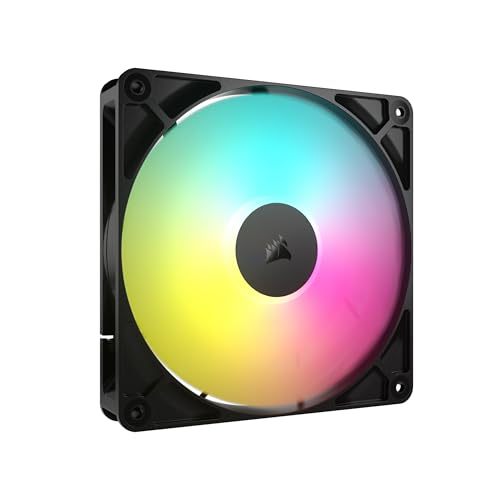
- Same core features as the dual pack: daisy-chain capability, ARGB control, and up to 1,700 RPM.
- Lighting: Eight LEDs per fan with customizable effects via compatible motherboard.
- Perf: 95.5 CFM at max, suitable for mid to high airflow PC builds.
Best for: Upgrading a single fan or adding one more fan to an existing ARGB array. Limitation: While daisy-chaining is supported, single-pack setups lack additional adapters included in multi-pack bundles.
be quiet! Light Wings 140mm ARGB – 3-Pack

- Package: Three fans with ARGB lighting plus a hub for synchronized control.
- Lighting: ARGB front and rear lighting with 20 LEDs for a vivid look.
- Performance: Balanced airflow and low noise for premium builds.
Best for: Those seeking premium ARGB lighting with a bundled hub for simpler control and a coordinated look. Limitation: Be quiet! branding often emphasizes quiet performance, which may not maximize raw airflow at high RPMs compared to some high-speed models.
Buying Guide: 140mm RGB Case Fans
What matters most when choosing 140mm RGB fans:
- Airflow vs. static pressure: If you’re cooling a case with dense radiators or restricted grills, prioritize higher static pressure. If you’re primarily front intake with open cases, aim for higher airflow (CFM) with adequate cooling.
- ARGB control: Check that your motherboard supports 5V ARGB control and that your BIOS or software can sync lighting across multiple fans. Daisy-chaining simplifies cable management but verify compatibility with your motherboard headers.
- Noise level: Look for fans with low dBA at typical speeds, and consider PWM control for automatic speed adjustments based on system temperature.
- Reliability and bearings: Hydrodynamic or fluid-bearing options usually offer longer life and quieter operation at high RPMs than basic sleeve bearings.
- Install and compatibility: Confirm the fan’s connector type (4-pin PWM, 5V ARGB), and ensure your case has mounting space for 140mm fans, including radiator setups if applicable.
Which 140mm RGB Fan Is Right For You?
For a cohesive look across multiple fans in a mid-to-high-end build, Corsair RS140 ARGB fans (single or dual packs) offer simple daisy-chaining and reliable ARGB control. If you want a premium blend of lighting and cooling with strong ARGB performance, the Thermalright TL-C14C-S X3 ARGB provides robust airflow in a 3-pack. For glass-front designs or cases emphasizing appearance, ARCTIC P14 Pro Reverse A-RGB is a strong aesthetic and cooling match. If you prefer a build with a hub included and vivid lighting, be quiet! Light Wings delivers a polished finish with broad color modes. Finally, use 140mm fans when you need a balance of quiet operation and solid cooling across a standard mid-tower case.
Frequently Asked Questions
- What does ARGB mean for fans?
Answer: ARGB stands for Addressable RGB, allowing individually controllable LEDs for dynamic lighting effects via compatible motherboard software or controllers. - Are 140mm fans better than 120mm fans for airflow?
Answer: Generally, 140mm fans can move more air at similar RPMs and with lower noise, making them a good choice for larger cases or radiators. - Is daisy-chaining multiple fans safe for speed control?
Answer: Yes, many fans support daisy-chaining, but ensure your motherboard or controller can handle multiple ARGB channels and PWM signals without voltage issues. - Do I need a special hub for ARGB lighting?
Answer: Some kits include a hub to synchronize lighting and simplify wiring; others rely on motherboard ARGB headers. Check product details for hub inclusion. - Can ARGB lighting affect cooling performance?
Answer: Lighting has negligible impact on cooling; focus on airflow and static pressure for performance, and use lighting as a visual enhancement.