Best WiFi Extender Through Electrical Outlets for Fast, Stable Home Networking
Answering common buyer questions: these powerline adapters use your home’s electrical wiring to extend wired and wireless networking to areas where routers or traditional extenders don’t reach. They’re best for multi-story homes, basements, attics, or rooms far from the router. The selections below favor AV2/AV1000–level speeds and simple plug‑and‑play setups, with options that add both wired and wireless capabilities. This guide helps you compare the top options to choose the right one for your home layout and internet plan.
Summary of chosen products
| Product | ||
|---|---|---|
| TP-Link AV2000 Powerline TL-PA9020P KIT | ||
| TP-Link AV1000 Powerline TL-PA7017 KIT | ||
| TP-Link Powerline Wi-Fi 6 Extender TL-WPA7817 KIT | ||
| TP-Link Powerline WiFi Extender TL-WPA7617 KIT | ||
| NETGEAR PLP2000-100PAS |
TP-Link AV2000 Powerline TL-PA9020P KIT

Best for: households with multiple devices needing robust wired speed to distant rooms. This AV2000 kit uses two adapters with passthrough and two Gigabit ports per unit, enabling high‑speed networking across a large area.
Why selected: AV2000 speeds help sustain high‑bandwidth tasks like 4K streaming, gaming, and large file transfers across floors. It supports easy plug‑and‑play setup and can connect two wired devices locally for faster local network access. Note that performance depends on electrical circuit quality and distance.
Caution: Adapters must be on the same electrical circuit and plugged directly into outlets (surge protectors can block signal). Data throughput is subject to wiring quality and circuit routing.
TP-Link AV1000 Powerline Ethernet Adapter KIT TL-PA7017 KIT

Best for: homes needing a compact, reliable AV1000 wired extension with minimal footprint. Ideal for multi‑story layouts where a single room needs a solid wired connection.
Why selected: It delivers AV1000 speeds over existing wiring and is compatible with other TP‑Link powerline adapters, making future expansion easy. It’s designed for plug‑and‑play use and works well for streaming devices or gaming consoles wired through powerlines.
Caution: Performance remains bound by the electrical circuit; distant rooms or noisy circuits may lower actual speeds below the maximum.
TP-Link Powerline Wi‑Fi 6 Extender TL-WPA7817 KIT

Best for: homes needing a dual function device that provides both wired powerline connectivity and high‑speed Wi‑Fi 6 coverage in tricky zones.
Why selected: This kit combines AV1000 powerline speeds with AX1500 Wi‑Fi 6, improving wireless performance on supported devices. EasyMesh compatibility helps expand coverage with compatible TP‑Link nodes. It’s a solid choice for HD streaming and online gaming across larger spaces.
Caution: Powerline speed is capped by the powerline network and router plan; real‑world Wi‑Fi speeds may vary due to interference and distance from the extender.
TP-Link Powerline WiFi Extender TL-WPA7617 KIT
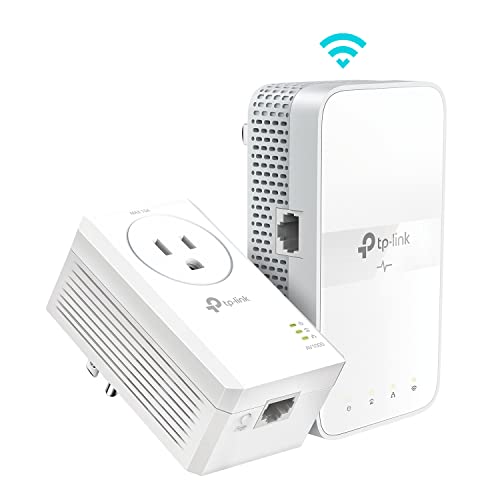
Best for: households needing a balanced mix of Wi‑Fi and wired ports with a passthrough feature for convenience in crowded outlets.
Why selected: It offers AV1000 powerline speeds paired with AC1200 dual‑band Wi‑Fi, helping ensure stable streaming and gaming while keeping a wired option available. The passthrough outlet helps avoid losing a power socket in tight rooms.
Caution: As with all powerline adapters, the best results come from being on the same circuit and away from surge protectors that can impede performance.
NETGEAR PLP2000-100PAS Powerline Adapter Kit
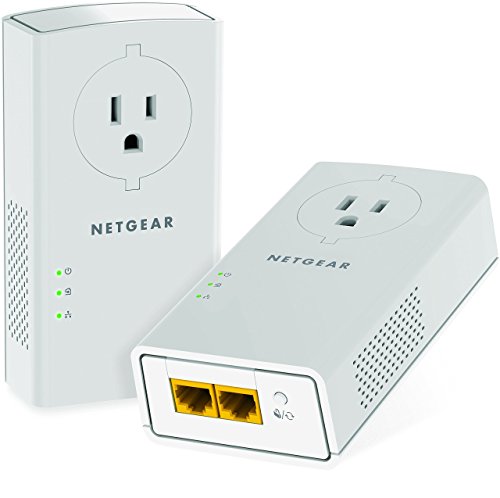
Best for: users who prioritize very high powerline speeds and a straightforward two‑port wired solution, plus a passthrough outlet for convenient placement.
Why selected: 2000 Mbps over existing wiring supports high‑bandwidth devices like 4K streaming boxes, gaming consoles, and smart TVs. It provides two Gigabit Ethernet ports for direct device connections and is designed for larger homes with demanding networking needs.
Caution: Real speeds depend on circuit design and distance; ensure adapters stay on the same electrical circuit for best results.
Buying Guide: How to Choose The Right Powerline Extender Kit
What is your home layout and wiring like?
Powerline performance depends on the electrical circuit. In multi‑story homes, place adapters on the same circuit if possible. For homes with many surge protectors or long runs across different circuits, performance may drop.
Do you need wired, wireless, or both?
Some kits emphasize wired Ethernet ports with passthrough, while others blend powerline with Wi‑Fi extenders. If you stream 4K, game online, and need wireless in rooms far from the router, prefer a dual‑function kit with a Wi‑Fi 5/6 or better router compatibility.
What speeds do you expect?
AV1000, AV2000, and higher indicate theoretical maximums. Real‑world speeds depend on distance, wiring quality, and interference. For homes with heavy usage, AV2000 or Wi‑Fi 6 integrated kits can offer more headroom.
Are there safety and compatibility considerations?
Adapters must be plugged directly into wall outlets, not into surge protectors. They should be on the same electrical circuit for best performance. If you have a modern smart home, choose kits with EasyMesh or multi‑device compatibility to grow your network later.
What about setup and ease of use?
Look for plug‑and‑play design, clear LEDs, and a simple security setup (WU stamping or pairing button). Manufacturers often provide free expert help or online setup guides to assist during initial setup.
Summary of key buying considerations
- Speed requirements (AV1000 vs AV2000 vs Wi‑Fi 6 extenders)
- Wired ports and passthrough availability
- Wi‑Fi coverage needs and integration with existing routers
- Electrical wiring quality and circuit layout
- Future expansion plans and network topology
FAQ
- Q: Do powerline extenders work through all wall materials? A: They typically work through most walls, but heavy insulation, metal studs, or long distances can reduce performance.
- Q: Can I mix different brands of powerline adapters? A: Yes, but performance is best on the same HomePlug standard and within the same circuit. Interoperability may vary by model.
- Q: Will these replace my Wi‑Fi router? A: They extend networks by adding wired or wireless access points, not replace the primary router. They rely on your existing router’s internet connection.
- Q: Are there security risks using powerline adapters? A: They include encryption (usually AES) during pairing. Use the built‑in pairing method to ensure secure connections.
- Q: How do I maximize performance? A: Place adapters on the same circuit, connect to a high‑quality outlet, avoid surges, and ensure your router delivers the expected internet speed to the network.
- Q: Do these require professional installation? A: No, most are plug‑and‑play with guided setup; user manuals provide pairing steps.