Best 90W AC Power Adapters for Dell Optiplex and Other Laptops
When you need reliable, high‑quality 90W AC power adapters for Dell Optiplex Micro PCs or similar laptops, this guide helps you pick models that deliver steady DC output, compatible connectors, and practical features. This selection is focused on 90W adapters that work with Optiplex Micro series and other mainstream laptops, ideal for office setups, IT technicians, and home workstations. The top picks below are evaluated for compatibility, ease of use, and durability.
| Product | Brand | Connector | Output | Best For |
|---|---|---|---|---|
| 90W AC Adapter for Dell Optiplex Micro | Verful | 4.5 x 3.0 mm | 19.5V 4.62A | Optiplex Micro PCs |
| Dell 90W AC Power Adapter | Dell | 4.5 mm | 19.5V 4.62A | Dell Laptops With LED Indirect Indicator |
| 90W AC Adapter for Dell OptiPlex Micro (IBATTS) | IBATTS | 4.5 x 3.0 mm | 19.5V 4.62A | Optiplex Micro and Related Models |
| ZOZO 90W Universal Laptop Charger | ZOZO | Varies by tip | up to 90W | Multiple Brands, Broad Compatibility |
| KITEURAD 90W For HP All-in-One | KITEURAD | 2 common HP tips | 90W | HP All-in-One Desktops |
Notes: The table summarizes connector compatibility, power output, and typical best-use scenarios. Always verify connector tip size and model compatibility with your device before purchasing. The included adapters cater to a range of Optiplex Micro PCs and other popular laptops, offering practical options for replacements or spares.
90W AC Adapter for Dell Optiplex Micro Series

Brand: Verful. Output: 19.5V 4.62A. Connector: 4.5 x 3.0 mm. Inputs range 100-240V, 50-60Hz, enabling broad compatibility for international use. Suitable for Dell Optiplex Micro series including 3000, 3020, 3040, 3050, 3060, 3070, 3080, 3090 and other MFF configurations. Best for technicians and offices needing a direct replacement for Optiplex Micro desktops. Limitations: Confirm connector size before purchase to avoid mismatch with your device.
Dell 90W AC Power Adapter

Brand: Dell. Output: 90W with 4.5mm connector. Features an LED indicator on the DC connector for quick status recognition. Includes a 2-meter North American power cable for convenient desktop setups and cable management via a rubber strap. Best for Dell laptops that use the standard 4.5mm connector and benefit from the LED indicator. Caution: Cable length and connector type must match your specific Dell model requirements.
90W AC Adapter for Dell Optiplex Micro (IBATTS)

Brand: IBATTS. Output: 19.5V 4.62A (90W) with compatibility for 4.5 x 3.0mm tips and alternative 7.4 x 5.0mm where applicable. Broad compatibility list includes Dell Optiplex Micro 9020, 9010, 7000 series, and related MFF models. Best for users needing a replacement from a third-party brand with extensive model coverage. Limitation: Some listed model compatibilities may require verification against your exact PC SKU.
ZOZO 90W Universal Laptop Charger
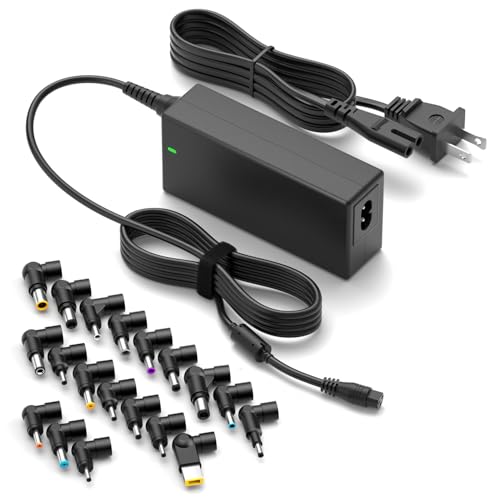
Brand: ZOZO. Output: Up to 90W with multiple tip options for compatibility across brands (HP, Dell, Lenovo, Asus, etc.). Features automatic voltage adjustment for ease of use and a global input range of 100-240V. Best for buyers who need a single charger suitable for multiple laptops and brands. Caution: Check that your device supports the selected tip and that total wattage does not exceed 90W for your model.
KITEURAD 90W For HP All-in-One

Brand: KITEURAD. Output: 90W with HP All-in-One compatibility and 20″ to 27″ all-in-one desktop compatibility. Includes common HP tip formats for All-in-One desktops and models like 20-C020 to 27-CB series. Best for HP All-in-One users seeking a reliable 90W power supply. Limitation: Primarily tailored for HP All-in-One systems; check if your All-in-One uses a compatible tip and connector size.
Buying Guide: 90W Power Adapter Essentials
What to check before buying
Power output and connector size must match your device’s requirements. A 90W rating indicates sufficient power for most mid‑range laptops and micro desktops, but the exact connector size and polarity matter. Verify that the tip size (commonly 4.5 x 3.0 mm or similar) matches your device’s DC input, and confirm whether the adapter supports a range of voltages or multiple tip configurations if you own a multi-brand charger.
Connector compatibility and stability
Adapters offering interchangeable tips or multiple tip options provide flexibility for users with devices across brands. However, ensure the selected tips are genuine or compatible with your device to avoid power delivery issues or port wear. A stable DC connector reduces the risk of intermittent connections and keeps devices charging reliably during use.
Build quality and safety features
Choose adapters with robust cabling, secure strain relief, and tested safety features such as overcurrent, short-circuit, and overvoltage protection. Longer cables can aid in accessibility, but ensure the connector length matches your workspace arrangement. For international use, models with wide input voltage ranges and certified insulation provide safer operation across regions.
Intended use and compatibility scope
Match the adapter to your primary device type. Optiplex Micro PCs and enterprise workstations often benefit from adapters explicitly labeled for Optiplex lines, whereas universal chargers appeal to households with devices from multiple brands. When possible, prioritize models that clearly list the compatible Dell Optiplex Micro models to avoid mismatches.
Availability and practicality
Having a spare 90W adapter can minimize downtime. If you rotate devices or travel frequently, a compact, universally compatible charger helps maintain productivity. Check for included accessories like a strap or extra length cables, which aid organization and convenience.
FAQ
- Will any 90W adapter work with my Dell Optiplex Micro? No. Confirm the exact connector size (commonly 4.5 x 3.0 mm) and model compatibility with your Optiplex Micro series before purchasing.
- Is a universal 90W charger safe for my laptop? A universal charger can be safe if it supports your device’s voltage and tip size. Ensure you select the correct tip for your model and do not exceed its wattage limit.
- Can I use a 90W adapter on a higher‑spec Dell laptop? If the laptop requires more than 90W or uses a different connector, a 90W adapter may be insufficient. Always match the recommended wattage for your device.
- What is the benefit of an adapter with LED indicator? An LED indicator helps confirm the adapter is delivering power to the device and can aid in troubleshooting.
- Do I need an adapter with a longer power cord? A longer cord improves reach in larger workspaces, but ensure it does not create excessive clutter or tension on the connector.
- Should I buy multiple brands’ adapters? Keeping adapters from trusted brands with documented compatibility reduces the risk of improper power delivery and port wear.