Best Rack Mounted Cooling Fans for Safe, Efficient Equipment Cooling
Answer: If you need reliable rack-mounted cooling, look for intelligent control, adequate airflow, and easy integration with your 19″ cabinets. The top picks below are best for AV racks, servers, network gear, and DJ setups. These options suit IT pros, data-center technicians, audio engineers, and small office IT staff seeking Quiet, programmable cooling with clear status indicators. The following table highlights five strong choices and their primary strengths.
| Product | Best For | Key Benefit | Best Feature |
|---|---|---|---|
| AC Infinity CLOUDPLATE T7 | AV/Network Racks | Intelligent cooling with programmable controls | Automated speed control, alarms, backup memory |
| Tupavco TP1701 | Quiet office/server rooms | Adjustable temperature, compact 1U | Digital display, adjustable temp control |
| AC Infinity CLOUDPLATE T9-N | Mid-to-large racks | Higher airflow panel for larger equipment | Thermostat with automated speed control |
| AC Infinity CLOUDPLATE T1-N | 1U rack systems | Low-profile intake airflow | Smart cooling with backup memory |
| AC Infinity CLOUDPLATE T2 | 1U top exhaust needs | Top exhaust design for cabinet ventilation | Programmable thermostat and alarm |
Note: Each product below is presented with direct product details and practical guidance for common rack environments. Where possible, select options that match your rack size, noise tolerance, and control needs.
AC Infinity CLOUDPLATE T7, 2U Rack Mount Fan Panel
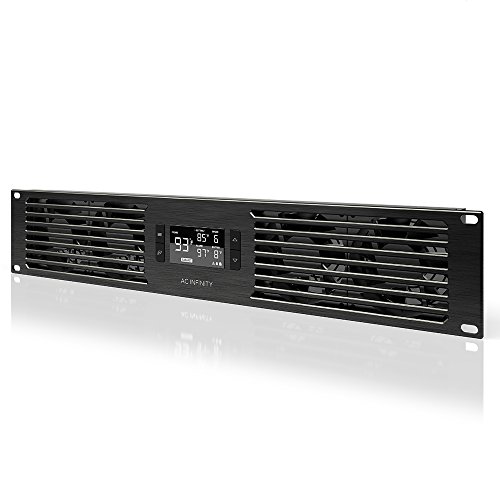
The CLOUDPLATE T7 is designed for cooling 19” racks in AV, home theater, and IT environments. It provides an intelligent fan system with automated speed control and programmable thermostat features, helping prevent overheating and performance issues in equipment racks. This 2U panel is suited for users who want a centralized, automated cooling solution without manual throttling. Best for slightly larger rack setups or where multiple devices share airflow paths.
Who it’s best for: AV technicians, small data rooms, and network cabinets needing dependable, programmable cooling. Why selected: Combines programmable control, alarms, and backup memory in a compact 2U form factor. Caution: Check clearance in shallow racks; 2U height may affect adjacent accessories in tight installations.
Rack Mount Fan – 4 Fans – Tupavco TP1701

The Tupavco TP1701 is a 1U, 19″ rack-mount fan panel with four fans and adjustable temperature control. It emphasizes quiet operation, making it suitable for office use, studios, or business spaces where noise must be minimized. It’s a practical choice when you need robust airflow in a compact, easy-to-install unit. Best for: smaller server or AV cabinets that require a higher total airflow within a single U.
Selected for: High airflow in a tight space with noise control. Caution: The digital display and auto-control rely on proper setup; verify temperature setpoints align with equipment requirements to avoid undercooling or overcooling.
AC Infinity CLOUDPLATE T9-N, 3U Rack Mount Fan Panel

The CLOUDPLATE T9-N provides a larger 3U intake panel suitable for higher cooling demands in AV, home theater, and network racks. It features an intelligent control system with programmable speed control, alarms, and backup memory. Best for: mid-to-large racks with multiple heat-generating devices or dense equipment layouts. Why chosen: Enhanced intake airflow helps maintain stable temperatures across thicker equipment stacks. Caution: Higher height means less available space for other 19” accessories.
AC Infinity CLOUDPLATE T1-N, 1U Rack Mount Fan Panel

The T1-N is a 1U intake-focused rack mount fan panel designed for efficient cooling in compact 19” racks. It provides intelligent fan management with automated speed control and backup memory. Best for: compact server rooms or home labs where space is at a premium. Why selected: Small footprint with smart controls; good balance of airflow and height. Caution: Intake-only design may require additional exhaust solutions for high-heat equipment clusters.
AC Infinity CLOUDPLATE T2, 1U Rack Mount Fan Panel

The T2 offers a 1U rack mount fan with top exhaust airflow, suitable for directing hot air away from sensitive components. It includes a programmable thermostat controller, automated speed control, and backup memory. Best for: cabinets that need efficient exhaust in a narrow 1U footprint. Why chosen: Clear, practical airflow design paired with programmable control. Caution: Top exhaust designs can influence clearance above the panel; ensure space for warm air to exit the cabinet.
Buying Guide: Rack Mounted Cooling Fans
What should you consider when choosing?
- Airflow and cooling capacity: Match CFM to your rack’s heat load and equipment density.
- Control features: Programmable thermostats, alarms, and memory help automate cooling and alert you to issues.
- Form factor: Ensure height (1U, 2U, 3U) fits your cabinet and leaves space for cables and other devices.
- Noise level: Look for quiet operation if the rack is in an office, studio, or living space.
- Power and compatibility: Verify voltage, connectors, and whether the unit supports PWM speed control.
- Ease of installation: Prefer panels with clear mounting hardware and straightforward wiring.
- Expandability: Consider whether you need multiple panels for larger racks or synchronized control.
FAQ
- What is the main difference between 1U, 2U, and 3U rack fans?
Answer: U-size indicates height; 1U panels fit in a single rack unit height, 2U fits two units, and 3U fits three. Choose based on your rack height and required airflow. - Do these panels require external controllers?
Answer: Many include programmable thermostats and alarms built into the panel, but some setups may benefit from external monitoring or integration with existing rack management systems. - Is top exhaust better than intake?
Answer: It depends on airflow design; top exhaust can efficiently remove hot air rising from equipment, while intake panels pull cooler air in. Some configurations use both for balanced cooling. - Can I daisy-chain multiple cooling panels?
Answer: Some models support shared programming and synchronization; check compatibility with your chosen brand’s CLOUDPLATE line for integrated control. - Will these panels reduce noise from my rack?
Answer: They can reduce noise by enabling more consistent cooling, but the intrinsic fan noise depends on speed settings and fan design. - How do I determine the right CFM for my rack?
Answer: Calculate heat load (watts) of all devices and choose a panel with sufficient CFM to maintain a safe operating temperature, adding buffer for peak loads.