Best Laser CO2 Cutting Machine for Home or Studio Use
Choosing a CO2 laser cutter or engraver involves balancing power, precision, and versatility. This guide highlights top options for desktop to small-business setups, focusing on reliability, feature sets, and ease of use. Whether you’re engraving wood, acrylic, leather, or glass, these units offer scalable performance and clear upgrade paths. Read on to compare capabilities, supported materials, and integration ideas to help you pick the right laser cutting machine for your workflow.
Summary of selected products
- xTool P2S 55W CO2 Laser Cutter
- Sihao 80W CO2 Laser Engraver
- OMTech 60W CO2 Laser Engraver (28×20)
- OMTech 60W CO2 Laser Engraver (16×24)
- xTool P3 80W CO2 Laser Cutter
xTool P2S 55W CO2 Laser Cutter

The xTool P2S 55W CO2 laser cutter is designed for desktop use with expanded capabilities. It emphasizes stronger airflow, upgraded exhaust, and a dual-cylinder air pump to deliver sharper cuts and cleaner engravings. Features include optical path indicators for easier setup and maintenance, plus updated hardware and software that refine performance for regular hobbyists and small studios. This model is built to support extended productivity without sacrificing desktop practicality.
Key specifications and capabilities include fast engraving at up to 600 mm/s and enhanced batch processing, which helps with serial numbers and mass designs in a single run. Two 16MP cameras deliver real-time previews, while a 0.001″ autofocus LiDAR ranging system supports precise focusing. An Auto-Passthrough design accommodates longer materials, and a riser base allows engraving on taller objects. The P2S integrates with a rotary accessory for tumblers and cylindrical items, expanding engraving opportunities.
In practice, users can expect accurate alignment, smooth edges, and reliable focus across a variety of non-metal materials. The 26″ x 14″ bed offers room for substantial projects, and the long-through capability supports extended objects when needed. For enthusiasts upgrading from entry-level units, the P2S provides a compelling blend of speed, accuracy, and feature depth in a compact footprint.
Sihao 80W CO2 Laser Engraver

The Sihao 80W CO2 laser engraving machine delivers substantial cutting and engraving capacity with a large working area of 28 x 20 inches. The machine is designed for aggressive materials processing, capable of cutting through thicknesses up to 15 mm. It touts a robust laser class and a fast throughput, making it suitable for commercial-grade applications in signage, gifts, and craft production. The model supports a wide material range, including wood, acrylic, glass, leather, and more, enabling diverse project options.
Notable features include a 28″ x 20″ (700 x 500 mm) working area, strong power output, and a focus on practical versatility for varied application needs. The design emphasizes stable output and dwell-time control to maintain clean edges and precise engraving. Its performance appeals to users who need reliable depth and consistent results across bulk runs or batch projects, with a straightforward approach to setup and operation.
OMTech 60W CO2 Laser Engraver (28×20)
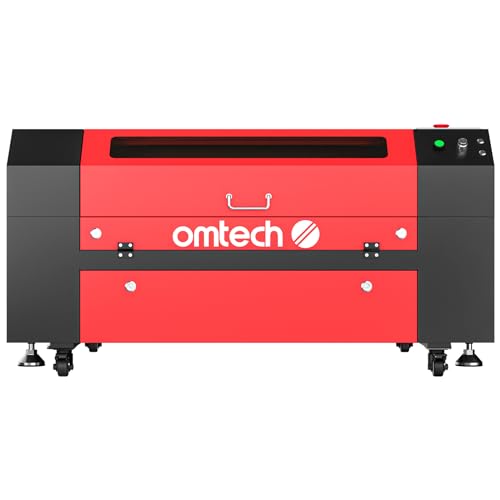
OMTech’s 60W CO2 laser engraver with a 28 x 20 inch bed targets users seeking strong performance with practical features. The unit supports engraving up to 10 mm acrylic and 10 mm wood depending on material composition and settings. Autolift adds convenience by moving the workbed up or down at the touch of a button, reducing manual effort. A four-way pass-through door design enables larger items to pass through the machine, increasing adaptability for batch projects or oversized components.
The machine emphasizes durable operation and consistent results, with a focus on user-friendly adjustments for cutting depth and engraving speed. For small studios or makers who regularly process non-metal materials, the OMTech 60W model offers a balanced mix of power, bed size, and accessibility, with a workflow that accommodates longer runs and varied piece sizes.
OMTech 60W CO2 Laser Engraver (16×24)

This OMTech 60W model provides a slightly smaller footprint with a 16 x 24 inch work area, making it a fit for tighter spaces without sacrificing essential capability. It supports engraving into a variety of non-metal materials, with two-way pass-through doors which aid in handling longer items. The 60W laser tube combines with a dependable power supply to offer reliable performance across daily tasks and creative projects. The unit emphasizes practicality for home workshops or small studios that require a compact yet capable CO2 laser system.
Designed for flexibility, this machine supports common software ecosystems and typical workflow pipelines, making it easier to integrate into existing production lines. Although smaller than some high-end commercial units, it provides consistent results in a compact package, enabling a range of engraving and cutting tasks from decorative signs to custom gifts.
xTool P3 80W CO2 Laser Cutter

The xTool P3 80W represents a flagship CO2 laser cutter with a focus on automated workflow and expansive capability. It targets industrial-grade cuts, including heavy woods and thicker acrylic, with a max speed of 1200 mm/s for rapid throughput. The system integrates an Advanced Creation System (ACS) that combines LiDAR autofocus, dual HD cameras, and an AutoLift Base for easy setup, effectively reducing alignment time and improving repeatability. The 36″ x 18″ workspace offers substantial room for large-format pieces, while the dual-camera system provides precise positioning for complex designs.
Key advantages include quick autofocus, high-speed engraving and cutting, and a robust, scalable platform for growing production needs. The P3 is positioned for users who require reliable performance at higher volumes and larger formats, with a strong emphasis on automation to streamline repetitive tasks and improve consistency across runs.
Buying Guide: Key Purchase Considerations
Intended use and material range: Identify typical materials you will process (wood, acrylic, leather, glass) and typical thickness. Choose a laser with sufficient power, bed size, and a workable depth to fit those materials and project sizes.
Bed size and expandability: Consider available workspace and whether you need longer-through options for oversized items, or the ability to add rotary attachments to engrave cylindrical objects. A larger bed can enable more efficient batch runs, while pass-through doors help with longer parts.
Autofocus, alignment accuracy, and speed: Autofocus (often LiDAR-based) reduces setup time and improves repeatability. Look for high-speed engraving and precise alignment features (e.g., dual cameras, high-contrast red-dot pointers) to minimize trial-and-error.
Cooling, air assist, and exhaust: Effective air cooling and a robust exhaust system sustain performance during longer jobs. An air assist or two-way air system can improve cut quality and reduce scorching on delicate materials.
Software compatibility and workflow: Ensure compatibility with common software ecosystems (LightBurn, RDWorks, LaserGRBL) and easy transfer of designs (SVGs, DXFs). Evaluate whether the controller and firmware support batch processing, layer management, and kerf compensation.
Maintenance and service: Consider machine build quality, availability of spare parts, and vendor support. Look for models with readily replaceable components and accessible service networks if you expect recurring usage or commercial workloads.
Reliability and safety: Check for compliance with recognized safety guidelines, stable motor control, and protective enclosures where applicable. A well-designed safety system reduces risk during frequent operation and training needs for new users.
Cost of ownership and upgrades: Beyond the initial price, factor in maintenance costs, consumables, laser tube life, and possible upgrades (rotary axes, extra lenses, or larger working areas) that can extend the machine’s usefulness as your needs grow.
Overall, selecting a CO2 laser cutter or engraver requires aligning power, bed size, and automation with your project mix and space. The options listed above offer a spectrum of capabilities—from compact desktop units to flagship systems with advanced automation—allowing you to tailor a setup that fits your workflow, budget, and growth plans.