Best Conference Table Connectivity Boxes for Modern Rooms
Find the right connectivity box to keep conference tables clean, organized, and highly functional. Below are five top picks that blend durable construction, ample port selections, and easy installation for any office or meeting space. Each entry highlights key features to help you compare at a glance.
| Product | Ports & Power | Panel & Build | Open Size / Panel |
|---|---|---|---|
| Tabletop Multimedia Connectivity Box (Black) | 4 AC, 2 RJ45, 2 HDMI, 1 USB-C, 1 USB3.0, 2 Audio | Aluminium alloy, brushed black panel | Panel 10.47″ x 5.12″; Opening 10″ x 4.61″ |
| Conference Table Power Hub (Black) | 4 AC, USB-A + USB-C, 1 RJ45, 1 HDMI | Aluminum alloy, sandblasted black panel | Panel 266mm x 160mm; Opening 255mm x 149mm |
| Kungfuking Conference Table Power Hub | HDMI, RJ45, 2 USB, 2 AC, 20W USB-C | Heavy-duty metal, UL listed | Standard depth with 6 ft cord |
| Conference Table Power Hub (Silver) | 4 AC, USB-A + USB-C, RJ45, HDMI | Aluminum alloy, sandblasted panel | Panel 266mm x 160mm; Opening 255mm x 149mm |
| Table Pop Up Power Date Center | 2 RJ45, 1 HDMI, 1 USB data, 1 VGA, 1 3.5mm audio | Aluminium alloy, smooth panel | Panel 10.5″ x 4.6″ |
Tabletop Multimedia Connectivity Box With 4 AC Power and More
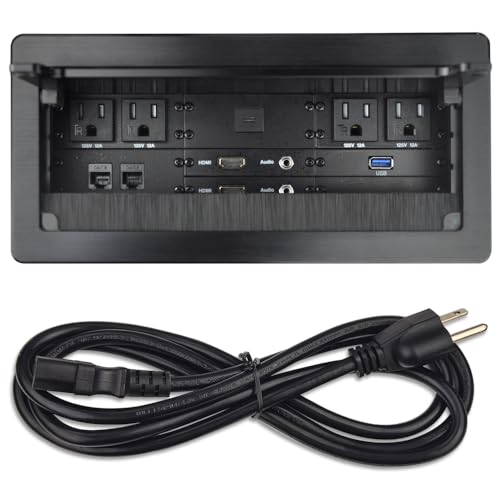
This metal multimedia desktop socket combines a brushed black top panel with a durable aluminium alloy housing. It provides a versatile configuration including 4 US Type AC outlets, 2 RJ45 network ports, 2 HDMI outputs, 1 USB-C, 1 USB3.0, and 2 3.5 mm audio jacks. The compact footprint helps maximize desk space while delivering robust connectivity for meeting rooms, classrooms, and executive desks. Panel size is 10.47″ x 5.12″, with an opening of 10″ x 4.61″. Ideal for setups requiring a consolidated power and data hub near the conference surface.
Key benefits:
- Clean, integrated, professional appearance
- Wide port assortment supports modern AV and network needs
- Brushed finish reduces visible wear in high-traffic areas
Note: Cable management and installation should align with local electrical codes and desk configurations to ensure safe use.
Conference Table Power Hub With USB-C and Ethernet

Designed for recessed installation, this aluminum alloy hub features a black sandblasted panel for a modern look. It offers 4 AC outlets, a USB-C + USB-A fast charging port, 1 RJ45 (Cat6) for network, and 1 HDMI connection. Panel size is 266mm x 160mm with an opening of 255mm x 149mm, providing a neat flush-mount solution that helps keep desktops tidy while delivering reliable power and data access during meetings.
Considerations:
- UL-listed materials and corrosion resistance support long-term use
- USB-C PD 65W support for laptops and devices
- Clear separation of power and data paths can reduce interference
Conference Table Recessed Power Box With USB-C and 65W PD

This recessed outlet combines 4 AC US Type outlets with 1 USB-A + USB-C charging and supports USB-C PD up to 65W. A network port (RJ45) and an HDMI port expand connectivity options, while the sleek black panel with sandblasted texture provides a refined appearance on conference tables. Panel size is 266mm x 160mm with an opening of 255mm x 149mm, suitable for mid-to-large meeting environments.
Useful tips:
- Flush-mount installation reduces clutter on the tabletop
- 65W USB-C PD supports many modern laptops and devices
- Check for cable length and clearance behind the desk to ensure a clean fit
Table Pop Up Power Center With HDMI And USB

This table top connectivity box offers a combination of US power outlets, 2 RJ45 network ports, 1 HDMI, 1 USB data port, 1 VGA, and 1 3.5 mm audio jack. Constructed from aluminium alloy, it features a smooth panel and a suggested hole cut size of 8.9″ x 4.33″ for flush mounting. Its compact profile is designed for easy integration into conference desks, supporting quick access to essential connections during sessions.
Implementation notes:
- Aluminium construction supports durable use in corporate environments
- VGA and HDMI provide legacy and modern AV compatibility
- Consider adding cable grommets or raceways for optimal cable routing
ZESHAN 45-Degree Angle Power Hub With USB and HDMI

Featuring a 45-degree angled lid for easy access, this power hub includes 2 AC outlets, 2 RJ45 ports, 1 HDMI, 1 USB, and 1 USB-C. The fully enclosed bottom box enhances safety, while the 10.47″ x 5.12″ panel and 0.49″ edge treatment optimize fit and finish on most conference tables. It leverages CNC-machined aluminum for sturdiness alongside iron-reinforced interior components.
Prospective considerations:
- 45-degree access design simplifies reaching ports
- Full enclosure reduces dust and spill risk on electronics
- UL-listed materials provide compliance confidence for business use
Buying Guide: Key Purchase Considerations for Conference Table Connectivity Boxes
When selecting a connectivity box for a conference table, consider project specifics such as table depth, required ports, power requirements, and installation method. Here are core factors to compare:
- Port mix and future-proofing: Look for models with a mix of AC outlets, USB-C, USB-A, HDMI, RJ45, and data interfaces. PD charging (65W+) on USB-C is beneficial for modern laptops.
- Mounting style: Flush-mount recessed boxes save tabletop space, while pop-up designs offer quick access. Panel sizes and opening dimensions should align with your table cutouts.
- Build quality and safety: Aluminum or steel housings with corrosion resistance and UL or other safety listings increase durability in high-use spaces.
- Cable management: Evaluate how cords are routed from the box to devices. Some models include pre-organized channels or improve access without clutter.
- Aesthetics and finish: A brushed black or silver panel improves visual harmony with office furniture. Consider color and texture to minimize wear visibility.
- Maintenance and accessibility: Easy access to ports for frequent usage and straightforward maintenance reduces downtime during meetings.
- Installation footprint: Panel and opening sizes determine whether the unit fits existing desk cutouts. Ensure compatibility with your desk thickness and edge profiles.
- Warranty and support: Check warranty terms and whether replacement parts are readily available for long-term reliability.
For office environments with varying device types, selecting a box with a broad port assortment and a robust build offers the best long-term value. If flush installation is essential, confirm hole cut sizes and cabinet clearances before purchasing. Finally, always verify compatibility with local electrical standards and any facility-specific mounting requirements to maintain safety and compliance in meeting spaces.