Best WiFi Thermostat With Battery Backup: Top Picks for Reliability and Convenience
Looking for a WiFi thermostat with battery backup that keeps your home comfortable even during power or WiFi interruptions? This guide highlights five strong options, explains who they’re best for, and helps you compare features like energy savings, ease of installation, and smart home compatibility. Ideal buyers include multi-room homeowners seeking reliable scheduling, energy-conscious users wanting rebates or incentives, and tech enthusiasts who want seamless voice assistant integration.
| Product | Why It Stands Out |
|---|---|
| Honeywell Home RTH9585WF1004 | Color touchscreen, flexible programming, energy rebates eligibility |
| Honeywell Home RTH9600WF | Remote control, wide compatibility, extensive WiFi features |
| Emerson Sensi ST55 | Privacy focus, easy DIY install, energy-saving features |
| Google Nest Thermostat | Energy savings and robust smart features, easy compatibility |
| ecobee Smart Thermostat Essential | Energy savings, broad assistant support, long-term software updates |
Honeywell Home RTH9585WF1004 Wi-Fi Smart Color Thermostat

The RTH9585WF1004 offers a dynamic color touch screen and flexible 7-day programming. It’s designed for users who want a visually customizable thermostat and energy rebates or demand-response program participation. Best for homeowners who want a high-visibility display and the option to enroll in utility programs to reduce costs during peak usage. A potential limitation is reliance on a stable WiFi connection to maximize its smart features.
Honeywell Home RTH9600WF Smart Color Thermostat

RTH9600WF emphasizes remote control and compatibility with a broad range of smart home ecosystems. This model suits homes where users want extensive energy management, easy app access, and compatibility with voice assistants. Its strength lies in flexible programming and energy-saving guidance, but setting up integrations may require a bit more configuration for some systems.
Emerson Sensi Wi-Fi Smart Thermostat ST55
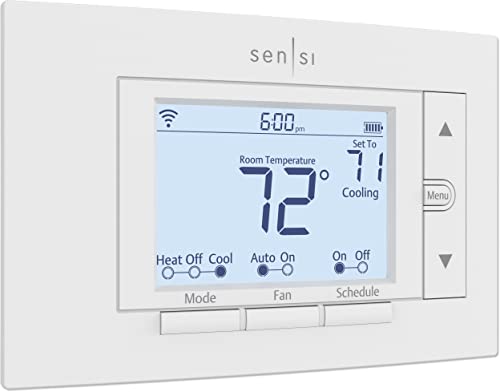
The Sensi ST55 highlights privacy protection and straightforward DIY installation. It’s a strong pick for users prioritizing data privacy and a simple setup, with notable energy-saving features like flexible scheduling and remote access. It may be best for homes with standard HVAC setups and users who prefer a quick, unobtrusive install.
Honeywell Home Smart Thermostat X2S

This model offers convenient WiFi control and a 7-day scheduling framework with options for 5-1-1 or 5-2 day cycling. Best for homes that want Matter compatibility, broad voice assistant support, and a balance between manual and programmed control. A limitation to note is that non-programmable options are available for those seeking simplicity.
Google Nest Thermostat

The Nest Thermostat focuses on energy savings with a learning assistant that adapts to your routine. It supports WiFi connectivity and is designed to work without a C-wire in many homes, though some setups may benefit from one. Best for users who value continuous learning, remote control, and compatibility with multiple smart home ecosystems. A caveat is that features can depend on your existing HVAC configuration.
Buying Guide: Key Considerations for Your Next WiFi Thermostat
- Battery backup and power options: Look for models that maintain functionality during outages, or at least retain settings without requiring constant power. Consider whether the thermostat requires a C-wire and if a battery backup is available for essential functions.
- Compatibility with your HVAC system: Confirm compatibility with heat pumps, conventional furnaces, and two-stage systems. Use online compatibility checkers to avoid mismatches.
- Smart home ecosystem: If you use Alexa, Google Assistant, or Apple HomeKit, verify native support. Some models offer broader integration with Matter or other platforms.
- Energy savings and rebates: Some thermostats participate in energy-saving rebate programs or demand-response incentives. This can lower operating costs over time.
- Ease of installation: DIY-friendly models typically provide clear instructions, built-in level, and simple wiring guides. If your system is complex, professional installation may be advisable.
- Display and usability: Consider a large color touchscreen for quick adjustments and clear visibility in different lighting conditions.
- Scheduling options: Evaluate whether 7-day, 5-1-1, or other scheduling patterns fit your lifestyle and occupancy patterns.
Frequently Asked Questions
- Do all WiFi thermostats require a C-wire?
- Is it worth choosing a thermostat that supports energy rebate programs?
- Can I install a WiFi thermostat myself, or should I hire a pro?
- Will a battery backup keep the thermostat working during a power outage?
- Which thermostat works best with multiple voice assistants?
- How do I verify if a thermostat is compatible with my heat pump or furnace?