Best Wall Mount Rack 8U for Compact, Safe Networking Gear
Answering the buying question: the best 8U wall mount racks balance depth, load capacity, and install ease for shallow IT gear. This guide highlights top 8U racks ideal for small offices, home labs, or AV setups that need reliable wall-mounted storage. The best picks are suited for network switches, patch panels, and compact servers. Each option includes who it’s best for and why it stands out, plus a quick reference table below.
| Product | Best For | Key Strength |
|---|---|---|
| StarTech.com 8U Wall Mount Patch Panel Bracket | Small offices needing solid, simple mounting | Low profile, easy install, 80 lbs capacity |
| Tecmojo 8U Wall Mount Rack (13.9″ depth) | Shallow equipment with sturdy frame | Open-frame design, strong 132 lbs capacity |
| Tecmojo 8U Wall Mount Network Rack (Adjustable depth) | Flexible depth for varied devices | Adjustable depth, quick side cable access |
| Tecmojo 9U Wall Mount Rack (18″ depth) | Lockable access and organized front cabling | Lockable door, swing gate, 110 lbs capacity |
| ECHOGEAR 9U Enclosed Wall Mount Rack Kit | Integrated cooling and front-access security | Pre-mounted fans, lockable door, easy install |
Buyer note: choose based on depth needs, load rating, and whether you want open-frame versus enclosed protection. The following sections review each option with clear, decision-focused guidance.
StarTech.com 8U Wall Mount Patch Panel Bracket
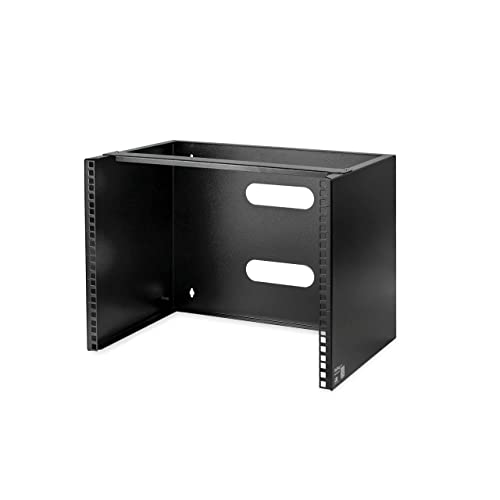
Best for compact network corners where depth is limited. This 8U rack is 19″ wide with a maximum mounting depth of 14 inches, leaving 2 inches for cable routing. It supports up to 80 lbs and ships fully assembled, including M6 screws and cage nuts for quick installation. Cold-rolled steel construction adds durability for mounting on 16″ studs. Ideal for small network closets or home labs that require a simple, sturdy wall-mount solution. Limitation: shallower depth may constrain larger deep-network devices.
Tecmojo 8U Wall Mount Rack (13.9″ Depth)
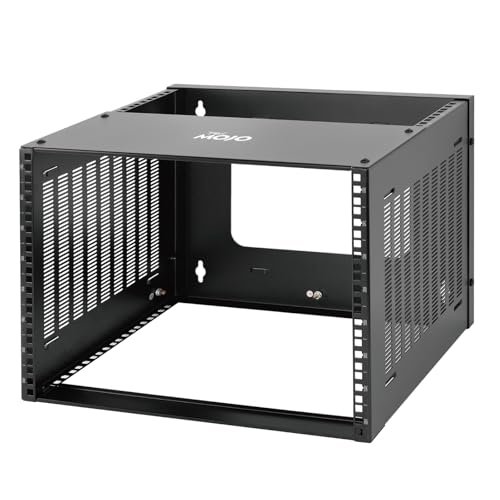
Best for sturdiness and flexibility in shallow spaces. The 8U rack uses cold-rolled steel and has a top panel and bottom beam to enhance stability, supporting up to 132 lbs. It can sit on a flat surface or be wall-mounted, with side-panel cable management. Depth reaches 13.9 inches, making it suitable for mid-sized switches and patch panels. Limitation: taller racks like this may still need careful cable planning when devices are dense.
Tecmojo 8U Wall Mount Network Rack (Adjustable Depth)
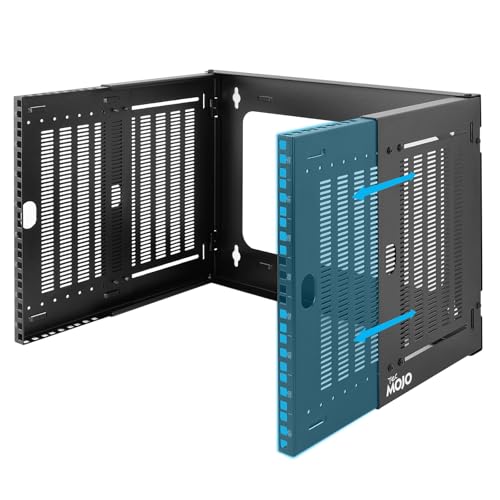
Best for mixed-depth equipment. This 8U rack supports adjustable mounting depth from 9.7″ to 15.9″ (247–403 mm), accommodating a range of 19″ equipment. It ships ready for wall installation with mounting screws and cage nuts included. Cables can be secured on the side panel, and the open-frame design enables easy access for maintenance. Limitation: open-frame racks expose components to dust; consider adding filters or enclosure if dust is a concern.
Tecmojo 9U Wall Mount Rack with Swing Gate

Best for securing critical equipment with rear access. The 9U rack features an 18″ depth, 110 lbs weight capacity, and a 180-degree swing gate for easy rear cable management. It uses cold-rolled steel and an electrostatic powder coat for durability. Front door can be mounted on either side to fit room layout. Limitation: swing-gate design may require extra clearance to fully open in tight spaces.
ECHOGEAR 9U Enclosed Wall Mount Rack Kit

Best for secure AV and IT setups with built-in cooling and a lockable door. This 9U kit includes two 1U shelves, pre-mounted fans, and hardware for quick assembly. It’s designed to fit 600 mm depth AV/IT gear and supports up to 132 lbs. The enclosure provides front access plus side panels that can be removed without tools. Limitation: enclosed design may be bulkier than open-frame options and takes longer to customize inside.
Buying Guide
Depth and clearance: Measure room depth and wall stud spacing to pick a rack that fits without crowding cables. Open-frame racks offer easier airflow and quick access, while enclosed racks provide security and better dust control.
Load capacity: Consider the total weight of current devices and future expansion. Choose a model with a higher rating than your expected load to avoid overloading.
Installation method: Decide between wall-mounted only or a combination of wall and surface mounting. Some racks ship fully assembled; others require basic assembly, screws, or cage nuts.
Cable management: Look for side-channel options, rear cable access, or removable panels. Depth-adjustable racks help accommodate devices with varying depths.
Security and access: Lockable doors and swing gates help protect equipment in shared spaces. For sensitive gear, prefer enclosed racks with secure doors and tamper-resistant hardware.
Frequently Asked Questions
- What is 8U in wall mount racks? It refers to the vertical space allocated for equipment, about 8 rack units tall (8U). This size is common for compact switches, patch panels, and small servers.
- Do these racks fit 19-inch equipment? Yes. All listed options support standard 19-inch equipment and mounting rails designed for that format.
- Should I choose open-frame or enclosed for a home office? Open-frame offers easier access and cooling; enclosed provides security and dust protection. Choose based on your environment and equipment sensitivity.
- Is depth important for installation? Yes. Deeper racks can accommodate larger devices but require more wall or floor space and may limit cable routing options.
- Can I install these on any wall? Most models are designed for wood studs or concrete walls. Always verify mounting hardware compatibility and stud spacing (often 16″ on center).
- What maintenance do these racks require? Periodic cable reorganization, component access checks, and dust removal help maintain airflow and reliability.