Best Wall Mount Data Enclosures for Secure, Space-Saving IT Cabinets
Looking for wall-mount data enclosures that fit 19″ IT gear while saving floor space? This guide highlights five versatile wall-mount server cabinets ideal for small offices, retail spaces, classrooms, and IT closets. Each option supports standard 19″ equipment, offers secure doors, and provides removable panels for cable management. Read on to find which enclosure is best for security, depth, or ease of setup, and who benefits most from each choice.
| Product | Depth | Rack Size | Max Load | Key Benefit |
|---|---|---|---|---|
| NavePoint 12U Wall Mount Enclosure (Glass Door) | 17.72 in | 12U | 110 lbs | Security door, removable side panels |
| NavePoint 12U Performance Series (2 Fans) | 23.63 in | 12U | 130 lbs | Sturdy steel, flexible mounting |
| Tecmojo 12U Wall Mount Server Cabinet | 17.72 in | 12U | Unknown | Lockable glass door, adjustable rails |
| NavePoint 9U Wall Mount Enclosure | 17.72 in | 9U | 110 lbs | Compact footprint, secure access |
| NavePoint 6U Wall Mount Cabinet | 17.72 in | 6U | 130 lbs | Lightweight, quick setup |
The following profiles help you match the enclosure to your space, equipment, and staff needs. If you’re flush for wall space but require robust protection for critical gear, one of the 12U options with glass doors is a strong choice. For smaller installs, the 6U or 9U models balance capacity and footprint. Each product section includes who it’s best for and why it was selected, plus a practical caution to consider.
NavePoint 12U Wall Mount Enclosure with Glass Door
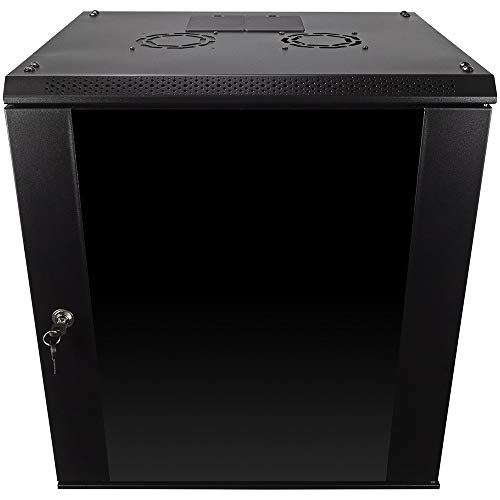
Best for security-conscious environments with moderate space. This 12U cabinet uses cold-rolled steel with a welded frame and a reinforced tempered glass front door with a security lock. It accepts standard 19″ equipment and supports up to 110 lbs. Removable side panels enable easy cable management and flexible layout. The compact footprint (17.72″ L x 21.65″ W x 24.42″ H) fits constrained spaces.
Who it’s best for: small to mid-sized offices needing secure access to network gear without floor-standing racks. Why selected: strong construction, secure glass door, and easy customization. Caution: weight handling is capped at 110 lbs, so heavier assemblies require a higher-capacity enclosure.
NavePoint 12U Performance Series with Two Fans

Best for installers needing extra airflow and robust support for IT and A/V gear. This 12U cabinet uses cold-rolled steel with a black powder coat and can hold up to 130 lbs. It supports 19″ equipment, and its wall-mount design helps conserve space. It ships flat-packed with hardware for assembly, making setup straightforward for projects with tight timelines.
Who it’s best for: installers managing long-term projects in space-tight rooms. Why selected: higher payload capacity and included adjustable features. Caution: 23.63″ depth may extend beyond very shallow wall spaces in limited rooms.
Tecmojo 12U Wall Mount Server Cabinet

Best for balanced depth and secure access with flexible door orientation. This 12U cabinet measures 24.25″ H x 21.65″ W x 17.72″ D and offers a max mounting depth of 14.2″. It features a lockable glass door and side panels, plus fully adjustable rails with numbered U positions. Front door can be swapped to different swing directions to fit room layout.
Who it’s best for: spaces requiring configurable door orientation and simple cable routing. Why selected: versatile front-door options, adjustable rails, and side panels. Caution: 14.2″ depth limit may constrain deeper equipment or oversized patch panels.
NavePoint 9U Wall Mount Enclosure with Glass Door
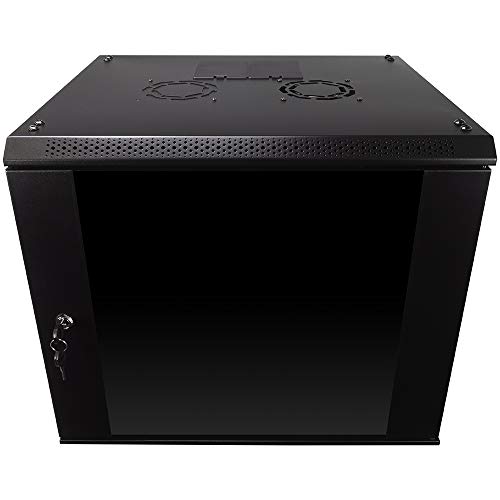
Best for compact setups requiring secure access to essential network gear. The 9U cabinet uses cold-rolled steel with a welded frame and supports up to 110 lbs. It has a tempered glass front door with a security lock and removable side panels for flexible configuration in limited spaces (17.72″L x 21.65″W x 19.17″H).
Who it’s best for: small offices or classrooms needing a compact but secure cabinet. Why selected: secure glass door and easy customization. Caution: lower U capacity means less space for multiple devices compared to 12U models.
NavePoint 6U Wall Mount Cabinet

Best for lightweight, quick-install needs with solid security. The 6U cabinet uses a durable cold-rolled steel frame, supports up to 130 lbs, and offers removable side panels plus a locked front door. It fits 19″ IT gear with a compact 17.72″ L x 23.63″ W footprint and 17.75″ H.
Who it’s best for: small deployments like retail kiosks or small offices that require a quick-to-set-up enclosure. Why selected: strong load rating for its size and easy assembly. Caution: 6U capacity limits expansion compared to larger enclosures.
Buying Guide
What to consider when choosing a wall mount data enclosure:
- Depth and space: Measure wall depth and available clearance; deeper cabinets fit more devices but require more wall space.
- Load capacity: Ensure the enclosure can support the total weight of your equipment, including cables and accessories.
- Security: Decide between glass doors with locks versus solid doors, and whether removable side panels are necessary for cable management.
- Mounting flexibility: Look for adjustable rails, door orientation options, and whether the cabinet can be wall-mounted or freestanding if needed.
- Cable management: Panels with cutouts, punchouts, and cable channels reduce clutter and improve airflow.
- Ease of assembly: Flat-pack designs or included hardware speed up installation for ongoing projects.
FAQ
- What is a wall mount data enclosure best used for? It saves floor space while securely housing 19″ IT equipment in constrained areas.
- Can these cabinets support A/V devices? Many models are designed for IT and A/V gear with standard 19″ mounting rails.
- Do these enclosures require professional installation? Some are straightforward for DIY setup, but heavier cabinets may benefit from two-person installation.
- Are there safety considerations for wall mounting? Ensure studs or solid backing and proper mounting hardware to support the load.