Best USB-C Network Switches for a Clean, Fast Home or Office Setup
Looking for a reliable USB-C network switch or adapter to expand wired connectivity? This guide highlights five capable options ideal for laptops, desktops, and compact workspaces. Each choice is best for different needs—whether you want a simple plug-and-play switch, a compact USB-C powered hub, or a kit that includes Ethernet cables. The table below compares essentials to help you decide quickly.
Overview Table (selected products)
| Product | Ports | Power | Best For | Limitations |
|---|---|---|---|---|
| Cudy GS105U | 5 RJ45 | USB-C power jack | Compact desktops and travel setups | Non-PoE, standard unmanaged |
| Cudy GS108U | 8 RJ45 | USB-C power jack | Small offices or hubs needing more ports | Unmanaged |
| Cable Matters USB C to 4-Port Gigabit Ethernet Switch | 4 RJ45 + USB-C passthrough | USB-C powered | Devices without built-in Ethernet port | Combo adapter/switch may feel integrated |
| UGREEN USB C to Ethernet Adapter | 1 RJ45 (Gigabit) | None built-in | Laptops without Ethernet port needing a quick fix | Not a multi-port switch |
| Litbla Gigabit Ethernet Splitter 1 to 4 Kit | 4 RJ45 ports | USB-C power cable included | Ready-to-use kit with cables | Cables may clutter desks |
Cudy GS105U 5-Port USB-C Powered Switch

The Cudy GS105U is a compact 5-port Gigabit Ethernet switch with a USB-C power jack. It supports Auto negotiation and Auto MDI/MDIX, enabling simple plug-and-play setup without software. This makes it a solid choice for desktops, small offices, or travel setups where space is at a premium. Best for users who need straightforward expansion of wired networks without extra configuration.
Who it’s best for: Personal desks, home offices, or students needing an easy, silent network expansion. Why selected: Combines a small footprint with USB-C power for neat, cable-friendly desktops. Caution: No PoE or advanced features; no fan means cooling relies on design, so keep it away from excessive heat.
Cudy GS108U 8-Port USB-C Powered Switch

The GS108U expands to 8 Gigabit ports with a USB-C power jack for a tidy, desktop-friendly hub. It’s ideal for small workstations or home networks that require more ports without sacrificing quiet operation or space. Best for: users who need more devices on a single switch while keeping a clean desk. Why selected: Plug-and-play with a fanless, unshielded design that fits under monitors or on shelves. Caution: As an unmanaged switch, it lacks QoS or VLAN features for traffic control.
Cable Matters USB C to 4-Port Gigabit Ethernet Switch

This device combines a USB-C port with a 4-port Gigabit Ethernet switch, enabling a laptop or tablet without a built-in Ethernet port to share wired connectivity with up to four devices. It supports WoL, FDX, auto-sensing, and IPv6, with MAC address pass-through via the EZ-Dock utility. Best for: mobile professionals who need quick, multi-port wired access on the go. Why selected: Flexible usage as both USB-C adapter and 4-port switch in one. Caution: Requires compatible host device and may need driver considerations for some systems.
UGREEN USB C to Ethernet Adapter

The UGREEN USB-C to Ethernet Adapter delivers up to 1 Gbps Ethernet via USB-C, compatible with Thunderbolt 4/3 devices and many operating systems. It’s a suitable upgrade for laptops lacking a dedicated Ethernet port or for devices with damaged LAN sockets. Best for: single-device connectivity upgrades; home or travel use. Why selected: Driver-free for many platforms, easy plug-and-play. Caution: Some older Windows versions may require drivers.
Litbla 1 to 4 Gigabit Splitter Kit
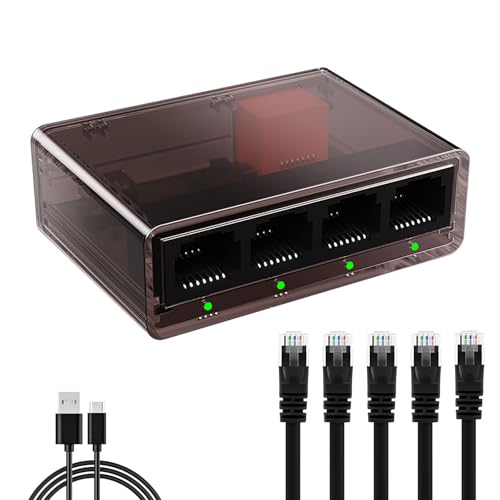
Litbla’s all-in-one kit includes a 1-to-4 Gigabit Ethernet splitter, five Cat6 cables, and a USB-C power cable. It’s designed for immediate 4-device connectivity with up to 1000 Mbps per port. Best for: setup-ready households or small offices that want a complete, immediate multi-device network extension. Why selected: Bundled cables simplify buying decisions; Cat6 cables provide stable performance. Caution: Cables add desk clutter; ensure adequate space and cable management.
Buying Guide
What to consider when choosing a USB-C network switch or adapter
- Port count: Do you need 5, 8, or more ports? Pick a model that fits your current devices and future growth.
- Power method: USB-C powered units keep desks tidy; non-powered options may require a separate power source.
- Managed vs unmanaged: Unmanaged switches are plug-and-play; managed switches offer QoS, VLANs, and monitoring for larger setups.
- Form factor: Desktop mini-switches save space; larger units may offer better airflow and label clarity for cable planning.
- Compatibility: If using a laptop or device with Thunderbolt, ensure USB-C compatibility and any driver requirements.
- Bundle value: Kits with cables and accessories can simplify setup but may include items you don’t need.
- Cable quality: For best performance, pair with Cat6 or better; longer runs may benefit from higher-spec cables.
Frequently Asked Questions
- Do I need a router to use a USB-C switch? No. A USB-C switch or USB-C Ethernet adapter expands wired connectivity directly to devices; it does not replace routing functionality.
- Is a PoE switch necessary for USB-C devices? Only if you require power over Ethernet to connected devices like IP cameras or PoE printers. Most USB-C switches are non-PoE.
- Can USB-C adapters work with Thunderbolt ports? Yes, Thunderbolt ports typically support standard USB-C Ethernet adapters, though performance may depend on system configuration.
- What’s the difference between a switch and an Ethernet adapter? A switch provides multiple ports to connect several devices; an adapter adds Ethernet to a single device. Some products combine both functions.
- Do I need drivers for USB-C to Ethernet on Windows or Mac? Many are driver-free, especially for Windows 10/11 and macOS. Some older systems may require drivers.
- Are USB-C powered switches safer for desks? USB-C power reduces clutter by eliminating extra wall adapters, making desks neater and easier to manage.