Best in-Wall TV Plug and Cable Management Solutions for Clean, Safe Setups
Answer: An in-wall TV plug-in kit is the best way to hide cords behind a wall-mounted TV while keeping power and low-voltage cables accessible. These kits suit homeowners seeking a clean living room, renters needing a non-permanent setup, and office spaces aiming for a professional look. The following top picks offer varied install depths, included hole-saws, and different outlet configurations to fit common wall materials and cable needs. This guide highlights five reliable options and helps you decide which is best for your space.
| Product | Best For | Key Benefit | Note |
|---|---|---|---|
| Naerza In Wall Cable Management Kit | Home theaters and multi-cable setups | All-in-one, wall-mounted TV outlet with 9 ft cord | Requires sufficient wall depth |
| Doufuhua Recessed Outlet Box Kit | Slim spaces and compact rooms | Recessed design hides outlets without external bulk | No wires included |
| TROND Flat Plug Power Strip | Behind couches or desks with limited space | Ultra-thin, 0.33 inch plug; wall/desk mounting | Tabletop use alongside; not a full in-wall kit |
| VCELINK In-Wall Cable Management Kit | Modular, paintable wall integration | Compact, passes multiple wires; secure, flush finish | Small size may limit some configurations |
| Tensilearm In-Wall Cable Management Kit | Heavy-duty and complete DIY installs | Includes hole saw and power/low-voltage pass-through | Must confirm wall depth |
Naerza In Wall Cable Management Kit
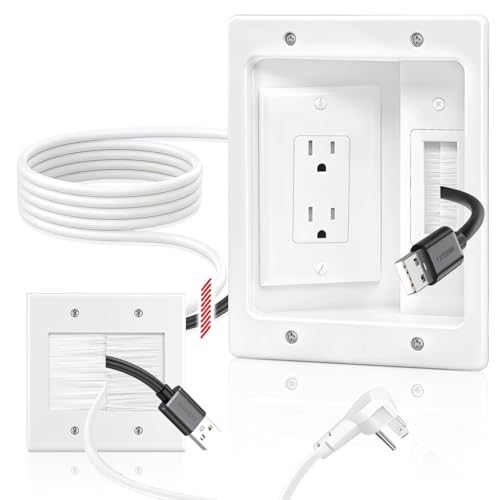
In-wall cable management that hides power cords, HDMI, Ethernet, and AV cables within the wall. Best for wall-mounted TVs and entertainment centers seeking a clean, professional look. The kit emphasizes a simple installation with step-by-step diagrams and no electrician required, though it requires adequate wall depth for recessed outlet work. The wing-shaped clips aim for a tight bond with gypsum boards, suitable for homes, offices, and conference rooms.
Best for: Home theaters and multi-cable setups where a single, all-in-one solution is preferred. Better for spaces with adequate wall depth and a preference for a white, unobtrusive appearance. Caution: The kit may need extra tools like fish tape to guide cables through the wall.
Doufuhua Recessed Outlet Box Kit

The kit centers on a recessed outlet box designed to hide wall outlets behind a TV, keeping the surface clean and space-saving. It includes a brush wall plate, socket, wall plate, electrical box, and a cutting template to help with precise installation. It’s especially suitable for rooms with limited external space and a tidy wall aesthetic.
Best for: Small to medium rooms where exterior clutter must be avoided. Choose this if you want a neat, recessed look behind a wall-mounted TV. Caution: It ships without wire (no wire pre-included), so plan cable runs accordingly.
TROND Flat Plug Power Strip

A flat, ultra-thin plug extension designed to tuck behind furniture, behind TVs, or under desks. It adds three outlets along with USB-C and USB-A ports, enabling multiple devices to be charged from a single wall outlet. This is a practical option when a full in-wall kit isn’t feasible or when you need to supplement existing wall outlets.
Best for: Apartments or rooms lacking wall outlets in critical areas where a hidden, low-profile solution is preferred. Better for temporary setups or behind furniture where a full wall pass-through isn’t required. Caution: It is a plug-in strip, not a fully in-wall installation.
VCELINK In-Wall Cable Management Kit

Compact and low-profile, this kit is designed for clean wiring behind wall-mounted TVs, soundbars, and projectors. It supports multiple passes, including HDMI, Ethernet, coaxial, and AV wires, with the option to paint the wall plate to match decor. The secure, flush-fit design minimizes wobble and blends into the wall.
Best for: People wanting a paintable, discreet solution that can handle several standard cables. Choose this if you value a flush finish and a modular approach. Caution: Some setups may require additional adapters or extensions depending on wall structure.
Tensilearm In-Wall Cable Management Kit

Professional-grade DIY kit designed to hide cables behind a wall with a dedicated power outlet and pass-through for low-voltage cables. It includes a hole saw attachment and a drill bit, turning a simple installation into a complete, ready-to-use setup. The kit’s all-in-one approach reduces the need for extra tools.
Best for: DIY enthusiasts and homeowners who want a full-featured in-wall solution with included installation tools. Choose this if you need a complete kit to manage power and low-voltage cables in one project. Caution: Ensure your wall has sufficient depth to accommodate the recessed components.
Buying Guide
What should you consider when choosing an in-wall TV cable management solution?
- Wall depth and outlet depth: Confirm the wall cavity depth to ensure the kit’s recessed components fit properly.
- Cable capacity: Match the kit’s pass-through capacity with your anticipated cables (HDMI, Ethernet, audio, power, etc.).
- Finish and customization: Look for paintable or color-matching plates for a seamless wall look.
- In-wall vs. surface-mounted: Decide whether you want a fully in-wall solution or a more temporary, surface-hidden option like a flat plug strip.
- Included tools and consumables: Some kits include hole saws and templates; others require separate purchases.
- Installation effort: Consider whether you’re comfortable with wall cutting and routing cables, or if you’d prefer a kit marketed as beginner-friendly.
What’s the best choice for different scenarios?
- Best for complete concealment in new or renovated spaces: Naerza or Tensilearm kits with pass-throughs and full outlet integration.
- Better for tight spaces or existing walls with limited depth: Doufuhua or VCELINK’s compact, flush designs.
- Choose this if you want a quick, non-permanent solution behind furniture: TROND flat plug power strip.
Installation tips
- Plan cable routes before cutting. Mark both the wall outlet and pass-through locations.
- Use the provided templates and hole-saw attachments when available.
- Test cable paths with low-voltage wires first to minimize wall damage.
- Paint or match the finish after installation for a cohesive look.
Maintenance and safety
- Avoid overloading outlets; distribute high-wattage devices thoughtfully.
- Keep power cords and low-voltage cables separated when possible to reduce heat buildup.
- Ensure accessibility to outlets for future maintenance or replacements.
FAQ
- Do I need an electrician for in-wall cable management?
Most kits are designed for DIY installation, but always follow the product’s depth and clearance requirements. If in doubt, consult a professional.
- Will these kits affect wall integrity?
Properly installed kits with the included hole saws and brackets minimize wall damage and maintain a clean appearance.
- Can I paint the wall plate to match my wall color?
Yes. Many kits use paintable plates to blend with home decor.
- What cables can pass through these systems?
Most support HDMI, Ethernet, coaxial, audio, and low-voltage cables. Check max pass-through counts for each kit.
- Are multi-outlet USB charging options included?
Some models offer USB ports as part of a power strip option; verify the product specs for USB availability.
- Is there a risk of interference with AV equipment?
A properly installed in-wall system minimizes external interference, but ensure power and signal cables are routed separately where possible.