Best Smart Thermostats for Air Conditioning: Save Energy and Stay Comfortable
Answering the question: which smart thermostat is best for cooling-focused homes. This guide highlights models that optimize air conditioning use, reduce energy waste, and integrate with popular ecosystems. It’s ideal for homeowners seeking energy savings, seamless app control, and compatibility with existing HVAC setups. Below, you’ll find five well-rounded options ranked for different needs, from hands-free smart assistants to flexible DIY installs. A quick summary table helps you compare essentials at a glance.
| Product | Best For | Key Benefit |
|---|---|---|
| Amazon Smart Thermostat | Alexa ecosystem users | Energy-saving features with Ring integration |
| Google Nest Thermostat | Google Home users | Auto-schedule and energy efficiency without always needing a C-wire |
| Emerson Sensi | Budget-friendly DIY installs | Privacy focus and energy savings |
| ecobee Smart Thermostat Essential | Smart assistant compatibility | Energy savings with broad system compatibility |
| Honeywell Home RTH9585WF1004 | Color display and utility rebates | Advertising flexible scheduling and energy rebates |
Amazon Smart Thermostat — Energy Saving with Alexa

The Amazon Smart Thermostat is designed for households already using Alexa or Ring devices. It provides a straightforward path to reduce HVAC energy usage by leveraging presence sensing and temperature-based automation. This model is best for buyers who want a simple setup that integrates with existing Amazon ecosystems and can help qualify for local energy rebates after purchase.
Best for: Alexa-centric homes that want easy voice control and presence-aware cooling adjustments. Choose this if you already use Ring or Echo devices and want quick installation without extra wiring in many cases. A potential limitation is reliance on Amazon’s ecosystem for optimal features.
Google Nest Thermostat — Smart Thermostat for Home

The Nest Thermostat emphasizes energy efficiency through smart scheduling and eco-friendly features. It supports Wi‑Fi connectivity and is designed to work even if a C-wire isn’t present in many homes. It may require a C-wire or compatible accessory for certain systems, especially when cooling-only or heat-pump configurations are used. It’s best for Google Home ecosystems and users who want automatic energy savings with minimal setup.
Best for: Homes already using Google Assistant or seeking a seamless, auto-adjusting schedule. Avoid this if your system lacks compatible wiring for advanced cooling setups or you prefer non-Google ecosystems.
Emerson Sensi Wi-Fi Smart Thermostat
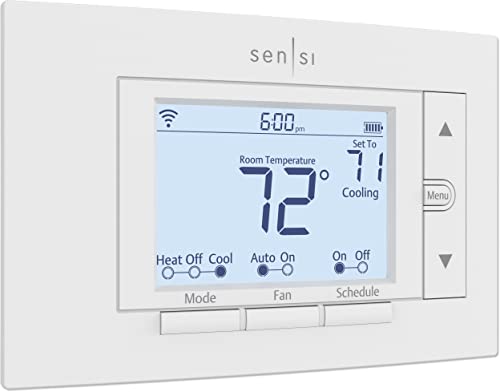
Sensi emphasizes privacy protections and energy-saving features through flexible scheduling and usage reports. It supports DIY installation and works with most HVAC setups, with many installations not requiring a C-wire. This option is well-suited for budget-conscious buyers who still want efficient heating and cooling management without big compromises on privacy or setup complexity.
Best for: DIY installers who want a balance of privacy, energy savings, and broad compatibility. Consider alternatives if you need more robust ecosystem integrations or a color display.
ecobee Smart Thermostat Essential

The ecobee Essential combines robust energy-saving features with broad compatibility and smart assistant support. It advertises significant yearly energy savings and includes a responsive color touchscreen plus app control. Software updates are highlighted as a long-term benefit, keeping the thermostat current with evolving features. Best for users who want strong cross-platform voice control (Siri, Alexa, Google Assistant) and reliable energy management.
Best for: Homes that use multiple smart assistants or want strong energy management. A caveat: check compatibility with your specific HVAC system to ensure full functionality.
Honeywell Home RTH9585WF1004 Wi‑Fi Smart Color Thermostat

Honeywell’s color touchscreen thermostat emphasizes flexible scheduling and energy rebates through utility programs. It’s designed to integrate with major smart home ecosystems and offers a visually customizable display. This model is strong for users who want energy rebates and peak-rate pricing support, helping optimize cooling costs during high-demand periods.
Best for: Color-display lovers and users pursuing utility rebates. Limitations may include more complex setup for some users versus simpler models.
Honeywell Home Programmable Thermostat RTH20B

The Honeywell RTH20B offers straightforward customization with 5-2 day scheduling and a clear display. It is positioned as a reliable direct replacement for older models, making it a good pick for those upgrading a dated thermostat. It’s best for users who want simple, predictable programming without the need for advanced smart features.
Best for: Upgrading older systems with a practical 5-2 day schedule. Slight limitation: fewer smart-home integrations than higher-end models.
Buying Guide
What should you consider when choosing a smart thermostat for air conditioning?
- System compatibility: Verify HVAC type (gas, electric, heat pump) and whether a C-wire is required or optional.
- Connectivity: Choose between Wi‑Fi, Bluetooth, or ecosystem-specific controls (Alexa, Google Assistant, Apple HomeKit).
- Energy savings features: Look for adaptive scheduling, occupancy sensing, and usage reports to quantify savings.
- Display and interface: A color touchscreen can improve ease of use; consider whether you prefer a simple or feature-rich interface.
- Smart home integration: If you use specific assistants, pick a model with native support and routines that align with your routines.
- Privacy and data handling: Some brands emphasize privacy protections and data usage disclosures—assess these against your preferences.
- Budget and installation: DIY-friendly units save on installation costs, while more advanced models may require professional setup.
Practical buying questions
- Do I need a C-wire for my system? Many modern thermostats work without a C-wire, but some configurations still benefit from one.
- Will this thermostat save me money? Look for ENERGY STAR certifications and documented energy-saving features such as scheduling and occupancy-based cooling.
- Can I control it without a smartphone? Most models offer remote control through apps; some also work with voice assistants.
- Is it compatible with my existing smart home? Check compatibility with your preferred assistant and any required hubs or apps.
- Will installation be difficult? DIY models offer straightforward setup; more complex systems may require professional help.
- Are rebates available? Certain models and energy programs offer rebates; check with your local energy provider.
FAQ
- Which thermostat works best with Alexa? The Amazon Smart Thermostat integrates tightly with Alexa for voice control and routines.
- Do Nest thermostats require a C-wire? Nest models work in many homes without a C-wire, but some systems may need one.
- Can I save energy with Sensi? Yes, Sensi offers scheduling and reporting designed to reduce HVAC energy use.
- Is ecobee compatible with Siri? Yes, ecobee supports Siri through Apple devices and HomeKit.
- Do color displays matter for energy savings? Display color does not affect energy savings; features and scheduling do.
- Are rebates common after installing a thermostat? Rebates vary by provider and region, but many programs exist for eligible models.