Best Table Mount Power Strips for Clean, Edge-Mounted Desk Power
If you need a tidy, desk-edge power solution, a table mount power strip offers secure placement, easy access to outlets, and charging for multiple devices without cable chaos. This guide highlights five top options suited for different setups—from compact desks to larger workstations—so you can choose the best fit for your workspace needs.
Summary of selected products
| Product | Best For | Key Benefit |
|---|---|---|
| Jgstkcity Desk Clamp Power Strip USB C (B0BXP2ZTWB) | Small to medium desks; fast USB-C charging | 4 PD USB-C ports and 5 outlets in a compact edge-mount frame |
| Acozvin Flat Plug Desk Clamp Power Strip 10FT (B0CNVRMYMR) | Multi-device households; longer reach | 17-in-1 outlets with dual PD 20W USB-C and multiple USB ports |
| Anker Nano Power Strip (B0FFGZH2S2) | Minimalist setups; laptop and peripherals | 6 outlets with 70W USB-C fast charging; organized layout |
| Jgstkcity Desk Clamp Power Strip (B09QSGJLNH) | Compact, semi-permanent desk installs | 2 PD 20W USB-C ports; slim edge-mount with two USB-C and two USB-A |
| TROND Desk Clamp Power Strip (B0D5Q79T2X) | Standing desks or gaming setups | 5 outlets plus USB charging; angled clamp for bulky adapters |
Jgstkcity Desk Clamp Power Strip USB C, 40W Total

Best for: Small to medium desks needing fast USB-C charging at the edge. This model provides four PD USB-C ports totaling 40W and two USB-A ports, plus five AC outlets. The edge-mount design clamps to the back or side of a desk, creating a semi-permanent, tidy charging dock.
Why selected: It combines compact dimensions with a robust 40W total output and fireproof materials for a secure desk setup. The 6-foot flat plug helps keep cords organized and out of the way, while the clamps provide stable installation on surfaces up to 1.96″ thick.
Caution: The 40W total output is shared across ports; individual USB-C ports may not all reach 40W simultaneously.
Flat Plug Desk Clamp Power Strip 10FT, 40W

Best for: Desks that need a longer reach and many ports. This unit offers 9 AC outlets and 8 USB ports, including 4 USB-C, with a total 40W PD charging capacity.
Why selected: The 17-in-1 configuration supports multiple devices without needing adapters. It’s designed for easy desk-edge mounting, with simple installation on tabletops up to 1.7″ thick.
Caution: With a large number of outlets, ensure your desk cable routing remains tidy to avoid overloading the edge area.
Anker Nano Power Strip, Desk Clamp
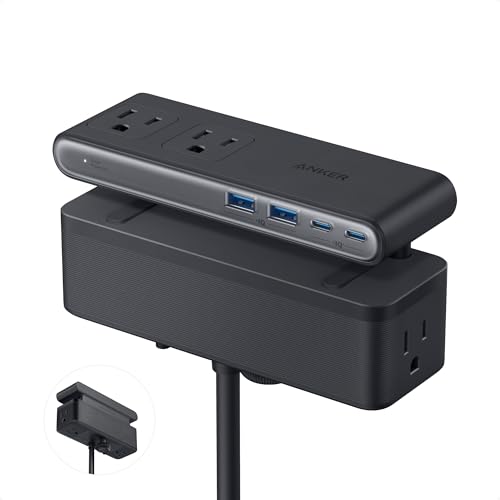
Best for: Minimalist workstations needing organized charging with laptop-friendly USB-C power. The strip includes six outlets plus two USB-C and two USB-A ports, with GaN-based 70W USB-C charging for laptops.
Why selected: The dual-zone layout reduces clutter, keeping cables out of the way. The 5-foot cord provides flexible placement, and the 70W USB-C port is well-suited for power-hungry devices.
Caution: The 70W maximum applies to USB-C ports combined; plan usage accordingly to avoid overloading a single port.
Jgstkcity Desk Clamp Power Strip, 40W

Best for: Small-space setups needing a slim, capable edge-mount solution. This model provides 2 PD 20W USB-C ports and 2 USB-A, plus two standard outlets.
Why selected: The clamp suits desks up to 1.96″ thick and maintains a low profile while delivering essential fast charging capabilities. It’s appropriate for minimal desk layouts that still require reliable USB-C charging.
Caution: The combined USB-C output is capped at 40W; distribute usage across ports to maximize efficiency.
TROND Desk Clamp Power Strip

Best for: Desks requiring easy access to bulky adapters with a clamp-on design. The TROND unit features five outlets and USB charging, with a 1.97″ desk-edge compatibility and an angled mounting approach.
Why selected: Its outward-facing outlets and flexible clamp make it a practical option for standing desks or gaming setups where space is at a premium. The USB charging helps consolidate devices on one station.
Caution: Check clearance behind the desk to ensure enough space for the clamp and outlets, especially when using thick cables or large adapters.
Buying Guide: Key Considerations For Table Mount Power Strips
- Edge thickness compatibility: Most desk clamps fit up to about 1.6″–1.97″ thick desktops. Measure your desk before choosing.
- Output and port mix: Consider the balance of AC outlets, USB-C PD ports, and USB-A ports. Total power (watts) capacity and per-port limits affect how many devices you can charge simultaneously.
- Cable length and layout: Longer cords help reach distant outlets but may create clutter. Look for flat or right-angle cords to minimize clutter along walls and under desks.
- Safety features: Fireproof materials, surge protection ratings (joules), and overload protection are important for protecting devices mounted on desks.
- Installation style: Edge-mount clamps are semi-permanent and require a stable desk surface. Some models are designed to be removed easily for relocation.
- Device compatibility: If charging laptops or power-hungry devices, prioritize USB-C PD ports with higher wattage if needed (e.g., 20–60W per port).
- Desk space and layout: Desks with back or side clearance may benefit from outward-facing outlets to accommodate bulky adapters without crowding.
FAQ
- Do desk clamp power strips require professional installation?
– No, most clamp-to-desks are simple to install with included hardware and basic tools, following the manufacturer’s guidance. - Is 40W total USB-C charging enough for modern devices?
– For many phones and tablets, yes, but laptops or high-power devices may need higher per-port output or multiple chargers. - Can I remove a desk clamp if I move?
– Yes, most clamps are designed to be removed without damaging the desk, though some residue may remain depending on the material. - What happens if I plug in many devices at once?
– The total power draw should not exceed the unit’s rated wattage. Spread devices across ports to avoid tripping. - Are these surge protectors safe for kids’ desks?
– Yes, when used as directed, especially models with overload protection and fire-resistant housings. - Do these units work with standing desks?
– Yes, many clamp designs adapt to standing desks, but check edge thickness and clearance in your setup.