Best Switches for Multiple Computers to Share Peripherals
When managing workstations, a reliable USB and KVM switch can streamline access to shared keyboards, mice, printers, and other peripherals across multiple computers. This guide highlights top options that balance ease of use, compatibility, and performance for American users. Each pick supports plug-and-play setup, and many offer USB 3.0 speeds, high-resolution display sharing, and responsive switching. Review the selections, then use our buying guide to compare features that matter most for your setup.
| Product | Brand | Key Peripherals Shared | Notes |
|---|---|---|---|
| UGREEN USB 3.0 Switch 2 Computers Sharing USB C & A Devices | UGREEN | Keyboard, Mouse, Printer/Scanner, USB cameras | Supports USB C & USB A; power recommended for multiple devices |
| USB 3.0 HDMI KVM Switch 1 Monitors 2 Computers (4K@60Hz) | Hearvo | Monitor, Keyboard, Mouse, USB peripherals | Single monitor; includes EDID adaptive feature |
| USB 3.0 HDMI KVM Switch 2 Monitors 2 Computers (4K@60Hz) | Hearvo | 2 Monitors, Keyboard, Mouse, USB peripherals | Dual-monitor sharing; HDCP 2.2 compliant |
| 8K/4K Triple Monitor KVM Switch (3 Computers) | DXchip | 3 Monitors, USB peripherals | DP 1.4/HDMI 2.1 for high resolutions |
| UGREEN USB 3.0 Switch 2 in 2 Out (2 Computers) | UGREEN | 2 USB devices per computer (keyboard, mouse, etc.) | 2 ports in, 2 ports out; 5Gbps; driver-free |
Below are five detailed product sections to help you compare performance, setup, and compatibility for shared peripherals across two or more computers. Each section includes a direct, clickable Amazon link for quick viewing.
UGREEN 2-In 4-Out USB Switch

The UGREEN 2-In 4-Out USB switcher enables two computers to share up to four USB devices, such as keyboards, mice, printers, headphones, and USB cameras. It supports USB C and USB A devices via a single USB 3.0 hub and offers data transfer speeds up to 5Gbps. It is compatible with Windows, macOS, Chrome OS, and Linux. Power supply is recommended when connecting several devices simultaneously to prevent disconnections. Note that it is not a KVM switch and does not transmit video signals.
USB 3.0 HDMI KVM Switch — 1 Monitor, 2 Computers

This KVM switch allows control of two computers sharing a single monitor, keyboard, and mouse, combining USB and HDMI switching in one device. It includes three USB 3.0 ports for fast data transfer, enabling easy sharing of printers and external drives. It supports Windows, macOS, Linux, and more, with 4K resolution at 60Hz and HDCP 2.2 compliance for protected content. The setup is suitable for mixed work environments needing peripheral sharing without extra cables.
USB 3.0 HDMI KVM Switch — 2 Monitors, 2 Computers
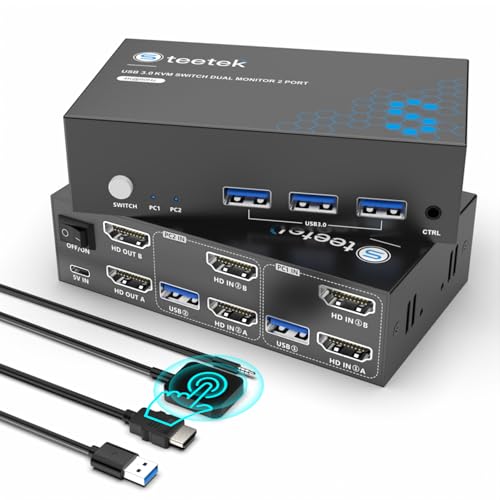
This KVM switch supports two monitors and two computers, enabling simultaneous control of multiple displays and shared USB peripherals. It features three USB 3.0 ports for high-speed data transfer and 4K@60Hz visuals with HDCP 2.2 compatibility. It supports a wide range of devices (PCs, laptops, PS4, etc.) and multiple operating systems, simplifying a multi-device setup with minimal desk clutter.
DXchip 8K/4K Triple Monitor KVM Switch

Designed to share three monitors across three computers, this KVM switch uses DP 1.4 and HDMI 2.1 standards to deliver high resolutions up to 8K via DisplayPort and 8K via HDMI, depending on source and monitor support. It includes four USB 3.0 ports for sharing keyboards, mice, drives, and printers. The device emphasizes one-click switching and is suitable for advanced multimedia setups, gaming, and professional environments requiring three-monitor workflows.
UGREEN USB 3.0 Switch — 2 In 2 Out

UGREEN’s 2-in-2-out USB switch enables two computers to share two USB devices, such as keyboards, mice, printers, webcams, and other USB peripherals. It supports USB 3.0 speeds up to 5Gbps and is backward compatible with USB 2.0. The device is driver-free and plug-and-play across Windows, macOS, Chrome OS, and Linux, making it a straightforward solution for simple two-machine setups that require efficient peripheral sharing.
USB 3.0 Switch — 4-Port, 4 Computers Share

This 4-port USB switch lets up to four computers share one set of USB peripherals. It includes three USB 3.0 ports and supports high data transfer rates and compatibility with USB 2.0 devices. The device is aimed at environments where multiple PCs need access to shared USB devices, simplifying workflow and reducing desk clutter.
Buying Guide
Key purchase considerations help you pick the right switch for your needs:
- Number of computers and devices: Determine how many computers will connect to the switch and how many USB peripherals you intend to share. Some models are two-way, while others support three or four machines.
- Video sharing needs: If you require monitor sharing, choose a KVM switch with HDMI or DisplayPort support and check resolution and refresh rate capabilities (4K@60Hz or higher). Note that many USB switches do not transmit video and are limited to data devices.
- USB standard and speed: USB 3.0 provides up to 5Gbps. Ensure cables and devices are compatible; USB 2.0 devices will work but at slower speeds.
- Power considerations: Some switches require external power when multiple USB devices are connected. If you plan to share power-hungry peripherals, verify power requirements and provide a reliable power source if needed.
- Operating system compatibility: Most switches claim broad OS support (Windows, macOS, Linux, Chrome OS). Confirm specific requirements if you rely on niche systems.
- Ease of switching: Button-based switching is common, and some models offer remote control. Consider whether you need hotkey switching or a physical button with LED indicators for status visibility.
- Reliability and build quality: Look for devices with sturdy housings, stable connectors, and reliable USB ports to minimize disconnects during heavy use.
When selecting a solution, weigh whether you primarily need peripheral sharing or combined USB and monitor sharing (KVM). For multi-monitor setups, prioritize KVM switches with multiple video outputs and check EDID compatibility to ensure consistent display behavior across devices.
All products listed here provide practical, driver-free or widely compatible options for home offices, studios, or small business environments. Depending on your exact needs—two computers sharing a pair of peripherals or a multi-monitor, multi-device workflow—there is a suitable choice among these top-rated switches.