Best Surge Protector Auto Shut Off Options for Safer, Smarter Power
Answering the top buyer question: which surge protectors offer auto shut-off or smart switching to protect devices and save energy? This guide highlights five reliable options suited for home offices, entertainment centers, and workspaces. Ideal buyers include tech-heavy setups needing consistent protection (computers, monitors, filing stations), busy households with many outlets, and users wanting built-in timers or autoswitching to reduce standby energy. Below is a quick comparison, followed by in-depth product sections and a buying guide to help you pick confidently.
| Product | Best For | Key Auto/Smart Feature |
|---|---|---|
| Belkin 12-Outlet Surge Protector Power Strip | Desktop setups with many devices | High joule rating for overload protection |
| Belkin Surge Protector Power Strip (4320 J) | Home offices and media centers | Enhanced surge protection and phone line protection |
| BN-LINK 8 Outlet Surge Protector with Timer | Energy-conscious setups needing scheduled control | 4 timed outlets with a programmable schedule |
| Smart Strip ECG-7MVR (Bits Limited) | Devices that benefit from autoswitching and threshold control | Autoswitching with adjustable on/off threshold |
| CRST 10-Outlets Heavy Duty Power Strip | Industrial and rugged environments needing many outlets | High 2800 J protection with long cord |
Belkin 12-Outlet Surge Protector Power Strip

The Belkin 12-Outlet model provides a dense outlet cluster with 12 AC ports and a robust 3,940-joule protection level. It is designed for desks, classrooms, or home offices where multiple devices need simultaneous charging. The safety indicator light confirms protection status, and the 8-foot flat plug reduces plug conflicts behind furniture. This option is best for buyers who want extensive outlet coverage and solid surge rating for sensitive electronics like computers, monitors, and external drives. A potential limitation is that it lacks an explicit auto-off switching feature on the data sheet, so rely on surge protection and indicator lights for status checks.
Who it’s best for: Tech-heavy workstations, students with many peripherals, and households needing a single power hub with clear protection status.
Why chosen: High outlet count, long cord, strong joule rating, and wall-mount compatibility provide flexible placement without compromising protection.
Caution: No built-in timer or autoswitch; ensure proper outlet management to avoid overloading a single circuit.
Belkin Surge Protector Power Strip with 12 Outlets (4320 J)

This Belkin model emphasizes 12 outlets and a high 4,320-joule protection rating, adding RJ11 phone line and coaxial protection to guard against multiple data and cable disturbances. It is well-suited for home offices or media centers with wired accessories, printers, and set-top boxes. While its surge protection is strong, note that auto shut-off or timer features are not highlighted in the listed data, so consider use cases that prioritize protection coverage over automatic power-down.
Who it’s best for: Home office setups with multiple wired peripherals and needs for line protection (phone, cable, modem).
Why chosen: Comprehensive protection, ample outlets, and support for phone and cable connections improve overall device safety.
Caution: No explicit auto shut-off feature documented; plan for manual power management if needed.
BN-LINK 8 Outlet Surge Protector with Timer

The BN-LINK unit pairs eight outlets with a 7-day digital timer, where four outlets are timer-controlled and four remain always on. This setup makes it ideal for home offices or entertainment centers that want lights, fans, or peripherals to turn off automatically at specific times. A practical note is that the timer controls only the four outlets on the timer side, which is important to plan device groups accordingly. A circuit breaker adds safety against overloads.
Who it’s best for: Users seeking energy savings and automated scheduling for lights, desktop peripherals, or gaming consoles.
Why chosen: Flexible timing options, reliable overload protection, and easy “set and go” operation support energy-conscious routines.
Caution: Timed control is not universal across all outlets; group devices to maximize automation benefits.
Bits Limited Smart Strip ECG-7MVR

The ECG-7MVR offers seven outlets with autoswitching technology and an adjustable on-off threshold via a small screw. This makes it suitable for setups where different devices have varying power needs or standby currents. Right-angle flat plug and a compact 4-foot cord improve placement behind furniture or dense equipment racks. The auto-switching feature helps reduce idle energy draw for compatible devices.
Who it’s best for: Tech fans with a mix of always-on and switched devices, plus spaces behind furniture where outlet access is tight.
Why chosen: Autoswitching with adjustable sensitivity provides smart power control that can adapt to device behavior rather than a fixed on/off rule.
Caution: Feature visibility on consumer listings is limited; verify specific behavior for your device mix before relying on autoswitching as the sole protection.
CRST 10-Outlets Heavy Duty Power Strip
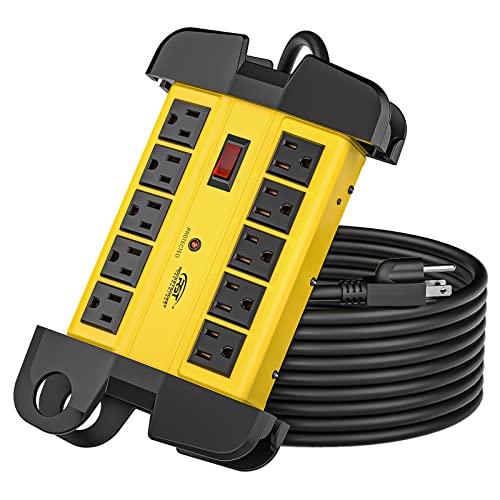
The CRST unit is designed for harsh environments and heavy usage, featuring 10 outlets and a long 15-foot power cord. It carries a 2800-joule protection level and an ETL listing, suitable for garages, workshops, or classrooms where durability matters. Although it offers robust protection and a longer reach, this model emphasizes industrial-grade construction over advanced auto-shutoff features, so plan power management separately if you need automatic device turning off.
Who it’s best for: Industrial settings, workshops, and labs needing durable, high-outlet power distribution with strong surge protection.
Why chosen: Long cord and rugged build provide flexible placement in larger spaces with demanding devices.
Caution: Fewer smart features; not ideal if auto shut-off or timer control is a priority.
Buying Guide: What to Consider When Choosing an Auto Shut-Off Surge Protector
Key questions to guide your decision:
- What level of surge protection is needed? Look for joule ratings that match your equipment’s fragility. Higher ratings generally offer longer protection lifespans for sensitive electronics.
- Do you want automatic shut-off or timing features? Timers are useful for energy savings and night-time safety. Autoswitching helps reduce idle consumption for mixed device loads.
- How many outlets and what layouts fit your space? Consider outlets that accommodate bulky adapters and the overall footprint, including cord length and wall-mount options.
- Is phone or coaxial protection required? Some models add RJ11 (phone) and coax protections to shield additional connections.
- Do you need rugged or consumer-grade construction? Industrial units may offer durability for garages or workshops, while slim profiles suit desks and living rooms.
How to use auto shut-off safely
Configure outlets by grouping devices with similar power behavior. Use timers to automate daytime or off-hours activities. Keep access to the power strip’s indicator lights to monitor protection status, and avoid overloading circuits by distributing devices across multiple outlets when possible.
Maintenance tips
- Periodically test protection indicators and replace units that show signs of wear or reduced protection.
- Keep power strips away from heat sources and moisture; ensure cords are not pinched or damaged.
- Avoid daisy-chaining power strips; instead, plug directly into a wall outlet or use a single, properly rated strip per circuit where appropriate.
Frequently Asked Questions
- What does “joules” mean in surge protectors? It measures the energy the protector can absorb before failing, indicating protection capacity.
- Can a surge protector with a timer also protect everyday devices? Yes; a timer can coordinate on/off cycles for certain outlets while others stay always on for essential devices.
- Is autoswitching better than a timer? Autoswitching dynamically turns outlets on/off based on device power draw; timers run on a fixed schedule. Choose based on your needs.
- Do these protectors protect against data loss? They primarily protect hardware from power surges; use additional equipment for data integrity and backups.
- Should I replace a power strip after a surge? If it shows damage, burns, or the indicator fails, replace it to maintain protection.
- Are these units safe for a home office setup? Yes, many are designed for desks and entertainment centers, with features like protection indicators and long cords for flexible placement.