Best Smart WiFi Surge Protectors for Home Office and Entertainment
Answering the need for convenient, voice-friendly, and energy-aware power protection, these smart WiFi surge protectors help you control outlets and charging ports from anywhere. They’re ideal for home offices, media rooms, and small businesses. The top picks below support 2.4 GHz WiFi, voice assistants, and surge protection to safeguard devices from surges and outages.
| Product | Best For | Key Feature |
|---|---|---|
| Kasa KP303 | Mini home offices and bedside setups | 3 independently controlled outlets + 2 USB ports |
| POWSAV 8-Outlet | Power-hungry electronics and home offices | 4 smart outlets with 4 always-on outlets |
| Kasa HS300 | Workspaces with USB charging needs | 6 smart outlets + 3 USB ports with energy monitoring |
| GHome 9-in-1 Extender | Compact setups needing many ports | 3 smart + 3 smart USB + 3 always-on outlets |
| Tapo P316M | High-load devices and energy tracking | 6 smart outlets + 3 USB ports with matter compatibility |
Kasa KP303: 3 Smart Outlets Plus 2 USB Ports

Best for small desks and compact setups, the Kasa KP303 provides three independently controllable smart outlets and two USB ports. It fits neatly on a desk or shelf while offering hands-free control via Alexa or Google Assistant. Use cases include lamps, a monitor, and charging devices without leaving devices unattended.
Who this is for: buyers who want separate on/off control per device and easy charging for phones or tablets. Why selected: it emphasizes precise outlet control in a compact form and requires no hub. Caution: USB ports are always-on, so high energy devices should be monitored to avoid power waste.
POWSAV 6 Ft WiFi Surge Protector

Best for media centers and workstations with higher device counts, this POWSAV strip offers eight outlets with four smart and four always-on, plus four USB ports. It supports voice control via Alexa and Google Assistant, and includes remote control and scheduling through the app. Note that it requires a 2.4 GHz WiFi network and does not work on 5G networks.
Who this is for: homes needing a larger outlet count with smart scheduling. Why selected: versatility in control and grouping capabilities for multiple devices. Caution: not compatible with certain encrypted or 5G networks; ensure your router uses 2.4 GHz for setup.
Kasa HS300: 6 Smart Outlets and 3 USB Ports
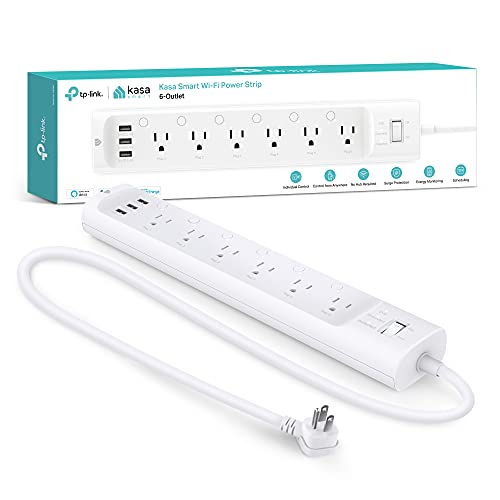
Best for comprehensive control in home offices and small businesses, the HS300 includes six independently controllable outlets plus three USB ports. It features ETL surge protection and energy monitoring so you can track usage by outlet through the Kasa app. This helps identify high-draw devices and reduce standby power.
Who this is for: users who want energy monitoring and granular control to optimize power usage. Why selected: strong visibility into consumption per outlet. Caution: larger footprint may require more under-desk space.
GHome 9-In-1 Extender
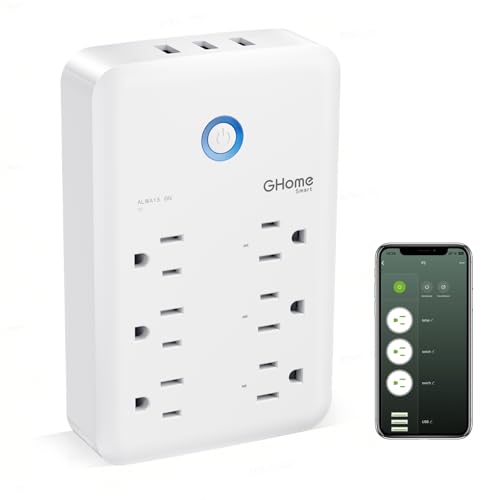
Best for tight spaces that still need multiple smart outlets, this extender packs three smart outlets, three smart USB ports, and three always-on outlets. It supports voice and remote control, plus scheduling, timers, and energy management. It is designed for 2.4 GHz WiFi networks and aims to fit behind furniture with a compact form.
Who this is for: compact setups requiring a higher outlet count without adding bulk. Why selected: combination of intelligence and USB charging in a slim footprint. Caution: 2.4 GHz WiFi only; no 5G support.
Tapo P316M: Matter Compatible 6-Outlet Strip

Best for future-ready homes, the Tapo P316M provides six individually controllable outlets and three USB ports with Matter compatibility, ensuring broader ecosystem interoperability. It supports Alexa, Google Assistant, Siri, and Bixby through various hubs, along with energy monitoring. The compact design helps conserve space on desks or shelves.
Who this is for: households integrating multiple smart platforms and seeking cross-platform compatibility. Why selected: Matter support adds flexibility for diverse smart home ecosystems. Caution: ensure your network uses 2.4 GHz for optimal performance.
Buying Guide: How to Choose a Smart WiFi Surge Protector
What should you consider when choosing a smart WiFi surge protector? Focus on outlet count, control granularity, and ecosystem compatibility to match your devices and routines.
Outlets and USB Ports: Do you need more smart outlets or USB charging?
If you regularly power many devices, pick a model with multiple independently controllable outlets and USB ports. More smart outlets means you can turn off or schedule individual devices without unplugging anything.
Energy Monitoring: Do you want to track power use?
Models with energy monitoring help identify energy hogs and reduce waste. This feature is valuable in home offices or media centers where many devices run simultaneously.
Voice Assistants and App Control: Which ecosystem is your priority?
Look for compatibility with Alexa, Google Assistant, or other assistants you use. An accompanying app with scheduling and groups can simplify routines and remote control.
WiFi Requirements: Is your network compatible?
Most products require 2.4 GHz WiFi. If your network uses only 5 GHz or has strict security settings, verify compatibility before purchase to avoid setup issues.
Surge Protection and Certification: How safe is your gear?
Choose ETL-certified surge protection to shield electronics from power surges. Certification ensures baseline safety and performance standards are met.
Frequently Asked Questions
- Do smart surge protectors require a hub? No. Most models work with built-in WiFi and a compatible app or voice assistant, avoiding an extra hub.
- Can I control all outlets individually? Yes, many models offer independent control for each smart outlet, plus grouped or scheduled control.
- Are USB ports always-on? Some models power USB ports continuously; others offer smart USB control. Check product features to match your charging needs.
- Is energy monitoring standard? It is common on higher-end units, but not universal. If monitoring matters, verify energy tracking capabilities in the spec.
- Will these work with 5G networks? Most require 2.4 GHz WiFi; 5G cellular networks are not relevant to the WiFi setup.
- Do these support Matter or broader smart home standards? Some models offer Matter compatibility, improving cross-brand interoperability.