Best Smart Digital Door Lock Systems for Modern Home Security
Smart digital door locks offer keyless entry, remote access, and activity tracking to enhance home security and convenience. This guide highlights five top options, covering Bluetooth, Wi‑Fi, biometric, and keypad models from trusted brands. Each product section includes a quick overview, core features, and practical installation notes to help you choose the right lock for your front door.
| Product | Brand | Unlock Methods | Connectivity | Installation |
|---|---|---|---|---|
| Philips Smart Lock with Handles | Philips | Fingerprint, PIN, Keys, App | Bluetooth | Standard door prep |
| Smart Door Handle Lock with Keypad | Yamiry | Fingerprint, Passcodes, App, Key Fob, Alexa | Bluetooth | Quick 10‑minute install |
| Philips Wi‑Fi Door Lock | Philips | Passcode, Fingerprint, App, Voice | Built‑in Wi‑Fi | Standard door prep |
| Sifely Biometric Smart Lock | Sifely | Fingerprint, Passcode, App, Key, Card, Fob | Bluetooth | Tool‑free installation |
| eufy Security Smart Lock C220 | eufy Security | Multi‑unlock: fingerprint, app, keypad, key | Built‑in Wi‑Fi | Easy DIY install |
Philips Smart Lock With Handles
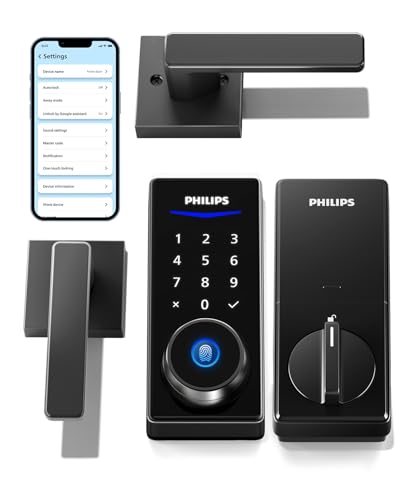
The Philips Smart Lock with Handles combines two lever handles with a built‑in smart deadbolt, enabling quick upgrades to an existing door setup. It supports multiple unlocking methods, including fingerprints, PIN codes, keys, and a companion smartphone app. A Bluetooth connection provides local access within about 8–10 meters, and a separate Wi‑Fi gateway (sold separately) enables remote control, permission sharing, and unlock history monitoring. Battery alerts help ensure ongoing operation, and auto‑lock features add daily convenience for front doors.
Key advantages include flexible access options that suit busy households, easy scale‑up from traditional locks, and the potential for remote management when paired with a gateway. Consider compatibility with your door’s hole pattern and whether you prefer Bluetooth for local use or Wi‑Fi for remote access. Regular battery maintenance is essential to keep performance optimal.
Installation notes
Designed to replace existing hardware with minimal tools. Verify door compatibility with lever handles and the lock body, and follow the included steps for a secure fit. Battery replacements should be planned around low‑battery alerts to avoid unexpected lockouts.
Related features: multiple unlock methods, smart Bluetooth access, and optional remote control when paired with a gateway.
Smart Door Handle Lock With Keypad: Yamiry

The Yamiry Smart Knob offers a 6‑in‑1 unlock approach, including fingerprint recognition, Bluetooth app control, personalized passcodes, key fobs, mechanical keys, and optional Alexa voice unlock when a Wi‑Fi gateway is added. It’s designed for quick DIY installation on most standard wooden doors and supports reversible handling for both left‑ and right‑handed doors. The keypad provides flexible access for family members and guests, with remote administration available via the app.
Strengths include robust multi‑access methods and easy retrofit on existing hardware. It’s ideal for users who want voice assistant integration and local app control without complex wiring. Consider whether you’ll need the Wi‑Fi gateway separately for remote features and how many users you plan to manage.
Installation notes
Installation is designed to take about 10 minutes with basic tools. The lock replaces the existing handle or deadbolt, without drilling in most cases. The reversible design supports doors with varying handedness, and the app provides detailed access management and event history.
Philips Wi‑Fi Door Lock

The Philips Wi‑Fi Door Lock delivers remote control via built‑in Wi‑Fi and supports fingerprint, passcode, app, key, and voice commands through Alexa or Google Assistant. It requires a 2.4 GHz network and keeps you connected even when away from home. The lock is designed for front doors and includes auto‑lock functionality for security. Note that batteries are not included, so plan for initial battery installation and ongoing replacement.
Highlights include hands‑free access through voice assistants, broad compatibility with home networks, and the convenience of no dedicated hub for remote operation. Evaluate your home network’s reliability and whether you want voice control integrated with smart home routines.
Installation notes
Self‑contained Wi‑Fi means straightforward setup without extra hubs. Ensure strong Wi‑Fi coverage near the door for stable remote operation, and place the unit within the recommended range for reliable connectivity.
Sifely Biometric Smart Lock With Handle

The Sifely Biometric Smart Lock combines a robust 6‑in‑1 access system with 1‑year battery life and easy screwdriver installation. It supports fingerprint, passcode, fob, card, app, and key access. The lock is ANSI/BHMA certified and IP65 weather‑resistant, making it suitable for varied climates and rental properties. It’s designed to fit different door orientations and provides remote management via the mobile app, plus battery backup for contingencies.
Key considerations include security certification, offline passcode sharing, and compatibility with rental setups where remote guest access is important. It is well suited for homeowners and property managers who value versatile access methods and reliable battery life.
Installation notes
Install in minutes with a screwdriver—no drilling required. The unit supports both left‑ and right‑handed doors, and battery replacement is straightforward with USB‑C backup if needed.
eufy Security Smart Lock C220

The eufy C220 is a feature‑rich smart lock with built‑in Wi‑Fi for app‑based remote control without a hub. It supports six unlocking methods, including fingerprint, app, keypad, and physical key, plus compatibility with voice assistants for convenient hands‑free access. The lock emphasizes battery longevity, with an approximate eight‑month life on typical usage, and includes an anti‑tampering design with real‑time notifications via the app.
Notable strengths include on‑the‑go access management and seamless integration with the broader eufy ecosystem if you already use eufy doorbells or cameras. Assess your need for remote access, notification frequency, and whether you want to tie this lock into broader home automation routines.
Installation notes
Typically simple DIY installation suitable for most standard front doors. The lock is designed to fit common door configurations with minimal tools, and it supports remote management through the eufy Security app for ongoing control and monitoring.
Buying Guide: Key Purchase Considerations
- Unlock methods and user management: Consider how many users you need to support and whether you want biometric, PIN, app control, or voice commands. Look for 6‑in‑1 or more options if you anticipate guests or renters frequently.
- Connectivity and ecosystem: Decide between Bluetooth for local access or Wi‑Fi for remote control. If you already use a smart home system (Alexa, Google Assistant, Apple HomeKit), verify compatibility and whether a gateway or hub is required.
- Installation and door compatibility: Check whether the lock fits your door thickness, hole size, and handedness (left vs. right). Some models offer tool‑free or quick DIY installation, while others may require minor modifications.
- Security standards and durability: Look for certifications (e.g., BHMA/ANSI) and IP ratings for weather resistance. Ensure the lock supports tamper alerts and has sturdy materials like reinforced metal and vandal‑resistant key components.
- Power and backup options: Consider battery life, alert notifications, and backup power (USB‑C or key access) in case batteries run low. Plan a maintenance schedule to prevent lockouts due to dead batteries.
- Remote access and privacy: If you’ll share codes or grant temporary access, evaluate how the app logs events and whether you can revoke permissions easily. Check how unlock history is stored and who can view it.
- Budget and maintenance: Cost varies with features like built‑in Wi‑Fi or gateway requirements. Factor in potential gateway purchases and ongoing battery replacements when budgeting.
Across these options, the best choice aligns with your door type, preferred access methods, and whether you value remote management or voice control as part of a broader smart‑home plan. All five models provide keyless convenience, but the optimal pick depends on your home network, security priorities, and installation preferences.