Best Smart Ceiling Fan Control and Dimmer Light Switches for Modern Homes
Answering your search for a reliable, voice-enabled ceiling fan control and dimmer light switch, these options fit common setups in American homes. They’re suited for single-pole installations, neutral-wire-equipped boxes, and 2.4 GHz Wi‑Fi environments. Ideal buyers include homeowners upgrading to smart lighting and airflow control, renters seeking easy retrofits, and tech enthusiasts who want voice or app control for comfort and energy savings.
Summary comparison of selected products:
| Product | Best For | Wi‑Fi | Key Strength | Limitations |
|---|---|---|---|---|
| KS240 Kasa Smart Ceiling Fan Control & Dimmer Switch | Apple HomeKit / multi‑assistant users | 2.4G | 4 fan speeds, dimmable light, HomeKit compatibility | Requires neutral wire |
| TREATLIFE 2‑Pack Smart Ceiling Fan Control and Dimmer | Budget-friendly multi‑pack installs | 2.4G | 4 fan speeds, smooth dimming, remote app control | Single‑pole; compatible wiring required |
| meross Smart Ceiling Fan Control & Dimmer (2 Pack) | Apple HomeKit ecosystem | 2.4G | 4 speeds, 1%–100% dimming, broad platform support | Neutral wire required; not for smart bulbs |
Kasa KS240 Smart Ceiling Fan Control & Dimmer

4 fan speeds allow precise airflow control, and adjustable brightness helps set the mood for any room. Compatible with Apple HomeKit, Alexa, and Google Assistant for voice control. Best for users who want HomeKit integration alongside other assistants.
Best for: Homes already using Apple HomeKit or seeking strong voice control integration. Why selected: Combines multi‑protocol compatibility with flexible lighting and fan speed control in a single device.
Caution: Requires a neutral wire; verify wiring in the switch box before installation.
TREATLIFE Smart Ceiling Fan Control and Dimmer
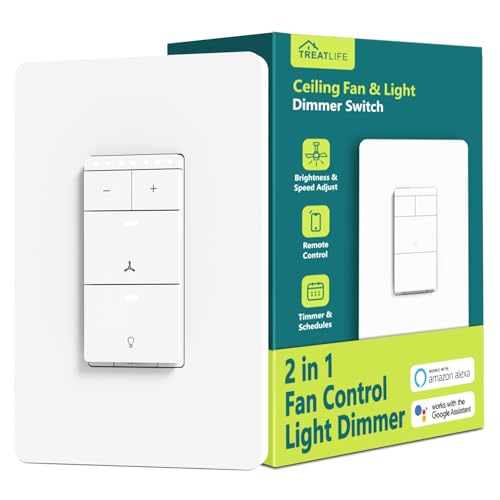
This 2.4Ghz single‑pole switch controls both fan speed and light brightness, requiring a neutral wire and separate fan/light wires. Best for tight installations where a single device must handle both functions without a hub. Limited to 2.4 GHz networks without additional hubs.
Best for: Installers prioritizing a compact, hubless setup with straightforward 2‑in‑1 control. Why selected: Complements a standard ceiling fan with dimmable lighting and four fan speeds without extra equipment.
Caution: Not compatible with fans that have built‑in remotes or non‑dimmable bulbs; confirm wiring supports separate load wires for fan and light.
GHome Smart Dimmer Switch With 4‑Speed Ceiling Fan Control
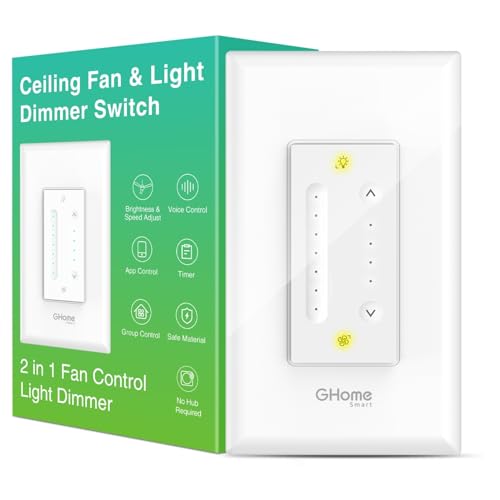
Adds 4-speed fan control and a stepless dimming light feature. 2.4Ghz Wi‑Fi only and neutral wire required. Not compatible with smart bulbs. Suitable for users who want a straightforward, no‑hassle upgrade with strong dimming performance.
Best for: Homes needing a simple, reliable dimming solution with four distinct fan speeds. Why selected: Clear user interface and direct control without complex features.
Caution: Only supports up to 120W for fans and 400W for lights; check your fixtures’ power requirements before purchasing.
meross Smart Ceiling Fan Control & Dimmer (2 Pack)

Supports 4 fan speeds and 1%–100% dimming for lights, with compatibility across Apple HomeKit, Alexa, Google Assistant, and SmartThings. Best for multi‑room setups or households wanting multiple synchronized controls. Neutral wire needed; 2.4G Wi‑Fi only.
Best for: Users in Apple or broader smart‑home ecosystems seeking cohesive control. Why selected: Accessibility across major platforms and scalable for homes with multiple rooms.
Caution: Not suitable for fans with built‑in remotes or DC motor fans; verify separate fan and light wiring before installation.
Buying Guide: Key Considerations For Smart Fan And Light Switches
- Wiring requirements: Most 2‑in‑1 switches require a neutral wire and separate load wires for fan and light. Check your wall box before buying.
- Compatibility: Verify if your fan uses a DC motor, remote, or built‑in smart controls. Some switches are not compatible with smart bulbs or 3‑way circuits.
- Network compatibility: All listed options operate on 2.4 GHz Wi‑Fi. They do not support 5 GHz networks unless stated otherwise.
- Voice ecosystem: Choose a switch that integrates with your preferred ecosystem (Apple HomeKit, Alexa, Google Home, SmartThings) for seamless control.
- Power limits: Confirm fan wattage and light wattage limits per device to avoid overloads. Some switches cap at 120W for fans or 400W for lights.
- Installation type: Most products are single‑pole only. If you need 3‑way functionality, prioritize models designed for multi‑location setups.
- Dimming quality: Look for smooth, flicker‑free dimming ranges (often 10%–100%) and non‑intrusive on/off transitions to reduce eye strain.
Frequently Asked Questions
- Do these switches require a hub? Most listed models work directly with your Wi‑Fi network and voice assistants; hubs are not required for basic control.
- Will these work with any ceiling fan? They’re compatible with many standard ceiling fans that have separate fan and light wiring and neutral wiring; always verify compatibility with your specific fan model.
- Can I install these myself? Installation generally requires wall‑box wiring knowledge, including neutral wires. If you’re unsure, hire a licensed electrician.
- Are they compatible with smart bulbs? Most are not compatible with smart bulbs; they control existing dimmable bulbs alongside the fan speed.
- What if my home uses 5 GHz Wi‑Fi? The listed switches operate on 2.4 GHz networks. A dual‑band router can help devices connect to the 2.4 GHz band if needed.
- Can these switches be used in multi‑location setups? Some models are designed for single‑pole use only; others support three‑way or multi‑location configurations—check product notes before purchase.