Best Server Rack Power Strips for Clean, Reliable Power Distribution
Answering the question: which server rack power strips provide solid surge protection, reliable outlets, and easy rack integration? The top picks below are geared toward IT pros, data centers, and organized home labs. Each option is tailored for 19″ racks, 1U or 1.5U form factors, and offers solid control with individual switches or surge protection. This guide helps you choose by outlet count, cord length, and protection features, so you can match your equipment and rack setup.
| Product | Best For | Key Feature |
|---|---|---|
| StarTech.com RKPW081915 | Medium racks, network gear | 8 outlets, 1U, 6 ft cord |
| CENTROPOWER 1U PDU | 10 outlets, 6 ft cord, surge | 10 outlets, 1800J, 6 ft |
| Tripp Lite 12-Outlet PDU | Large setups, front/rear access | 12 outlets, 15 ft cord |
| UltraPoE 10-Outlet 1U PDU | Industrial racks, light-to-moderate loads | 10 outlets, 1800J, 6 ft |
| Tecmojo 1U 19-Outlet PDU | Compact, many devices | 16 rear + 3 front outlets |
StarTech.com 8-Outlet 1U PDU
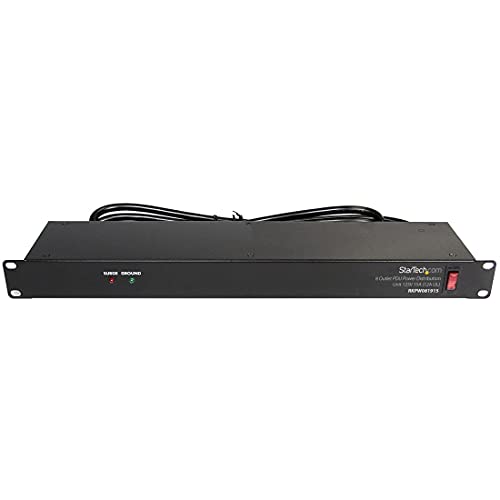
This 1U horizontal rack mount PDU adds eight NEMA 5-15 outlets (120V/15A) with a 6 ft cord. It’s built for compatibility with all 19″ racks that are at least 4 inches deep and includes LED indicators for ground and surge protection. The integrated power cord simplifies installation in mobile or stacked racks. Best for: small to mid-size network racks needing easy expansion without multiple power strips.
Why selected: The slim 1U horizontal design fits tight rack spaces while maintaining straightforward power control. The rugged steel chassis supports durable use in data closets and server rooms. Caution: ensure the 6 ft cord reaches your power source without forcing cable tension.
Jgstkcity 8-Outlet PDU with Individual Switches

This 1.5U PDU provides eight outlets with independent LED switches and a heavy-duty 6 ft extension cord. It supports 15A at 125V and offers robust surge protection for data centers, server rooms, or home labs. Best for: environments requiring precise on/off control per outlet to manage diverse devices. Caution: heavier chassis may necessitate standard mounting rails and additional support in lighter racks.
CENTROPOWER 1U 10-Outlet PDU

This 1U rackmount PDU features 10 outlets (125V) and a 6 ft cord. It aligns with 19″ racks 4 inches or deeper and includes a built-in overload and reset switch. Best for: setups needing higher outlet density without purchasing a separate power strip. Caution: data on the casing notes heavy-duty construction; verify rack clearance for rear cabling in crowded spaces.
UltraPoE 10-Outlet 1U PDU

The UltraPoE 1U PDU provides ten outlets with individual switches, a 6 ft cord, and 1800 joules of overload protection. It supports 100V-240V, 15A, and a 50-60Hz range, making it suitable for mixed-venue deployments. Best for: networks or labs needing granular power control and solid surge protection. Caution: check compatibility with non-US voltages if used outside North America.
Tecmojo 1U 19-Outlet PDU

The Tecmojo 1U PDU uses a 19-inch rack form factor and features 16 rear-facing outlets plus three front-facing outlets for flexible cabling. A built-in circuit breaker adds protection against overloads, and the unit includes four USB ports for secondary power needs. Best for: compact racks with many devices that require expansion without crowding front panels. Caution: USB ports should be used for low-draw peripherals to avoid overloading the primary outlets.
Buying Guide
What matters most when selecting a server rack power strip? Consider these practical questions:
- Outlets and layout: Do you need 8, 10, or 12 outlets? Front, rear, or both-facing outlets affect cable management.
- Power rating and protection: Is surge protection and a circuit breaker required for sensitive equipment?
- Rack compatibility: Will the unit fit your 19″ rack depth and 1U or 1.5U height?
- Cord length: Does the included cord cover your distance to power sources without tension?
- Individual outlet controls: Are per-outlet switches helpful for turning off idle gear without affecting others?
- Construction and durability: Is a steel or aluminum chassis preferred for data centers or labs?
- USB power: Do you need USB ports for charging or powering accessories?
Practical tips for setup
- Simplify cabling: group cables by function and label outlets when possible.
- Balance loads: avoid overloading a single outlet group to minimize tripping risk.
- Plan accessibility: place frequently used outlets in easily reachable positions, preferably front-facing.
- Inspect protection: verify surge protection and reset mechanisms are functioning after installation.
FAQ
- What is the difference between 1U and 1.5U PDUs?
Answer: 1U PDUs are 1 rack unit high; 1.5U PDUs occupy more vertical space and often offer more outlets or features in the same footprint. - Should I choose a PDU with individual outlet switches?
Answer: Yes if you need precise control to power down specific devices without affecting others, which helps save energy and reduce noise. - Is surge protection enough for data center equipment?
Answer: Surge protection plus a built-in circuit breaker provides basic defense. For critical gear, consider PDUs with higher Joule ratings and additional protections. - Can a PDU be used in non-traditional spaces?
Answer: Many PDUs are designed for cabinets, offices, garages, or workshops, but confirm mounting compatibility and environment suitability before use. - How important is cord length?
Answer: Cord length matters for clean cabling and accessibility. Select a length that minimizes excess slack while avoiding tension on outlets. - What should I do if a PDU overheats?
Answer: Ensure adequate ventilation, check for overloaded outlets, and confirm the unit’s rating matches the connected equipment.