Best Server Cabinet Cooling Fans for Quiet, Efficient Cooling
When selecting cooling fans for 19” server cabinets, look for quiet operation, reliable airflow, and easy integration with existing racks. This guide features five top options suited for home theaters, AV cabinets, data closets, and DIY racks. The buyers who will benefit most are those prioritizing low noise, adjustable speed, and straightforward mounting. Below is a quick summary table of the chosen products to help you compare at a glance.
| Product | Best For | Key Benefit |
|---|---|---|
| AC Infinity Rack ROOF Fan KIT | Quiet, rack-mounted cooling | PWM speed control for silent operation |
| AC Infinity AIRPLATE S7 | Cabinets needing ultra-quiet cooling | UL-certified, multi-speed control |
| Tupavco TP1511 2pc Kit | Budget-friendly, reliable airflow | 2-pack with solid airflow and silent design |
| SXDOOL 4 in 1 Cooling Fan | Versatile, adjustable speed | 0-3000 RPM with metal mesh guard |
| Easy Cloud 120mm Fan with AC Plug | Versatile power options | Multi-voltage controller for flexible use |
AC Infinity Rack ROOF Fan KIT

The Rack ROOF Fan KIT is designed for standard 19” racks and can be mounted on the roof or used to replace existing fans. It features a PWM speed controller that adjusts fan speed without introducing extra noise, making it suitable for environments where quiet operation matters. This kit can be linked with CLOUDPLATE series rack fans to share the same programming, simplifying multi-fan deployments for larger cabinets.
Best for: quiet, scalable cooling in AV and network racks where centralized control is desired. Why selected: its PWM control reduces noise while maintaining airflow, and its compatibility with other AC Infinity components supports expandable setups. Caution: ensure your rack space supports roof mounting and that the wiring conforms to your cabinet’s electrical layout.
AC Infinity AIRPLATE S7
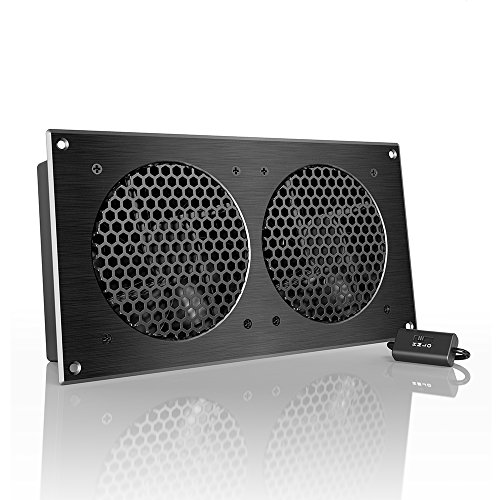
The AIRPLATE S7 is an ultra-quiet fan system designed for cooling cabinets with minimal noise. It includes a multi-speed controller to set the fan’s speed for optimal balance between noise and airflow. The CNC-machined aluminum frame with a modern brushed black finish adds a premium look while performing well under continuous load.
Best for: users needing near-silent operation in media centers or quiet server enclosures. Why selected: its UL certification and adjustable speeds support precise environmental control. Caution: may be overkill in small cabinets where lower airflow suffices.
Tupavco Network Cabinet Fan (2pc Kit)
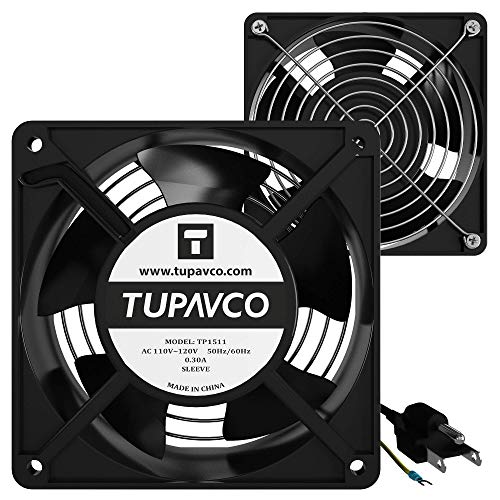
This 2-pack from Tupavco includes 120mm axial fans designed to keep air flowing in standard 19” network cabinets. At 110V AC and 95–110 CFM with 2600–2800 rpm, these fans offer solid cooling with a relatively low noise profile (around 45 dBA). They come with a 6.2 ft AC power cord and a 9-inch ground wire, plus mounting hardware for straightforward install.
Best for: budget-conscious setups requiring reliable dual-fan cooling. Why selected: two fans provide redundancy and more even airflow across host equipment. Caution: check cabinet depth and clearance to ensure the fans fit and cables reach power sources.
SXDOOL 4 in 1 Variable Speed Cooling Fan

The SXDOOL 4 in 1 cooling solution offers a wide speed range (0–3000 RPM) and a metal mesh guard to protect blades while ensuring airflow. It’s a versatile option for server rooms, PC rigs, AV racks, and mining setups where multiple devices require cooling in tight spaces. The metal guard enhances safety and durability in demanding environments.
Best for: users who need adjustable cooling across diverse equipment. Why selected: the wide speed control enables precise temperature management. Caution: ensure the mounting method accommodates the protective mesh and keeps airflow unobstructed.
Easy Cloud Computer Fan with AC Plug

The Easy Cloud 120mm fan provides speed control via a 3V–12V multi-speed controller and can be powered directly from an AC outlet, making it highly adaptable for a range of devices—from PCs and gaming consoles to AV cabinets and DVRs. It supports multiple voltages (120V, 110V, 220V) for flexible installation in different regions.
Best for: buyers needing versatile power options and adjustable cooling in mixed-use cabinets. Why selected: simple plug-and-play with independent speed control helps tailor performance to noise constraints. Caution: the included controller is external; plan cable management to minimize clutter near heat-sensitive equipment.
Buying Guide: Key Considerations for Server Cabinet Cooling Fans
- Noise level and airflow: Prioritize fans with PWM or multi-speed controls to balance noise and cooling.
- Power and wiring: Check voltage compatibility with your fixtures and whether an AC plug or DC power is needed.
- Mounting compatibility: Ensure the fan size (most common 120mm) fits your cabinet’s rack space and mounting points.
- Control integration: If you manage multiple devices, consider fans that can share programming or be controlled via a central controller.
- Durability and protection: Metal guards and UL or UL-Certification can indicate long-term reliability in demanding environments.
- Safety and installation: Plan for safe cable routing, grounding, and heat dissipation without obstructing airflow paths.
What configuration should I choose for my setup?
For small home theaters or AV cabinets, opt for ultra-quiet solutions like the AIRPLATE S7 or Rack ROOF Kit with PWM control to minimize audible fan noise. For larger or multi-device racks, a two-fan kit (like the Tupavco pair) or a programmable dual-fan system (such as AIRPLATE S7 or AC Infinity MULTIFAN S7) provides better airflow distribution and redundancy.
Which installation considerations matter most?
Ensure adequate clearance for intake and exhaust, confirm that the fans won’t interfere with cables or rack doors, and verify that power sources are safely wired and grounded. If your cabinet requires thermostat-linked operation, choose fans with built-in or compatible temperature sensors.
Frequently Asked Questions
- Do I need UL certification for cabinet fans? UL certification helps indicate compliance with safety standards and predictable performance, especially in professional or commercial environments.
- Is it better to use a single high-CFM fan or multiple smaller fans? Multiple fans can provide more uniform airflow and redundancy, reducing hotspot risk compared with a single unit.
- Can I mix different brands of cabinet fans? Mixing is possible but may complicate control schemes. Prefer fans that support shared programming or central controllers if you plan to synchronize operation.
- How do I minimize noise from cabinet fans? Use PWM or multi-speed controllers, and place fans to avoid direct contact with racks or enclosure panels that can amplify vibration.
- Are 120mm fans always the best choice? 120mm is common and versatile, but choose based on required airflow (CFM) and space constraints in your cabinet.
- What maintenance is needed for cabinet fans? Periodic cleaning of dust filters and guards helps sustain airflow and extend fan life.