Best Secure Server Rack Enclosures for Small to Medium IT Setups
Yes, secure wall-mount and floor-standing server rack enclosures are essential for protecting IT gear from tampering and dust while keeping cables organized. This guide highlights five reliable options ideal for small to mid-sized networks, studios, classrooms, and retail spaces. Each model prioritizes security, airflow, and easy access, with different depths and capacities to fit 19″ equipment. Read on to find the best fit for your equipment, space, and budget, plus clear buying guidance and common questions answered.
| Product | Depth | Mount Type | Best For |
|---|---|---|---|
| Tecmojo 6U Wall Mount | 17.72″ / 450mm | Wall Mount | Compact office, small network closets |
| Tecmojo 12U Wall Mount | 17.72″ / 450mm | Wall Mount | Small to mid-size IT gear, A/V setups |
| NavePoint 12U Wall Mount | 17.72″ / 450mm | Wall Mount | Security-conscious small setups with glass door |
| VEVOR 6U Wall Mount | 15.5″ / 394mm | Wall Mount | Space-constrained locations, quick access |
| VEVOR 22U Wall Mount | 23.6″ / 600mm | Wall Mount | Larger networks, multi-device racks |
Tecmojo 6U Wall Mount Server Cabinet

The Tecmojo 6U wall-mount cabinet is a compact, lockable enclosure designed for 19″ IT gear and A/V devices. It features a glass door and lockable side panels for secure access control, with a reversible front door for flexible installation. Fully adjustable mounting rails and numbered U positions simplify equipment alignment. Top and bottom punch-out panels support clean cable routing. Best for small data closets or offices needing a space-saving, secure rack.
- Best for: Small offices or network closets with limited floor space.
- Why chosen: Locks and adaptable rails improve security and setup speed in tight areas.
- Caution: Maximum mounting depth is 14.2″ (fits compact gear; larger servers may require deeper enclosures).
Tecmojo 12U Wall Mount Server Cabinet

The Tecmojo 12U model expands capacity while retaining wall-mount convenience. It shares a lockable front glass door and side panels, with adjustable rails and U-position numbering for orderly deployments. It supports a 14.2″ maximum mounting depth, making it suitable for mid-range servers, switches, and KVM gear in compact rooms. Best for: growing small networks or classrooms needing more rack space without floor cabinets.
- Best for: Offices upgrading from 6U to 12U without increasing footprint.
- Why chosen: More rack space without sacrificing security or cable management.
- Caution: Depth limit may constrain deeper equipment or cable organizers behind air flows.
NavePoint 12U Server Rack Enclosure
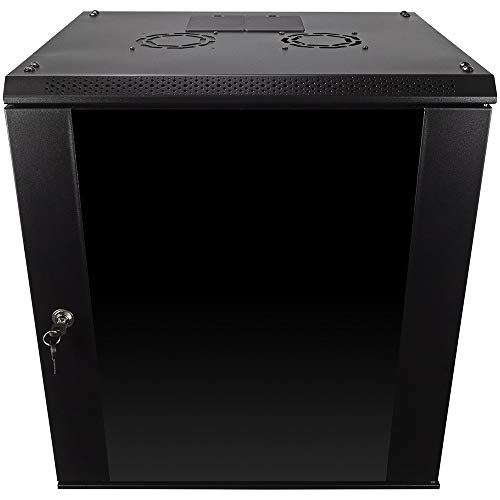
The NavePoint 12U enclosure emphasizes durability with a cold-rolled steel build and a tempered glass lockable front door. Its compact 17.72″ L x 21.65″ W x 24.42″ H footprint supports up to 110 lbs and offers removable side panels for flexible layouts. Best for: environments needing secure access with a sturdy, serviceable cabinet and easy future reconfiguration.
- Better for: Security-focused installs that require removable panels for quick access.
- Why chosen: Strong build and flexible panel options support varied IT configurations.
- Caution: Weight rating may limit very heavy equipment combinations on the same rack.
VEVOR 6U Wall Mount Network Cabinet

The VEVOR 6U cabinet is designed for space-constrained sites, offering a 15.5″ depth with locking glass doors and side panels to deter tampering. It emphasizes airflow through vents and a sturdy welded frame supported by a 100 lbs wall-mounted capacity. Best for: Retail counters, classrooms, and small offices needing quick access to essential IT gear.
- Choose this if: You need a slim footprint with reliable security and ventilation.
- Why chosen: Lightweight yet robust enough for common 19″ devices in tight spaces.
- Caution: Deeper equipment may require a larger enclosure or floor-standing option.
VEVOR 22U Server Rack Cabinet

The VEVOR 22U cabinet offers substantial rack space with a 23.6″ depth and locking tempered glass door. It includes four casters and side panels, supporting up to 300 lbs. This model is ideal for larger IT setups or A/V rooms needing a single, organized enclosure for multiple devices. Best for: medium to larger installations where floor space permits and cable management matters.
- Better for: Multi-device racks requiring lockable access and mobility with casters.
- Why chosen: Higher capacity and improved airflow enable more devices in a single enclosure.
- Caution: Heavier weight may require reinforced mounting or floor support in some locations.
Buying Guide: How to Choose the Right Secure Server Rack Enclosure
What size and depth do I need?
Measure available space and the largest device depth. Choose a cabinet with at least 1–2 inches of clearance behind front panels for cabling and airflow. Wall-mount units typically suit 6U–12U with 15–18″ depths, while larger networks may justify 22U or more with deeper footprints.
How important is security?
Lockable doors and side panels deter tampering. Glass doors allow quick visual checks, but solid doors may offer better privacy. Consider whether you need front-door orientation flexibility to fit your room layout.
What about airflow and heat management?
Ventilation, top/bottom punch-outs, and rear access panels help maintain safe operating temperatures. Cabinets with ventilation holes and top/bottom fans are better for equipment that runs hot or is densely packed.
Is wall mounting sufficient, or do I need mobility?
Wall-mount cabinets save floor space and are ideal for closets, offices, or classrooms. If you frequently rearrange gear, consider cabinets with casters or a larger, floor-standing option for easier relocation and heavier loads.
How flexible should the enclosure be?
Removable side panels, adjustable rails, and tool-less front-door orientation simplify equipment changes. Look for U-numbering, square-hole rails, and included mounting hardware for faster setups.
What are typical weight capacities?
Capacity ranges from about 100 lbs for compact wall-mount units to 300 lbs or more for larger 19″ enclosures. Match the rating to your total planned equipment weight to avoid overstressing the cabinet.
FAQ
Q: Can I mount 19″ equipment in all listed enclosures?
A: Yes, all models are designed for 19″ IT and A/V gear with adjustable mounting rails.
Q: Do these cabinets come with cooling accessories?
A: Some include cooling fans or mention air-flow-friendly designs; check each model’s features to verify included components.
Q: Are the doors lockable on all models?
A: Most listed models have lockable doors and side panels for security; verify lock type on the product page.
Q: Is wall mounting suitable for heavier racks?
A: Wall-mount units are best for lighter to moderate loads. For heavier setups, a floor-standing cabinet or reinforced wall mount is recommended.
Q: How do I choose between glass and solid doors?
A: Glass doors enable quick visual checks without opening the cabinet, while solid doors offer enhanced privacy and may provide slightly better security.