Best Rack Mount Cabinet Enclosures for Safe, Organized IT Setups
Answering buyers’ needs for secure, space-saving network racks, this guide highlights five top rack mount cabinet enclosures designed for 19″ IT equipment and A/V devices. They suit small offices, classrooms, retail environments, and server closets where cabinet security, cable management, and efficient airflow matter. The selections emphasize wall-mount options for space constraints, adjustable rails for flexible gear, and lockable doors for security. Below, compare five strong choices, with clear indications of who each is best for and why.
Product Comparison At A Glance
| Product | Best For | Depth / Space | Key Benefit |
|---|---|---|---|
| Tecmojo 6U Wall Mount | Small deployments with limited floor space | 17.72″ D, 14.2″ max mounting depth | Lockable glass door, adjustable rails |
| VEVOR 22U Server Rack Cabinet | Retail, classroom, offices needing more rack space | 23.6″ D | Strong airflow, robust, 300 lbs capacity |
| NavePoint 12U Wall Mount Cabinet | Mid-sized IT/A/V setups with easy access | 23.63″ L x 23.63″ W x 25.25″ H, 600mm depth | Removable side panels, locking glass door |
| Tecmojo 12U Wall Mount | Mid-sized wall-mounted needs with orientation options | 17.72″ D, 14.2″ max mounting depth | Lockable door, configurable front swing |
| RackPath 12U Wall Mount | Compact wall-mount with easy cable management | 24.53″ H, 21.65″ L, 14.6″ usable depth front-to-back | Perforated door for airflow, removable panels |
Tecmojo 6U Wall Mount Server Cabinet

The Tecmojo 6U model is a compact wall-mount enclosure designed for small IT rooms or tight spaces. It features a lockable glass front door and lockable side panels to secure equipment, with optional door swing orientation for user preference. The cabinet offers fully adjustable mounting rails and numbered U positions for straightforward installation, plus top and bottom punch-out panels for cable access. Best for small offices or classrooms needing occasional rack space without floor-standing cabinets.
Who it’s best for: small departments or home labs where floor space is limited and security is essential. Why selected: it combines security with straightforward setup and flexible cabling options. Caution: the maximum mounting depth is limited, so taller equipment or deeply configured racks may require a larger enclosure.
VEVOR 22U Server Rack Cabinet

This cabinet maximizes space with a deeper 23.6-inch depth and a robust 300-pound capacity, making it suitable for retail floors, classrooms, or offices needing extra rack space. It emphasizes heat management with ventilation vents and cooling holes to promote airflow and prevent overheating. The welded steel frame provides durability for longer deployments. Best for: environments requiring more U-space and reliable airflow. Caution: deeper cabinets may require more wall clearance and may not fit in ultra-tight niches.
NavePoint 12U Wall Mount Cabinet

NavePoint’s 12U cabinet emphasizes user-friendly customization with removable, locking side panels and adjustable rails. The unit supports up to 130 pounds and offers a compact footprint with a 23.63″ depth and 25.25″ height, making it suitable for modular IT rooms and small data closets. Best for: installers needing a balance of security and adaptability. Caution: flat-pack assembly may require careful installation planning to ensure proper alignment.
Tecmojo 12U Wall Mount Server Cabinet

This 12U Tecmojo wall-mount cabinet provides a larger rack space with a 14.2″ maximum mounting depth and a lockable door with sides for security. It mirrors the 6U model’s easy rail adjustment and cable access via punch-out panels. Best for: mid-sized stacks in space-constrained rooms. Caution: heavier gear necessitates confirming total load within listed limits to avoid overloading.
Tecmojo 9U Wall Mount Cabinet

The Tecmojo 9U option offers a balance of space and compact footprint with a 14.2″ maximum mounting depth. It includes a lockable glass door and adjustable rails for versatile equipment installation. Best for: mid-sized IT racks in limited spaces. Caution: ensure door swing orientation matches room layout to avoid clearance issues.
NavePoint 6U Wall Mount Cabinet
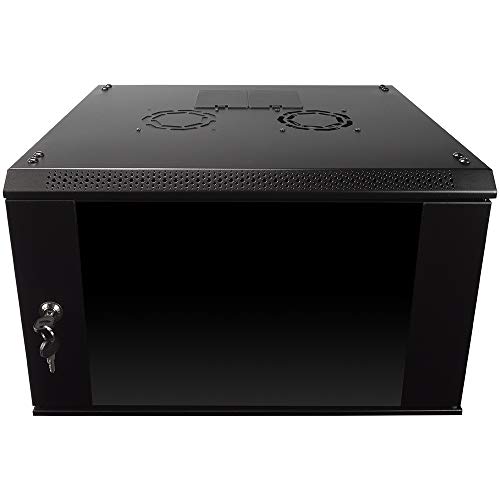
The NavePoint 6U cabinet is designed for compact spaces with a 6U capacity, a tempered glass front door, and locking features. It supports up to 110 pounds and includes removable side panels for flexible cable management. Best for: small networking closets or home labs needing secure, compact framing. Caution: limited U-space may require stacking or alternative enclosures for larger gear or future expansion.
VEVOR 12U Wall Mount Cabinet

The VEVOR 12U wall mount combines space-saving design with heat-dissipation features. It supports up to 100 pounds of equipment on a 15.5″ depth, with locking glass doors and side panels for security. Best for: spaces needing secure, mid-sized wall-mounted racks in offices or classrooms. Caution: ensure mounting hardware compatibility with wall structure to avoid mounting failures.
Buying Guide: How To Choose The Right Rack Mount Cabinet Enclosure
- Space and layout: Choose depth and height to fit your room and ensure cable clearance for door swing and air flow.
- Security: Lockable doors and side panels protect equipment from unauthorized access; consider tempered glass for visibility with protection.
- Load capacity: Verify total weight of equipment matches cabinet’s load rating; oversizing helps future-proof installations.
- Ventilation and airflow: Perforated doors, vents, and strategic fan placement reduce heat buildup in dense racks.
- Modularity and accessibility: Removable side panels, adjustable rails, and punch-out cable access panels simplify installation and reconfiguration.
- Installation orientation: Wall-mount vs. floor-standing; door swing orientation and clearance can impact room usability.
- Build quality: Welded frames and powder-coated finishes improve durability in busy environments.
- Compatibility: Ensure 19″ rack compatibility and depth allowances align with your equipment depth and mounting rails.
Practical Tips For Buyers
- Measure existing gear depth, width, and clearance to select a cabinet with comfortable mounting space.
- Plan cable management ahead with punched panels and top/bottom cutouts to minimize clutter and improve airflow.
- Consider future growth; choosing a slightly larger enclosure accommodates additional servers or switches later.
- For high-security spaces, prioritize models with lockable doors and robust frame construction.
Frequently Asked Questions
- What is a rack mount cabinet enclosure?
A cabinet designed to hold 19″ IT equipment securely with rails, doors, and panels for organization and airflow.
- Should I choose wall-mount or floor-standing?
Wall-mount saves floor space and suits small rooms; floor-standing offers more depth and capacity for larger deployments.
- What depth should I pick?
Match depth to your equipment depth plus extra clearance for cables and future expansion.
- How important is ventilation?
Critical in preventing overheating; choose cabinets with perforated doors and ventilation holes.
- Do I need removable side panels?
Removable sides simplify access for wiring and upgrades during installations.
- Can I mix brands in a single rack?
Yes, as long as rails are compatible with standard 19″ equipment and depth constraints are respected.