Best Pop Up Outlets With USB for Home and Office Setups
Pop up countertop outlets with USB ports blend power access with clean, clutter-free surfaces. This guide highlights five top options, explaining how each model handles charging needs, space saving, and installation. Whether you’re outfitting a kitchen island, a conference table, or a home office desk, these pop up outlets offer built-in charging, wattage options, and safety features to keep cords tucked away when not in use.
| Product | Brand | Key Feature |
|---|---|---|
| ANNQUAN 3.15″ Pop Up Countertop Outlet with 15W Wireless Charger | ANNQUAN | 4 outlets, 4 USB ports, wireless charging |
| 2.5 Inch Hole Pop up Outlet for Countertop (4 Outlets, 20W USB C) | Jgstkcity | 2 USB-C, 2 USB-A, 4 AC outlets |
| Pop Up Countertop Outlet with 20W USB C, 15W Wireless | XBA | PD 20W USB-C, wireless charging, 5-in-1 |
| Jgstkcity Pop Up Power Outlet for Countertops & Desks | Jgstkcity | 2.5″ hole, 4 USB, 4 outlets |
| ANNQUAN Motorized Pop Up Countertop Receptacle | ANNQUAN | Motorized lifting, wireless charging |
The following sections review each option, including installation notes, charging capabilities, and what makes it suitable for busy workspaces or kitchens.
ANNQUAN 3.15″ Pop Up Countertop Outlet With Wireless Charger

This model features a fully automatic retractable design with a 15W wireless charger on top and multiple outlets for flexible charging. It offers 1 wireless charger, 4 AC outlets, and ports for USB-C and USB-A devices, combining wired and wireless charging in a single embedded unit. Install by cutting a 3.15-inch hole, removing the ring, and sliding the body into place. The unit includes a caution to activate the mechanism by popping it up and down several times to ensure reliable operation.
2.5 Inch Hole Pop Up Outlet For Countertop

Designed for a 2.5-inch hole, this Jgstkcity unit offers a pop-up mechanism with dual-sided access and four outlets alongside two USB-C ports and two USB-A ports. It is tamper-resistant to meet codes and intended for kitchen islands, office desks, or conference spaces. Installation involves a simple insert-and-tighten process, with specific emphasis on fit within granite or quartz surfaces for a clean, recessed appearance.
Pop Up Countertop Outlet With 20W USB-C And Wireless

This unit highlights a high-speed USB-C PD port (up to 20W) plus a 15W wireless charger on the top. It provides 2 AC outlets and 2 USB-A ports, enabling simultaneous charging for multiple devices. The design supports use with a recessed countertop power strip arrangement, and the wireless charging function remains accessible even when the pop-up is retracted, reducing cable clutter on your workspace.
Jgstkcity Pop Up Power Outlet for Countertops & Desks

This Jgstkcity model uses a 2.5-inch hole and offers a balanced 4 outlets alongside 2 USB-C ports and 2 USB-A ports. It emphasizes an easy top-press pop-up action, with a built-in spring-loaded mechanism. The unit is tamper-resistant to meet safety standards and designed to hide away when not in use, making it suitable for home offices, kitchens, and conference rooms where cable management matters.
ANNQUAN Motorized Pop Up Countertop Receptacle
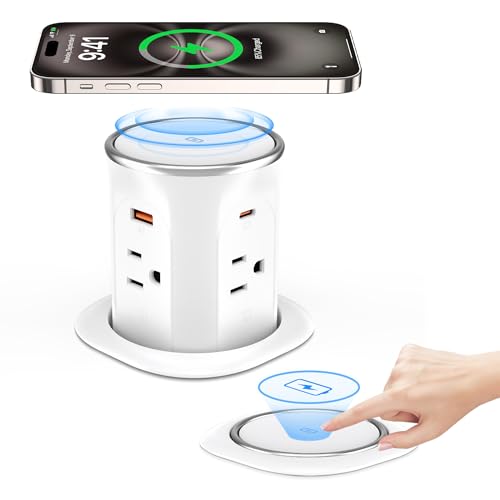
The motorized variant uses intelligent electronic technology with a finger touch lifting mechanism. Users can lift or lower the unit with light taps, and the top panel includes a display for the charging status. It provides a 15W wireless charger and 4 outlets plus USB ports, enabling a modern, space-saving setup for home offices or kitchens. It also supports multiple lifting modes, including a flat hidden mode for a clean surface when not in operation.
Buying Guide: Key Purchase Considerations
When selecting a pop up outlet with USB, consider the following factors to match your space and charging needs:
- Power and charging options: Look for PD USB-C ports with at least 20W for fast device charging, and a wireless charger with at least 10-15W. The more USB ports you have (USB-C and USB-A), the more devices you can support simultaneously.
- Outlets and amperage: Check the number of AC outlets and the total amperage rating. A 15A or 20A design is common; ensure it fits your electrical circuit and device load requirements.
- Wireless charging compatibility: Confirm the wireless pad supports standard Qi charging and verify any center-contact requirements for reliable charging when the unit is retracted.
- Installation and hole size: Holes ranging from 2.5 to 3.15 inches are common. Ensure your countertop material (granite, quartz, wood) can accommodate a flush or recessed installation.
- Safety features: Tamper-resistant protection (TR), ETL listing, surge protection, and proper ground connections reduce risk in busy areas such as kitchens and conference rooms.
- Motorized vs. manual pop-up: Motorized variants offer hands-free operation and more precise control, but may be more complex and pricier than standard pop-up mechanisms.
- Surface aesthetics and color: Choose a unit that blends with your countertop color and edge profile to maintain a cohesive look in a modern workspace.
- Maintenance and reliability: Look for units with easy access for cleaning and clear installation instructions. Springs, rings, and center contact alignment impact longevity.
- Security and safety usage: For spaces used by children or in high-traffic areas, opt for tamper-resistant designs and ensure cords are routed to avoid tripping hazards.
All five reviewed products offer a mix of charging versatility, space-saving design, and ease of installation. Depending on whether you prioritize motorized sophistication, USB-C PD performance, or a purely manual pop-up, there are options to fit different countertops and room layouts without clutter.