Best Wall-Mount TV Cable Management: Behind-the-Wall TV Cord Solutions
Answering the question you asked: how to hide a plug behind the TV on the wall effectively? This guide compares popular in-wall and behind-the-TV cable management options to help you choose the right kit. It targets buyers who want a clean, professional-looking setup, from renters needing temporary solutions to homeowners planning a permanent install. Below are five top picks, with concise reasons for each, a quick-buying table, and practical buying guidance.
| Product | Best For | Key Benefit |
|---|---|---|
| BGHEOUYV 4 Pack TV Cord Hider | Permanent wall concealment | Includes four pass-throughs and a hole saw for quick installation |
| TROND Flat Plug Power Strip | Space-saving outlets behind furniture | Ultra-thin flat plug; USB charging; wall-mount capable |
| Naerza In-Wall Cable Management Kit | All-in-one wall solution | Recessed box kit designed for TVs and entertainment systems |
| SANUS On-Wall Low Profile Surge Protector | Outlets with surge protection | Low profile; three-line protection; six outlets |
| NUTICT 3FT Flat Extension Cord | Behind furniture or tight spaces | Ultra-thin outlet cover; 3 outlets; 1625W limit |
BGHEOUYV 4 Pack TV Cord Hider for Wall Mounted TV
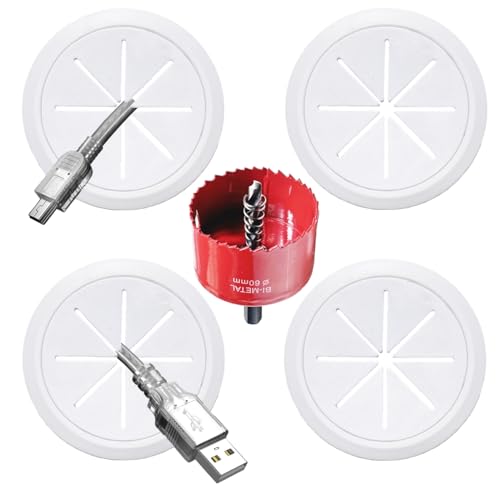
The BGHEOUYV kit provides in-wall cable management designed for wall-mounted TVs. It includes four pass-throughs and a hole saw drill attachment for a clean, concealed wiring path. Best for buyers seeking a simple, all-in-one solution to hide power cords, HDMI cables, and other AV wires behind the wall. The components are described as PC-based, aiming for safety and durability to keep cables out of sight for years.
Who this is best for: Homeowners who want a neat, professional wall finish without visible cords, and who are comfortable drilling a hole and routing cables through the wall.
Why chosen: It offers a comprehensive kit with multiple pass-throughs and a dedicated drill attachment, which supports a straightforward install and a tidy result.
Caution / Limitation: In-wall installations require wall depth and may need basic carpentry tools; not all walls are equally suited for in-wall cable routing.
TROND Flat Plug Power Strip with USB

This TROND power strip is designed for behind-the-TV mounting or under-desk use. Its ultra-thin 0.33-inch plug and 45-degree angle help it tuck flush against walls, while four screw-mounting tabs support secure placement. It adds three outlets and two USB ports, enabling simultaneous charging for multiple devices without clutter.
Who this is best for: Renters or homeowners who need to expand outlets behind a TV or in compact spaces with a low-profile footprint.
Why chosen: Its combination of a slim plug, mounting capability, and USB charging makes it a practical behind-the-TV power solution.
Caution / Limitation: It turns a single outlet into three, so be mindful of total load on one circuit to avoid overloading.
Naerza In-Wall Cable Management Kit
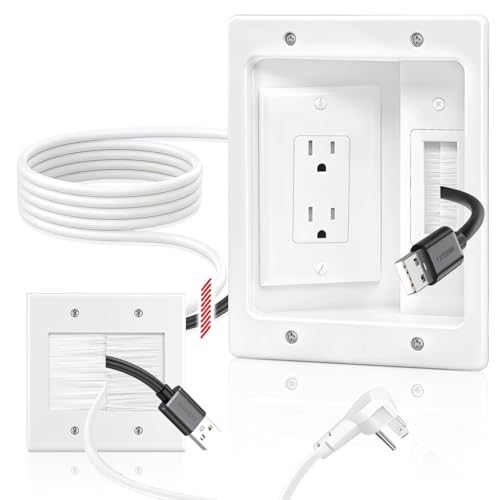
The Naerza kit emphasizes an all-in-one approach to in-wall cable management. It aims to hide power cords, HDMI, Ethernet, and audio/video cables behind the wall for a cleaner living space. Installation is described as quick, with diagrams included to guide the process. The design is white and neutral, intended to fit various home decors. Depth considerations and the potential need for additional tools (like fish tape) are noted in its setup guidance.
Who this is best for: Those seeking an integrated solution to conceal multiple cable types behind a wall for a streamlined look.
Why chosen: It targets comprehensive wall concealment beyond just power cords, making it suitable for multi-cable entertainment setups.
Caution / Limitation: Requires sufficient wall depth for recessed outlet installation; longer or complex runs may need extra tools.
SANUS On-Wall Low Profile Surge Protector
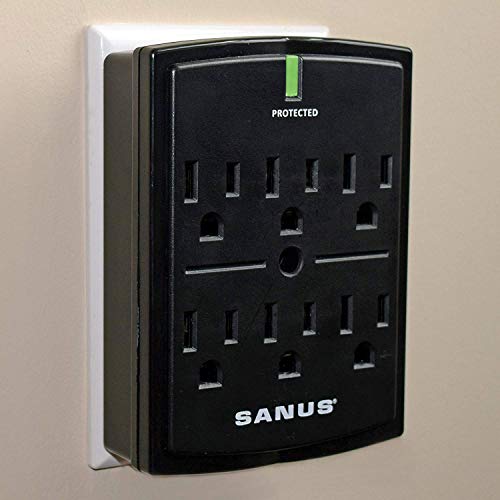
The SANUS surge protector offers six outlets and three lines of protection. Its low-profile footprint is designed to fit behind most TVs and in tight AV setups. It is positioned as a protective power solution, aiming to guard connected devices against power surges while conserving wall space in media centers.
Who this is best for: People who want surge protection integrated with a compact, behind-the-TV installation.
Why chosen: Combines outlet expansion with robust protection, simplifying cable management around the TV area.
Caution / Limitation: It’s a traditional surge protector with outlets, not a full in-wall or wire-through-the-wall solution; consider installation location when hiding cables behind drywall.
Buying Guide: Key Considerations for Behind-The-Wall TV Cable Management
- Installation type: In-wall kits hide cables inside walls, while behind-the-TV strips conceal along the surface. Choose based on whether you prefer a permanent, cleaner aesthetic or a flexible, non-invasive setup.
- Wall depth and building codes: In-wall solutions require sufficient wall cavity depth and adherence to local electrical codes. Some kits are designed to be DIY-friendly, while others may necessitate professional installation.
- Outlet and cable types: Consider what you need to hide—power cords, HDMI, Ethernet, or audio/video cables. Look for kits that accommodate multiple cable types if you have a full HDMI/AV setup.
- Fire and safety: Choose products with materials and features that reduce heat buildup and ensure safe cord routing behind walls. UL-listed options offer added reassurance.
- Future flexibility: If you anticipate changing devices or expanding your entertainment system, select modular pass-throughs and scalable kits that allow easy reconfiguration.
- Space constraints: For slim spaces behind a TV or furniture, prioritize low-profile outlets or flat-plug options that won’t push items away from walls.
- Tools and installation time: Some kits include all necessary hardware and a drill attachment; others require extra tools. Assess the time and effort you’re willing to invest.
FAQ: Quick Answers for Buyers
Is it safe to hide power cords behind the wall?
Yes, when using kits designed for in-wall installation and following local electrical codes. Some products include dual outlets and discreet brush plates to reduce risk.
Do I need a professional to install an in-wall cable management kit?
Not always. Many kits are DIY-friendly, but in-wall installations may require a licensed electrician, especially when wiring outlets or working with a live circuit.
Can these kits support multiple devices behind the TV?
Yes, many kits provide pass-throughs for HDMI, Ethernet, and power; select kits labeled for multi-cable management to ensure compatibility.
Will hiding cables affect TV signal or HDMI quality?
Generally no if cables are properly routed and not excessively bent. Use appropriate lengths and avoid sharp bends to maintain signal integrity.
Are flat-plug extensions behind furniture worth it?
They are ideal for tight spaces where a standard plug would protrude, helping furniture sit flush against walls while providing outlets and USB charging.