Best Network Racks and Brackets for Safe, Organized IT Setups
Choosing the right network rack or bracket helps protect equipment, improve airflow, and simplify maintenance. The following picks emphasize wall-mounted and compact floor-ready designs suitable for small data closets, home labs, and edge deployments. Each option supports common 19-inch devices like switches, patch panels, and small servers, with varied depth, weight capacity, and mounting styles to fit tight spaces.
| Product | Brand | Depth | Mount Type | Weight Capacity |
|---|---|---|---|---|
| Tecmojo 4U Wall Mount Rack | Tecmojo | 14 in | Wall/Mounted or Floor | 110 lbs (50 kg) |
| StarTech.com 6U Wall Mount Rack | StarTech.com | 13.78 in | Wall Mount | 44 lbs (20 kg) |
| RackPath 4U Wall Mount | RackPath | 11.25 in | Wall Mount | 150 lbs |
| Jingchengmei 1U Hinged Wall Mount | Jingchengmei | 6 in | Hinged Wall Mount | Not stated |
| IRENPORU 1U Vertical Wall Mount | IRENPORU | 2.3 in | Vertical Wall Mount | 40 lbs |
Tecmojo 4U Wall Mount Rack

The Tecmojo 4U Wall Mount Rack is designed for shallow installations with a maximum mounting depth of 14 inches. Built from cold-rolled steel and finished with an electrostatic powder coat, it resists rust and corrosion. It supports up to 110 pounds and offers flexible placement: mount on a wall, place flat on a surface, or mount vertically under a table. The frame is open for easy inspection and quick access, and side-panel provisions help secure cables without clutter. This option is suitable for network switches, patch panels, and small servers needing compact support without assembly hassles.
StarTech.com 6U Wall Mount Network Rack
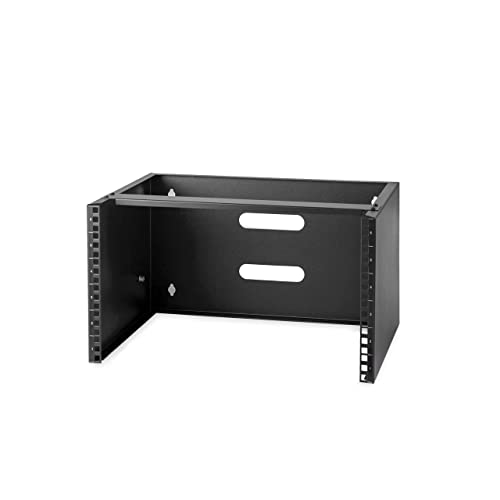
The StarTech.com 6U Wall Mount Network Rack prioritizes space efficiency in tight areas. Its low-profile 14-inch depth and open-frame, two-post design maximize airflow and accessibility. The unit is fully assembled and ships with M6 screws and cage nuts, reducing setup time. Constructed from cold-rolled steel, it offers reliable support for networking gear where wall mounting is preferable to floor-standing setups. With a 44-pound weight capacity, it’s well-suited for compact configurations of switches, patch panels, and small patching gear in offices or closets with limited depth.
RackPath 4U Wall Mount Network Rack

The RackPath 4U Wall Mount provides versatility with an 11.25-inch maximum depth and a robust 150-pound capacity. Its design supports both horizontal (patch panel and server) and vertical mounting arrangements, enabling streamlined cable management and flexible IT layouts. The rack uses 2mm cold-rolled steel and a black electro-static powder coating to resist wear and corrosion. Spacing of the wall-mount holes—centered at standard intervals—ensures easy integration with typical building frameworks. This bracket is well-suited for dense rack environments in small offices or edge deployments that demand dependable support with straightforward installation.
Jingchengmei 1U Hinged Wall Mount Bracket

This 1U hinged wall mount is designed for quick access to equipment, with a compact 1U height and a 19-inch width that accommodates standard patch panels and similar gear. It ships fully assembled and includes the necessary screws and nuts for mounting. The hinged side aids maintenance and allows easy access to devices without removing the entire rack. Its space-saving footprint makes it a practical choice for wall-adjacent equipment closets, small offices, or desk-area under-setup arrangements where frequent access is needed.
IRENPORU 1U Vertical Wall Mount Rack

The IRENPORU 1U vertical wall mount rack is designed to save floor space by positioning equipment flush against the wall. Constructed from cold-rolled steel with a powder-coated finish, it provides a sturdy, durable housing for 19-inch equipment up to about 40 pounds. The compact 2.3-inch depth keeps it ideal for tight closets, small offices, or wiring closets. It supports vertical mounting and is suitable for network switches, patch panels, or small server devices where wall-mounted configurations are preferred for accessibility and cable routing.
Buying Guide
Key considerations when selecting a network rack or bracket include depth, weight capacity, mounting style, and accessibility.
- Depth and footprint: Choose a unit that fits your equipment depth and available space. Shallow depths are common in wall-mounted options, while deeper brackets accommodate more devices.
- Weight capacity: Ensure the rack supports the total weight of installed devices, plus future expansion. Overloading can compromise stability and safety.
- Mounting style: Wall mounts are ideal for closets, offices, and edge deployments with limited floor space. Floor-mounted or freestanding options offer more flexibility for larger setups.
- Accessibility: Hinged or open-frame designs improve maintenance access. Consider whether you need quick cable access or tool-free mounting features.
- Cable management: Look for side-panel cable routes or integrated cable ties to reduce clutter and improve airflow.
- Material and finish: Cold-rolled steel with a powder coat provides durability and corrosion resistance in various environments.
- Compatibility: Ensure compatibility with standard 19-inch equipment (patch panels, switches, routers) and check for any screw, nut, or mounting hardware included in the package.
- Installation complexity: Some models ship fully assembled, others require assembly. If you need fast deployment, prefer ready-to-mount options with hardware included.
For mixed environments with space constraints, a combination approach—limited-depth wall mounts for switches and patch panels paired with a small 4U or 6U rack for a router or mini server—often delivers the best balance of accessibility, airflow, and organization. Always verify the exact mounting hole spacing and depth to ensure a clean, secure installation.