Best Mountable Power Strips With USB for Flexible, Organization-Friendly Power
Looking for a mountable power strip with USB ports that keeps cords tidy and outlets accessible? This guide compares five top options ideal for desks, walls, and under-cabinet installations. Each pick suits a different setup: student dorms, home offices, busy workstations, or compact living spaces. Read on to see which model best matches your space, device mix, and mounting needs.
Buyer’s quick-reference table is provided below for quick comparison.
| Product | Outlets & USB | Mount Type | Best For | Notable Limitation |
|---|---|---|---|---|
| Addtam Surge Protector Power Strip (10-in-1) | 6 AC, 4 USB (2 USB-C) | Wall or desk mount (3-side design) | Small to medium desks, dorm rooms, home offices | Longer length extension may still require cable management |
| TROND Power Strip Surge Protector | 5 AC, 2 USB-A, 2 USB-C | Wall mountable, 4 mounting tabs | Desk setups with larger adapters | Spacing may be tighter for bulky plugs on a busy station |
| VIPWELL 360° Mountable Surge Protector | 6 AC, 4 USB (2 USB-C) | 360° flexible installation, wall/desk/under-desk | Under-desk or corner mounting, high device counts | Bulkier footprint; ensure mounting surface supports clips |
| Addtam 8 Widely Outlets With 4 USB Ports | 8 AC, 4 USB (USB-C up to 3A) | 3-side design, wall/desk mounting | Multidevice heavy workstations, media setups | 3-side design may require spacing checks for adapters |
| 4 LEAF Mountable Power Strip With USB | 4 AC, USB ports | Desk wall mounting (screw-down) | Slim, minimalist desks with screw-down mounting | Fewer outlets than some multi-port rivals |
Addtam Surge Protector Power Strip — 10-In-1

This 10-in-1 power strip combines 6 AC outlets with 4 USB ports (including 2 USB-C ports) and a 5-foot heavy-duty cord. The design emphasizes space-saving efficiency and smart charging, making it suitable for home offices or dorm rooms where multiple devices must charge simultaneously. The smart charging technology automatically detects device needs to optimize power delivery, helping reduce clutter and keep devices powered. Best for users who want a single, compact hub for smartphones, laptops, tablets, and cameras.
- Best for multi-device setups on a single desk or nightstand.
- Flat plug with a slim profile helps it sit flush against the wall.
Caution: Larger adapters can still crowd nearby outlets; verify clearance when placing under a desk or behind a monitor.
TROND Power Strip Surge Protector

This model expands a standard outlet into five grounded AC sockets plus two USB-A and two USB-C ports. Its wide spacing accommodates larger adapters without blocking adjacent outlets, and a wall-mountable design helps reduce desk clutter. Overall, this is a solid choice for users who need robust outlet density with flexible mounting options, especially in workstations or kitchens with multiple devices.
- Better for setups with several larger adapters that need separation.
- Choose this if you value easy wall mounting and a tidy desk.
Limitation: The layout may feel tight for very dense plug clusters on busy rigs.
ANNQUAN 40W Fast Charging Under Desk Power Strip

This under-desk power strip focuses on high-speed USB-C charging alongside a 12-outlet configuration. The USB-C ports deliver PD20W fast charging, while USB-A ports provide additional power. Its side-design allows adapters to fit on each side without blocking other outlets, making it a strong choice for under-desk installations in busy home offices or study nooks.
- Best for high USB-C power needs without sacrificing multiple AC outlets.
- Choose this if you need fast charging alongside many sockets in a compact footprint.
Caution: The total 40W fast charging is shared across ports; plan usage to avoid exceeding the port limits.
VIPWELL 360° Mountable Surge Protector

VIPWELL’s 360° mountable design pairs six AC outlets with four USB ports, including USB-C. The unit emphasizes commercial-grade durability with reinforced USB ports and a copper wire core for reliable power delivery. Its flexible installation—wall, desk, or under-desk—addresses varied layouts, making it a strong option for place-sensitive spaces such as behind a TV or along a workshop bench.
- Best for flexible mounting in rooms with limited desk space.
- Choose this if you want a robust, multi-angle mounting solution.
Limitation: The footprint is larger than ultra-slim options, so verify available mounting space in advance.
Addtam 8 Widely Outlets With 4 USB Ports

This 12-in-1 design uses a 3-side layout to fit eight AC outlets and four USB ports, aiming to power up to 12 devices. The three-sided arrangement gives more outlet-to-outlet spacing than typical strips, easing big adapters into place. Mounting is straightforward on walls or desks, making it a practical option for shared workstations or dorm rooms.
- Best for multi-device dorm rooms or shared offices with many adapters.
- Better for users who want more outlets without a cluttered surface.
Limitation: The three-side design may require a larger mounting area and careful planning to avoid crowding on dense power setups.
4 LEAF Mountable Power Strip With USB Ports
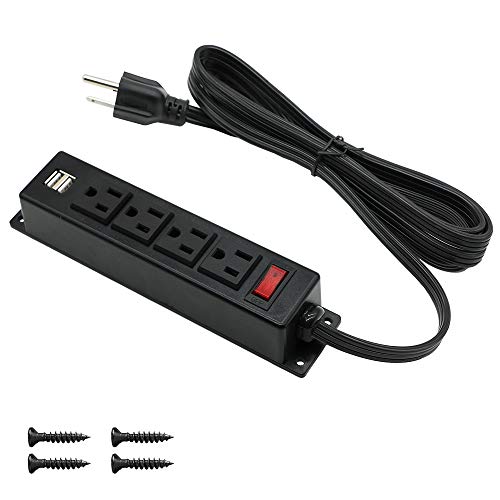
This compact, screw-down power strip is designed for desk or cabinet mounting. It includes four AC outlets and USB ports, with a UL-certified build for safety. It’s ideal for minimalist setups where a simple, sturdy mount is preferred over higher outlet counts. It’s a straightforward choice for people who want a clean under-surface power solution without extra bulk.
- Best for tight spaces where a secure, fixed mounting is required.
- Choose this if you want a low-profile, essential power hub.
Limitation: Fewer outlets than some multi-port rivals; plan device needs accordingly to avoid gaps in charging capacity.
Buying Guide: Mountable Power Strips With USB
Key questions to guide your pick:
- How many devices require simultaneous power and charging? If you have many laptops, phones, and cameras, choose models with 6 or more AC outlets and multiple USB ports, including USB-C for fast charging.
- Where will you mount the strip? If you plan to mount under a desk or along a wall, confirm the mounting method (screw-down, clips, or a flat plug) and ensure the surface supports hardware mounting.
- Spacing matters. Models with wider outlet spacing help accommodate bulky adapters without blocking adjacent outlets.
- Safety features. Look for surge protection ratings, overcurrent, overload, and short-circuit protection. ETL or UL certification is a good indicator of standards compliance.
- Cord length and flexibility. A longer extension cord provides more placement options, but ensure the cord doesn’t create a tripping hazard or clutter.
FAQ
- Are mountable power strips safer than standard ones?
They can be, when they feature robust surge protection, proper grounding, and certified safety standards. Always mount according to the manufacturer’s instructions and avoid overloading any single outlet. - What is the advantage of USB-C ports on power strips?
USB-C ports provide faster charging for compatible devices and can reduce the need for multiple wall adapters. - Can I mount any power strip to wood or drywall?
Most mountable models include mounting screws or clips. Always follow weight and mounting guidelines and consider wall integrity and bracket compatibility. - How many devices should a typical mountable power strip support?
It depends on the outlet count and USB capabilities, but many setups aim for 8–12 devices total while avoiding overheating and voltage drops. - What about surge protection ratings?
Look for joule ratings that reflect energy absorption; higher joules typically indicate greater protection against surges, but pairing with quality devices matters too.