Best Modbus RTU to Ethernet IP Converters for Industrial Networking
Looking for a reliable Modbus RTU to Ethernet IP converter? This guide highlights top options that translate Modbus RTU signals into Modbus TCP/IP, helping you connect serial devices to Ethernet networks. These gateways are best for engineers integrating PLCs, sensors, and legacy equipment into modern control systems. Each pick is suited for different environments—compact DIN-rail solutions for industrial cabinets, multi-host polling for expansive dashboards, and easy setup for quick deployments. The table below compares the five featured models to help you decide which fits your needs.
Product Snapshot
| Product | Key Strength | Best For |
|---|---|---|
| PUSR RS232 RS485 Modbus RTU to Modbus TCP Gateway | Simultaneous RS232/RS485, redundant power, robust Modbus gateway | Systems needing dual serial support and reliable power options |
| PUSR TCP232-306 RS232/RS485/RS422 to Ethernet | ARM core, low latency, multi-host polling | Networks with several Modbus masters requesting polling |
| PUSR DR302 DIN Rail Modbus Gateway | Compact DIN-rail design, simple configuration | Control cabinets with quick-engineering installation |
| LINOVISION Dual Ports Serial Server | Dual ports, multi-host polling, RS232/RS485 to Ethernet | Remote monitoring of multiple serial devices over Ethernet |
| ADnet RS232/RS485 to Ethernet Converter | Dual serial ports, Modbus TCP gateway, DIN Rail friendly | Industrial environments needing simultaneous serial channels |
PUSR RS232 RS485 Modbus RTU to Modbus TCP Gateway

Overview: This gateway supports RS232 and RS485 serial ports in parallel and offers a Modbus RTU to Modbus TCP gateway function with Modbus polling. It supports either a DC power input (5-36V) or terminal-based power, enabling flexible deployments. Best for facilities requiring redundancy and versatile power options. The device is designed for straightforward conversion between Modbus RTU devices and Modbus TCP networks, which helps integrate legacy equipment with modern Ethernet-based SCADA systems.
Who it’s best for: Engineers integrating legacy serial devices that need reliable parallel serial interfaces and flexible power options. Why selected: Dual serial support simplifies wiring and reduces the need for extra hubs or repeaters. Caution: Ensure proper power supply configuration to avoid downtime in redundant power setups.
Key considerations:
- Serial interfaces: RS232 and RS485 can operate simultaneously.
- Power options: DC 5-36V or terminal power supply.
- Gateway role: Modbus RTU to Modbus TCP with polling capability.
PUSR TCP232-306 RS232/RS485/RS422 to Ethernet Gateway

Overview: An ARM core device with a Cortex-M0 core and an optimized TCP/IP stack delivering low latency and scalable performance. It supports Modbus RTU to Modbus TCP and multi-host polling, plus watchdog features for automatic restarts if needed. This model offers strong reliability for larger networks with several masters requesting data simultaneously.
Who it’s best for: Networks requiring multiple polling hosts and a strong TCP/IP stack for stable Modbus traffic. Why selected: The combination of low latency and multi-host polling makes it suitable for dashboards and control rooms with numerous Modbus devices. Caution: Verify compatibility with your specific master devices for polling frequency and timing.
Key considerations:
- Processing: ARM core with Cortex-M0 and optimized TCP/IP stack.
- Protocol support: Modbus RTU to Modbus TCP, multi-host polling.
- Reliability features: Hardware/software watchdog and auto-restart.
PUSR DR302 DIN Rail Modbus Gateway

Overview: This DIN rail gateway emphasizes a compact form factor and ease of use for Modbus RTU to Modbus TCP conversions, with support for TCP server/client and UDP modes. It also offers a Virtual COM feature, enabling easier integration with software that expects COM ports. Best for cabinets where space is at a premium and quick deployment is needed.
Who it’s best for: Industrial setups seeking a compact, straightforward Modbus gateway that fits on standard DIN rails. Why selected: Simple configuration and a lightweight design help speed up installation in crowded control panels. Caution: Confirm the expected TCP/UDP roles in your network to avoid misconfiguration of server/client modes.
Key considerations:
- Configuration: Simple setup for Modbus RTU to Modbus TCP.
- Modes: TCP server/client, UDP server/client, Virtual COM.
- Form factor: Compact DIN rail design.
LINOVISION Dual Ports Serial Server
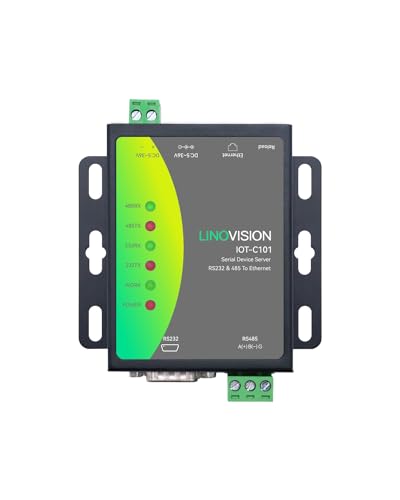
Overview: This dual-port gateway converts RS232 and RS485 to Ethernet and supports Modbus RTU/TCP translation with multi-host polling. It also functions as an RS485/RS232 to RJ45 converter, expanding network flexibility for remote monitoring scenarios. It is designed for varied applications like POS, agricultural sensors, and PLCs that require remote control and data access.
Who it’s best for: Environments needing remote monitoring across multiple serial devices from a single gateway. Why selected: The model’s multi-host polling and dual-port design simplify large-scale deployments. Caution: Ensure the network’s polling cadence aligns with the device’s capacity to avoid overwhelming the gateway.
Key considerations:
- Ports: RS232 and RS485 to Ethernet; supports Modbus RTU/TCP.
- Polling: Up to 16 hosts in multi-host polling scenarios.
- Applications: Suitable for POS, sensors, PLCs, and medical devices requiring remote visibility.
ADnet RS232/RS485 to Ethernet Converter

Overview: A dual serial port device server that supports RS232 and RS485 with Modbus TCP gateway capabilities. It offers TCP Server/Client and UDP modes, and is designed for robust industrial installations with DIN rail compatibility and straightforward configuration. This model helps bridge legacy serial devices to Ethernet clarity and reliability.
Who it’s best for: Industrial users needing dependable dual serial capabilities and a straightforward Modbus gateway. Why selected: Its dual serial support and DIN-rail compatibility make it a versatile fit for control cabinets and remote sites. Caution: Check Ethernet network performance and IP addressing to ensure smooth operation in larger networks.
Key considerations:
- Serial compatibility: RS232 + RS485, simultaneous operation possible.
- Gateway: Modbus RTU to TCP, with TCP Server/Client and UDP options.
- Physical design: Industrial DIN rail-friendly enclosure.
Buying Guide
What to consider when choosing a Modbus RTU to Ethernet converter:
- Ports and compatibility: Do you need RS232, RS485, or RS422? Do you require simultaneous operation of multiple serial interfaces?
- Gateway features: Is Modbus RTU to Modbus TCP enough, or do you need additional modes like UDP, TCP Server/Client, or virtual COM?
- Network integration: Will the device operate in DHCP or static IP mode? Is NTP or DNS support important for time synchronization?
- Power and mounting: Do you prefer DIN rail mounting for cabinet use? Are redundant power options or PoE/terminal power desirable?
- Performance: Consider latency, polling support (number of hosts), and watchdog/auto-restart features for reliability in critical systems.
Frequently Asked Questions
- What is a Modbus RTU to Ethernet gateway used for? Answer: It converts serial Modbus RTU signals into Modbus TCP/IP communications, enabling serial devices to be controlled over Ethernet networks.
- Can a single gateway support both RS232 and RS485 at the same time? Answer: Yes, several models offer simultaneous RS232 and RS485 operation to connect different devices without switching.
- Do these devices require special software to configure? Answer: Most provide web-based configuration or simple setup utilities to map Modbus registers and network settings.
- What is multi-host polling? Answer: A feature that allows a gateway to poll multiple Modbus masters or devices on the same network, improving data collection efficiency in larger systems.
- Are DIN rails necessary for installation? Answer: Not strictly, but many industrial gateways are designed for DIN rail mounting to simplify cabinet installations.
- What should I check before buying? Answer: Check port types, supported Modbus modes, network mode (DHCP or static), power options, and whether the device fits your cabinet size.