Best Metered Input Rack PDU for Data Centers and IT Stations
The right metered input rack PDU helps manage power, monitor loads, and prevent outages in IT racks. This guide highlights five solid options suited for different environments—from small server rooms to crypto mining setups. Each product is evaluated for who benefits most, potential limitations, and practical buying considerations.
| Product | Best For | |
|---|---|---|
| A PC AP8841 Netshelter Metered PDU | Mid-to-large racks needing robust 200V–240V input | Large outlet count (36 C13, 6 C19) |
| CyberPower PDU24001 Metered ATS PDU | Redundant power needs with automatic transfer | Dual inputs and LCD status panel |
| Eaton Metered Input Rack PDU | Simple, reliable metered distribution | 1U horizontal, IEC C13 outlets |
| Tripp Lite ATS PDU (PDUMH15ATS) | Critical devices requiring rapid source switching | Auto-transfer switching, 16 outlets |
| Tripp Lite Metered PDU (PDUMH20) | Higher-current 2U or 1U setups with 20A support | Two-pole 20A input, 12-outlet network |
Notes: All products listed are metered PDUs suitable for rack-mount installations. When comparing, consider input voltage, current rating, number and type of outlets, and whether automatic transfer or redundancy is required for your environment.
APC Netshelter Metered PDU AP8841

Reference features: 200V-240V input, metered single-phase 30A rackmount PDU. Input uses NEMA L6-30P with a 5.0 kW rating. Receptacles include 36 C13 outlets and 6 C19 outlets. Best for racks requiring a high outlet count and higher power delivery in a 2-pole, 200–240V environment.
Best for: Medium-to-large IT racks with multiple servers or network devices that need substantial outlet capacity and clear load visibility. This model suits data centers or office server rooms with dense equipment.
Caution: Higher voltage and many outlets may require careful wiring and clearance for plug management. Verify compatibility with your server power supply configurations and cable management.
Tripp Lite Metered PDU PDUMH15-6
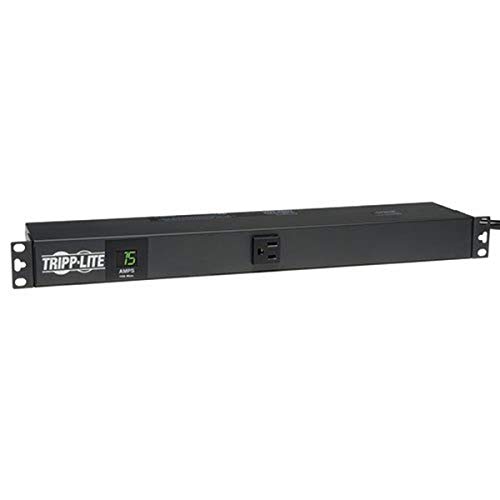
Reference features: Metered single-phase 15A 120V PDU with 6 ft cord, 1U horizontal rack-mount. Includes a digital current meter and 6 NEMA 5-15R outlets. Best for compact 1U rack deployments needing straightforward load monitoring.
Best for: Smaller racks or workstations where space efficiency matters and a simple, cost-effective metered PDU is enough to monitor load in real time.
Caution: Limited outlets and lower voltage may not suit higher-density gear or higher-current servers.
CyberPower PDU24001 Metered ATS PDU

Reference features: 100–120V input, 15A, 10 outlets. Features an automatic transfer switch (ATS) for dual power cords and redundant sources. Selectable color LCD panel displays amperage, voltage, kilowatts, IP address, etc. Not compatible with simulated sine wave sources.
Best for: Environments requiring redundant power paths to protect critical equipment and quick load visibility in a compact 1U form factor.
Caution: Requires dual power sources and a compatible power environment to utilize ATS functionality effectively.
Eaton Metered Input Rack PDU

Reference features: Metered 5.76 kW max, 200–240V single-phase PDU, 1U horizontal, NEMA L6-30P input, 18 IEC 60320 C13 outlets. Simplified, reliable power distribution for standard IT racks.
Best for: Use cases needing straightforward metered power without additional smart features, ideal for established data centers or office server rooms.
Caution: Fewer advanced features than ATS models; plan for potential redundancy separately if required.
Tripp Lite Metered PDU PDUMH20

Reference features: 20A single-phase, 12 outlets (NEMA 5-15/20R), 15 ft cord, 1U rack-mount. Metered PDU with built-in two-digit load meter displaying current in amps. Best for higher current, compact 1U deployments with clear load visibility.
Best for: Smaller racks needing higher current per circuit and easy load monitoring, suitable for varied IT gear within a single rack line.
Caution: Agency de-rating to 16A may apply in continuous operation; verify real-world load against rating.
Buying Guide
What is a metered PDU and why choose one?
A metered PDU provides real-time load information for connected devices. This helps prevent overloads, plan capacity, and optimize cooling and power distribution in racks.
Key considerations for selecting a metered PDU
- Input voltage and phase: Ensure compatibility with your power supply (120V vs. 208–240V; single-phase vs. multi-phase).
- Current rating: Match the PDU current rating to your equipment’s power needs; consider potential derating in continuous operation.
- Outlet count and type: Count how many devices you need to power and ensure outlets (C13, C19, NEMA types) fit your equipment cables.
- Redundancy and ATS: If uptime matters, look for automatic transfer switches or dual-input designs for power source redundancy.
- Form factor: 1U vs. 2U, horizontal vs. vertical mounting affects space and cable management.
- Monitoring features: Digital meters, LCD displays, and remote monitoring capabilities improve visibility and management.
- Warranty and support: Consider the vendor’s warranty length and service options in your procurement plan.
Which features matter most by use case?
- High-density storage or compute racks: Higher outlet counts (C13/C19) and 200–240V input help consolidate power in a single PDU.
- Redundant networks or mission-critical gear: ATS PDUs minimize downtime by switching sources quickly.
- Small racks or quiet environments: Compact, 1U units with straightforward meters fit easily while providing essential visibility.
Common limitations to watch for
- Derated current: Some PDUs are de-rated for continuous operation; verify continuous current limits and runtime expectations.
- Compatibility: Not all PDUs work with every power source type; confirm input/output configurations align with your rack.
- Outlets vs. devices: A large number of outlets can complicate cable management if devices are densely packed.
Installation and maintenance tips
- Label outlets and cords clearly to simplify future upgrades or maintenance.
- Plan cabling paths to avoid obstruction of airflow and prevent accidental disconnections.
- Use the LCD or remote monitoring data to track load trends and plan for capacity expansion.
Frequently Asked Questions
- What is the difference between metered and intelligent PDUs? Metred PDUs show current load; intelligent PDUs offer remote monitoring, alerts, and control.
- Do I need a dual-input ATS PDU for a single-critical device? Not always, but it helps if uninterrupted power is essential and you can source a second power line.
- Can a metered PDU support high-wattage servers? Yes, if the input and outlet types match, and the current rating supports the load.
- Is a 1U PDU suitable for dense equipment? For compact spaces, yes, but ensure outlet and load requirements fit within 1U constraints.
- How do I know which outlets I need? Map each device’s power plug type to ensure compatibility (C13, C19, or NEMA variants).
- Should I choose a PDU with a digital load meter? A digital meter simplifies load monitoring and helps prevent overloading.