Best Keyless Door Locks With Wifi for Modern Homes
Answer: If you want hands-free access, remote control, and smart home integration, choose a WiFi-enabled keyless door lock. This article helps American buyers pick five reliable options for front doors, apartments, and rental properties. The top picks balance remote access, security features, and ease of use for busy households.
Overview of selected products: The following five models cover a range of needs—from voice control and fingerprint unlock to keypad access and virtual guest sharing. A quick reference table below highlights each product’s key strengths and best-use scenarios.
| Product | Best For | Key Strengths |
|---|---|---|
| Philips Wi-Fi Door Lock, S1 | Busy households needing flexible unlock options | Multiple unlock methods; built-in WiFi; remote control |
| Schlage Encode Smart Wi‑Fi Deadbolt | Homeowners who want extensive access codes and notifications | 100 access codes; app control; voice support |
| Philips 4200 Series WiFi Keypad Lock | Front doors with keypad preference | No hub needed; real-time app control; voice ready |
| Veise VE012W Satin Nickel | Families needing multiple entry methods | 6‑in‑1 access; AI fingerprint; built‑in WiFi |
| eufy Security Smart Lock C220 | Reliability with long battery life | 8 months battery; self-learning fingerprint; built‑in WiFi |
Philips Wi-Fi Door Lock, Keyless Entry and Remote Control

The Philips Wi‑Fi Door Lock provides flexible unlocking methods: app, passcode, fingerprint, a physical key, or voice via Alexa/Google Assistant. It supports remote control from anywhere with built-in Wi‑Fi and works best for households that value multiple entry options. Note that batteries are not included, and the lock requires a 2.4GHz network within about 65 feet for reliable remote access.
Best for: Families that want choices—whether hands are full or you’re away from home. Limitation: No battery included, so the initial setup requires purchasing power separately.
Schlage Encode Smart Wi‑Fi Deadbolt

The Schlage Encode offers built-in Wi‑Fi for control and monitoring via the Schlage Home app. It supports remote locking/unlocking and up to 100 access codes, with notifications and the option to manage multiple locks. It also integrates with Alexa and Google Home for voice control. This model is ideal for households that require broad access control and robust remote features.
Best for: Homeowners who want extensive code management and real‑time notifications. Caution: Advanced features rely on a stable Wi‑Fi connection and compatible app setup.
Philips WiFi Keypad Door Lock With Handle

The Philips 4200 Series WiFi Lock connects directly to 2.4GHz WiFi with no hub required. It provides app control for remote locking/unlocking, user code management, and real‑time status. Voice compatibility with Alexa and Google Assistant adds hands‑free convenience. This lock suits front doors where keypad access is preferred or handy for guests.
Best for: Users who want keypad entry and direct app control without extra hardware. Limitation: Requires stable Wi‑Fi and 2.4GHz network for reliable operation.
Veise VE012W Built-in WiFi Fingerprint Lock

The Veise VE012W combines fingerprint, keypad, codes, keys, and voice controls with built‑in WiFi. It stores up to 20 fingerprints and 100 PINs, with 6‑in‑1 entry options. The AI fingerprint technology offers quick recognition, and you can manage access remotely via the app. This model is best for families who want multiple access methods and strong fingerprint support.
Best for: Users who prioritize biometric access along with app control. Caution: Like many smart locks, it relies on WiFi stability for remote features.
Veise VE012W Satin Nickel Lock

Veise’s satin nickel variant mirrors the 6‑in‑1 access approach with built‑in WiFi, app control, and 20 stored fingerprints. It supports unlimited one‑time codes, 100 PINs, and voice commands, while enabling remote management of family, guests, and service providers. The AY self-learning fingerprint feature improves access speed over time.
Best for: Homes needing consistent biometric and code-based access with flexible aesthetics. Limitation: Data privacy relies on local encryption and app security settings.
TEEHO TE012W WiFi Smart Lock
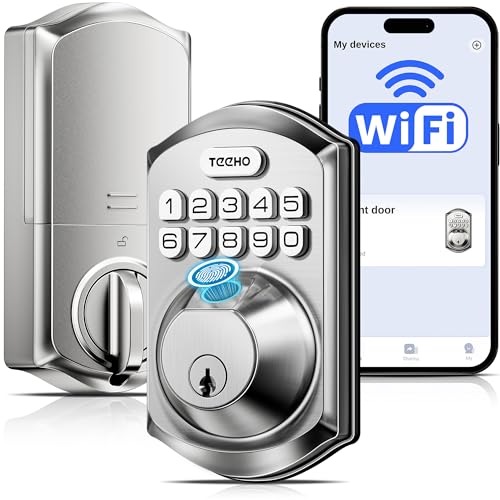
The TEEHO TE012W provides 2.4GHz WiFi direct connectivity with app control and Alexa/Google Assistant compatibility. It offers multiple unlock methods, including fingerprint, passcode, keys, and voice control, plus AES-128 encryption for data security. This model is well-suited for front doors and rental properties requiring flexible sharing.
Best for: People who value broad unlock options and smart sharing capabilities. Caution: Ensure network stability for remote access and voice features.
eufy Security Smart Lock C220

The eufy C220 offers built‑in WiFi and app remote control with an 8‑month battery life on 8 AA batteries. It features self-learning AI fingerprint recognition for quick access and supports unlocking via the eufy Security app, keypad, physical key, or voice via Alexa/Google Assistant. It’s a strong option for households prioritizing long battery life and reliable biometric access.
Best for: Users seeking long battery life and a self‑improving fingerprint system. Limitation: Battery changes will be needed periodically; plan for maintenance.
Buying Guide: Key Considerations For Choosing A WiFi Keyless Lock
- Unlock methods: Do you prefer fingerprint, keypad, codes, keys, or voice control? Choose a model that supports your preferred mix.
- Connectivity: Some locks connect directly to WiFi; others require hubs. Consider your home network stability and whether a hub is acceptable.
- Access management: If you need to create many user codes or share temporary access, look for locks with robust code management and guest sharing features.
- Security features: Encryption level, anti-tamper alerts, and automatic lock/unlock timing matter for daily security. Check supported standards and data handling.
- Compatibility: Ensure compatibility with your smart home ecosystem (Alexa, Google Assistant, etc.) and with your mobile devices and OS.
- Battery life and maintenance: Some models advertise months of battery life; consider how easy it is to replace batteries and monitor power levels.
- Installation: Some locks require professional installation, others are DIY-friendly. Verify door compatibility (hole size, backset) and mounting options.
- Privacy and data: Local vs cloud storage, app permissions, and device privacy controls affect long‑term security and data ownership.
FAQ
- What is the main advantage of a WiFi-enabled door lock?
It allows remote locking/unlocking, access monitoring, and guest sharing without a separate hub. - Do these locks require a subscription?
Most do not require a subscription; some apps offer premium features, but core access control works without it. - Can I use voice assistants with these locks?
Yes, many models support Alexa and Google Assistant for hands-free control. - Will these locks work if the power or WiFi goes out?
Most include a physical key or backup methods; some require WiFi for remote features but still allow local access. - How many access codes can I store?
This varies by model; some locks support up to 100 codes, others offer multiple PINs and temporary codes. - Is fingerprint speed reliable?
Most premium models feature fast, AI-driven fingerprint recognition, with improvements over time.