Best in-Wall TV Box Solutions for Clean Home Theater Setup
In-wall TV boxes offer a streamlined way to hide cables, power, and AV gear behind your wall for a tidy, professional-looking living space. Whether you’re retrofitting an existing setup or planning a new installation, selecting the right in-wall box helps manage power, low-voltage cables, and devices like streaming boxes or sound systems. Below are five well-regarded options that cover different sizes, configurations, and installation needs, so you can choose the best fit for your room and wall type.
| Product | Brand | Key Benefit |
|---|---|---|
| in-Wall TV Box with Flange for Home Theater Installation | Dremica | Large cavity, integrated outlets, simple retrofit |
| Legrand – OnQ In-Wall Media Box 17 Inch | On-Q | Structured wiring versatility, wide compatibility |
| Perlegear 9″ in-Wall Media Box | Perlegear | Compact, fire-resistant, includes cutting tools |
| Mount-It! In-Wall TV Cable Concealer Kit | Mount-It! | All-in-one cabling concealment and power |
| ECHOGEAR 17″ In Wall TV Media Box | ECHOGEAR | UL-listed power, DIY install, paintable |
These options emphasize different priorities—from maximum space for devices to easier DIY installation and safety features. Review the specs, wall cavity requirements, and included hardware to select the best match for your room layout and remodeling timeline.
Dremica In-Wall Box With Flange

The Dremica in-wall box provides a sizable wall cavity (11.9″ x 8.4″ x 3.14″ D) and a visible faceplate of 13″ x 9.5″ with a 1.13″ border. It includes two outlets and a dedicated cable bracket, making it suitable for home theater setups needing multiple connections. The features emphasize accommodating multiple devices and ample cable space, which helps reduce clutter behind the TV.
Legrand On-Q In-Wall Media Box 17 Inch
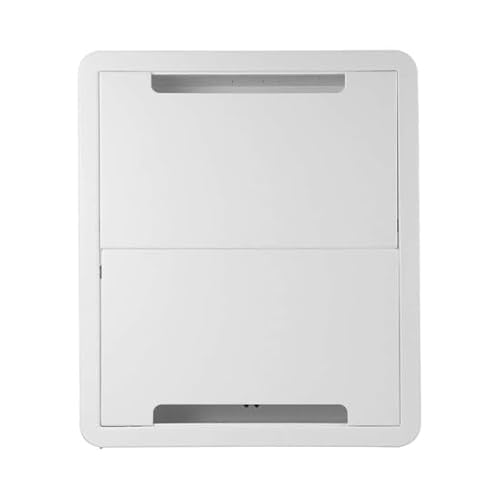
Designed for seamless in-wall storage and distribution, this 17-inch enclosure supports a range of AV components and structured wiring. Its versatility includes compatibility with many TV wall-mounts and devices such as streaming players, game consoles, and set-top boxes. A key advantage is its flexibility for both current setups and future expansions, helping you keep cables tidy behind the wall.
Perlegear 9″ In-Wall Media Box

Perlegear offers a compact 9″ recessed box designed to save space while hosting devices like Samsung One Connect Box, network switches, and streaming players. It includes a drywall saw, cutting template, and a dust bag. The kit emphasizes tidy cable management, durability with SGS-certified fire-resistant materials, and safety by keeping devices behind the wall to reduce hazards and visual clutter.
Mount-It! In-Wall TV Cable Concealer Kit

This kit combines cable concealment with a recessed power option and a generously sized opening for multiple HDMI, Ethernet, and AV cables. It’s designed for easy DIY installation, with included drywall saw and cutting template. The result is a clean, modern look with minimal visible wiring behind the wall—a practical solution for living rooms and home theaters alike.
ECHOGEAR 17″ In-Wall TV Media Box

This 17″ recessed enclosure is built to house both streaming devices and networking gear, including the Samsung One Connect Box, Apple TV, Roku, and Fire TV. It is UL-certified for in-wall power, supports low-voltage runs, and includes DIY-friendly installation steps. A paintable surface helps the unit blend with wall color for a seamless look behind your TV.
Buying Guide
- Wall cavity size and power needs: Confirm cavity dimensions and whether you need dual outlets and space for multiple devices. Larger boxes support more gear but require a bigger wall cut.
- Low-voltage cable management: Look for built-in brush plates or pass-throughs that accommodate HDMI, Ethernet, and audio cables. A wire catcher or cable clips helps prevent tangling.
- Compatibility with mounts and devices: Ensure the box fits with your TV mount and supports devices you plan to use (Apple TV, Roku, One Connect Box, soundbars, etc.).
- Safety and certification: UL-listed or fire-resistant materials add safety, especially when handling power and networking equipment behind walls.
- DIY installation vs. professional retrofit: Some kits are designed for easy, renter-friendly installations with included templates; others may require professional electrical work for permanent wiring.
- Aesthetic considerations: Paintable surfaces and matching faceplates help blend the enclosure with your wall color and decor for a seamless look.
- Future-proofing: Consider a model with extra space and flexible pass-throughs to accommodate new streaming devices or upgraded AV gear.
When selecting an in-wall TV box, balance size, ease of installation, and device compatibility. For retrofits, a larger cavity with easy expansion may be preferable, while new installations may benefit from modular kits that simplify future upgrades. Always follow manufacturer instructions and local building codes during installation.