Best in-Wall Server Rack Solutions for Efficient IT Environments
Looking for an in-wall server rack that saves floor space while securely housing IT gear? This guide highlights top wall-mounted enclosures and racks designed for 19” equipment. Each pick targets different setups—from compact home labs to compact professional IT closets—so you can choose based on depth, weight capacity, and accessibility. The following selections are ideal for small offices, home labs, classrooms, and spaces where floor real estate is precious. A quick comparison table follows to help you decide at a glance.
| Product | Best For | Depth | Key Benefit |
|---|---|---|---|
| Tecmojo 6U Wall Mount Server Cabinet | Small IT closets or home labs | 17.72″ | Lockable glass door, adjustable rails |
| Tecmojo 12U Wall Mount Server Cabinet | Mid-range IT setups | 17.72″ | Locking access, adjustable rails |
| Tecmojo 4U Wall Mount Rack | Very compact, shallow spaces | 14″ | Open frame, versatile mounting |
| VEVOR 6U Wall Mount Network Cabinet | Retail, classrooms, busy networks | 15.5″ | Ventilation, sturdy welded frame |
| NavePoint 12U Wall Mount Enclosure | Security-conscious offices | 17.7″ | Tempered glass front, removable sides |
Tecmojo 6U Wall Mount Server Cabinet IT Network Rack

Best for small IT closets or compact setups where space is at a premium. This 6U cabinet measures 13.78″ H x 21.65″ W x 17.72″ D with a maximum mounting depth of 14.2″. Features include a lockable glass door and lockable side panels for security. The front door can switch sides to fit your door-swing preference, and fully adjustable rails with numbered U positions simplify equipment mounting. Cable access is facilitated by top and bottom punch-out panels.
Who it’s best for: small offices, home labs, or rooms needing secure, space-saving IT housing for 19” devices and AV gear. Why selected: compact footprint with security features and flexible door orientation. Caution: limited depth may restrict larger rear-access cables or bulky equipment.
Tecmojo 12U Open Frame Network Rack

Best for users needing modular expansion and easy airflow in a wall- or floor-mounted configuration. This 12U open-frame rack supports 130 lbs wall-mounted and up to 260 lbs floor-mounted, with top-panel space for devices and anti-slip shelf stops to secure gear. It includes two ventilated shelves and mounting hardware for flexible setup. Open-frame design aids heat dissipation and quick inspection.
Who it’s best for: home labs and small server rooms that require easy expansion and robust airflow. Why selected: higher capacity than compact 6U options with practical accessories. Caution: open-frame design offers less visual security and sound containment than enclosed cabinets.
Tecmojo 12U Wall Mount Server Cabinet IT Network Rack

Best for mid-sized IT setups where security and cable management are priorities. This 12U enclosure measures 24.25″ H x 21.65″ W x 17.72″ D with a maximum mounting depth of 14.2″. Features lockable glass and side panels, plus adjustable rails and U-positioning for organized mounting. The front door orientation can be adjusted to suit room layout. Cable access is supported by top and bottom punch-out panels.
Who it’s best for: small data closets, clinics, or classrooms needing secure, adjustable 12U space. Why selected: strong security features and flexible installation options. Caution: similar depth to other 12U models may limit some deeper equipment setups.
VEVOR 6U Wall Mount Network Cabinet

Best for retail locations and classrooms that need maximum wall-space efficiency with solid construction. This 6U cabinet offers a 15.5″ depth, sturdy welded frame, and a 100 lbs wall-mounted load capacity (200 lbs ground-mounted). It emphasizes fast heat dissipation through vented design and helps prevent overheating in dense setups. Locking glass doors and side panels add security.
Who it’s best for: environments with a mix of network and AV equipment, where secure, space-saving, vented cabinets are desirable. Why selected: notable depth and ventilation features for better cooling. Caution: install in well-ventilated areas to maximize airflow potential.
NavePoint 12U Wall Mount Enclosure
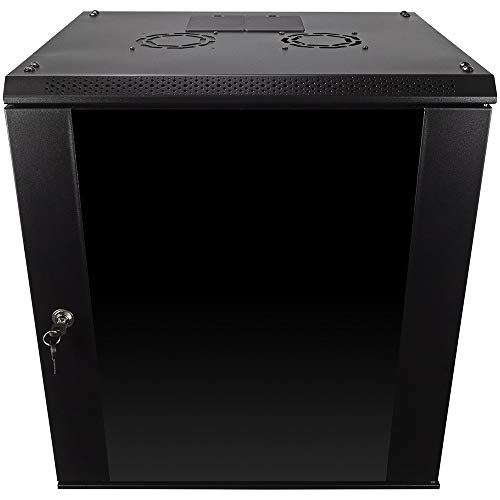
Best for security-conscious IT spaces needing a tempered front door and lockable access. This 12U wall-mount enclosure supports up to 110 lbs and features removable side panels for easy reconfiguration. The case is constructed from cold-rolled steel and aligns with 19” rack standards, making it a practical choice for secure, space-saving network deployments.
Who it’s best for: offices or classrooms where gear security and configurability matter. Why selected: balanced security, modularity, and space efficiency. Caution: deep equipment may require careful cable routing due to the wall-mount depth.
Buying Guide: Key Purchase Considerations
What size should you choose? Consider the number of devices and the depth you can accommodate in-wall. In-wall racks with 12U or 6U capacity fit many small offices, while larger rooms may benefit from 12U or more. Are doors lockable? For sensitive gear, prioritize lockable doors and removable side panels to simplify maintenance. How important is airflow? Open-frame and vented models improve cooling but offer less security; enclosed glass cabinets provide better protection. Do you need versatility? Open-frame racks and adjustable rails support easy reconfiguration as equipment evolves. What about installation options? If you can mount on the wall with adequate studs and studs spacing, wall-mounted options save space and simplify cabling. Consider whether you will occasionally relocate or reconfigure equipment, which makes adjustable rails and stackable shelves valuable. Check weight capacity to ensure the rack supports all devices without overloading the frame. For spaces like classrooms and retail, emphasis on secure, compact, and well-ventilated options is typically ideal.
FAQ
- What is the main advantage of an in-wall server rack?
It saves floor space and can provide centralized, secure housing for IT gear in small rooms. - What should I check before buying a wall-mounted rack?
Check depth, weight capacity, security features (locks), door orientation options, and whether rails are adjustable for future equipment. - Are open-frame wall racks better for cooling?
Yes, open-frame designs generally offer better airflow but less physical security and sound containment. - Can a 12U wall mount rack hold a full switch, patch panels, and a small NAS?
Yes, with properly positioned rails and removable shelves; ensure the depth fits your cables and devices. - Is a glass door better than a solid door for wall-mounted cabinets?
Glass doors balance visibility and security, while solid doors provide higher protection from dust and tampering. - How do I plan cable management in a wall-mounted rack?
Use top and bottom punch-outs, side-panel cable guides, and labeled rails to organize power, data, and AV cables.