Best in Wall Outlet Extension Solutions for Clean, Hidden Power
Answering the demand for neater rooms and safer outlets, these in-wall outlet extension kits and related power-relocation solutions are designed for wall-mounted TVs, desks, nightstands, sofas, and home theaters. Ideal buyers include renters seeking easy DIY installs, homeowners remodeling a space, and anyone who wants to reduce visible cords without professional wiring. The following picks emphasize ease of installation, wall concealment, and practical power sharing, with clear notes on suitability and limitations.
Buying Quick Reference
- Best for wall-mounted TV setups: CIRKULYX in-Wall Cable Management Kit (7.8 ft) and similar TVs-focused kits.
- Best for renters or temporary setups: Mount-It! and Legrand Wiremold options emphasize DIY and non-hard-wired installs.
- Best all-in-one USB and AC extension: CIRKULYX 2AC + USB kit blends USB charging with wall power.
| Product | Key Benefit | Best For |
|---|---|---|
| CIRKULYX In-Wall Cable Management Kit (7.8ft) | Long extension cord, wall concealment, fire-resistant materials | TVs, desks, nightstands |
| Farlaku In-Wall Kit with Recessed Box (9.8ft) | Drywall saw, easy wall-to-wall wiring | Renters, remodels |
| Wiremold In-Wall Relocation Kit | Simple, clean install, extend up to four feet vertically | Kitchen, living room rearrangements |
| Mount-It! In-Wall TV Cable Concealer Kit | Triple outlet, recessed power, easy install | Home theaters and media rooms |
| CIRKULYX Outlet Relocation Kit (2 AC + USB) | USB-A and USB-C plus 2 AC outlets | Nightstands, desks, media stands |
CIRKULYX In Wall Cable Management Kit, 7.8ft

This kit extends power from blocked outlets to a TV, nightstand, desk, or kitchen counter using a 7.8-foot cord, minimizing furniture rearrangement. It hides power cords, HDMI, Ethernet, and A/V cables within the wall for a tidy, professional look. The unit uses fire-resistant materials with tamper-resistant shutters and supports up to 1875W (15A/125V) for safe operation. Best for wall-mounted entertainment systems and spaces where visible cords are undesirable. Caution: ensure your wall cavity depth meets installation requirements and follow safety instructions for drywall work.
Farlaku In-Wall Cable Management Kit with Recessed Outlet Box, 9.8ft

Designed to extend outlets behind furniture to an accessible location, this kit offers a drywall saw and cutting template for under-30-minute installs. It hides wiring behind the wall to create a neater appearance and reduce tripping or chew hazards from pets. Best for renters and homeowners who want a professional look without a full electrical rearrangement. Limitation: requires a drywall cutout and a minimum cavity depth of about 2.5 inches.
Wiremold In-Wall Outlet Relocation Kit (White)

Wiremold offers a trusted pro-grade solution to extend power within walls, enabling vertical four-foot or horizontal six-foot relocations. The kit focuses on clean cable management behind walls for remodeling kitchens or living areas. It is well-suited for users who want a straightforward, do-it-yourself approach with a focus on behind-the-wall concealment. Caution: installation requires careful planning to avoid electrical code conflicts and ensure proper clearances.
Mount-It! In-Wall TV Cable Concealer Kit
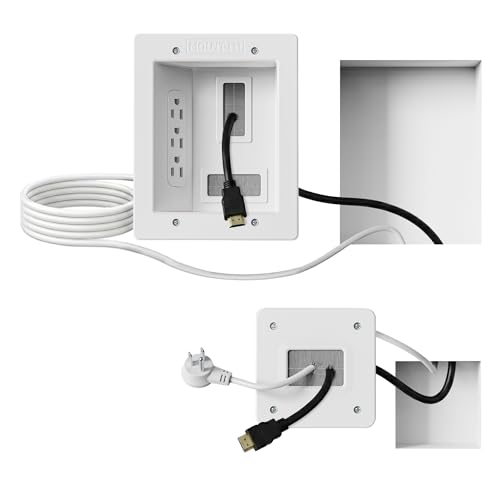
This kit provides a triple outlet with a 9-foot cord and a hand saw for safe, organized cable management around TVs and home theaters. It offers a roomy recessed opening to accommodate multiple HDMI, Ethernet, and A/V cables, allowing devices to connect while staying hidden behind the wall. Best for media rooms where a clean, professional-looking setup matters. Limitation: designed for wall-mounted setups; not ideal for areas without a suitable wall cavity.
CIRKULYX In-Wall Kit, 2AC + USB Kit
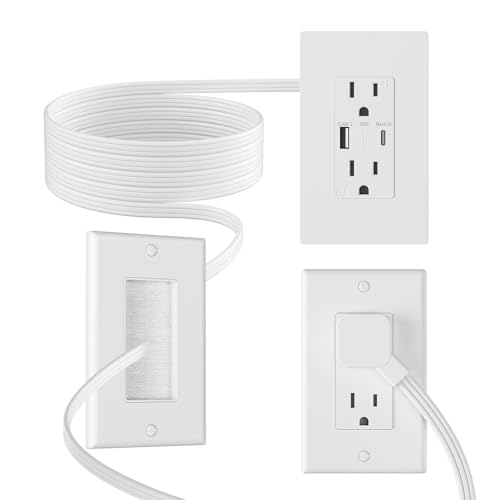
This all-in-one kit combines two AC outlets with USB-A and USB-C ports, designed to power a TV, nightstand, or desk while keeping cables hidden inside the wall. It supports up to 1875W (15A/125V) and provides total USB output up to 4.8A. Best for spaces where device charging is frequent and multiple devices need simultaneous power. Caution: ensure wall cavity depth and stud layout allow the required drywall cutouts.
One Beat Surge Protector Outlet Extender

While not strictly in-wall, this rotating plug surge protector provides a practical solution for desks or nightstands with multiple devices. It includes six outlets and four USB charging ports (two USB-C) with 1800J surge protection. Best for power-dense desktops or travel-friendly setups that still require accessible outlets without wall modification. Limitation: visibility of cords remains, and it is not designed for in-wall installations.
Buying Guide: Key Purchase Considerations
What should you evaluate before buying an in-wall extension kit? Consider wall structure, cavity depth, and whether you need hard-wired or plug-in solutions. For renters, DIY-friendly options with templates and saws reduce risk of damage. If you have a wall-mounted TV, prioritize larger recessed openings to accommodate multiple cables. For charging devices, USB-A and USB-C ports add convenience and reduce adapter clutter. Fire-resistant materials and tamper-resistant shutters improve safety in homes with kids or pets.
Do I need a professional to install an in-wall kit?
Most listed kits are designed for DIY installation with provided templates, saws, and instructions. However, certain layouts and electrical codes require professional oversight, especially if you’re altering existing circuits or outlets. Always verify local codes prior to cutting into walls.
How deep should the wall cavity be?
Installations commonly require a minimum cavity depth around 2.5 inches, with standard walls typically offering 3.5 inches. Confirm this in your wall before purchasing and cutting.
What if I want USB charging included?
Look for kits that explicitly include USB-A and USB-C ports (as several products do). USB ports should offer a total current that meets your charging needs without overloading the unit.
Is concealment essential for safety?
Concealing cords and cables reduces tripping hazards and minimizes pet or child interference. It can also improve electrical safety by keeping cords away from outlets and liquids in busy living spaces.
What is best for renters?
Renters typically benefit from non-permanent, plug-in solutions that require minimal wall modification and can be removed without damage. Kits with templates and cutout guides provide the easiest path to a neat, concealed setup.
Which kit is best for home theater setups?
Kits with spacious recessed openings and multiple cable accommodations (HDMI, Ethernet, A/V) are ideal. Mount-It! and CIRKULYX options emphasize organized, behind-wall cable management for TVs and home theaters.
What are the main advantages of in-wall outlets?
Primary advantages include a cleaner appearance, safer cable management, reduced clutter, easier access to outlets in wall-mounted setups, and better space utilization in living rooms and entertainment zones.
How do I compare kits?
Compare by: length of extension cord, number of outlets and USB ports, whether the kit is plug-in or hard-wired, wall-cutout requirements, included tools (saw/template), and the depth of the wall cavity each kit supports.
FAQ
- Can I install these myself if I’m not handy with tools? Most are designed for DIY use with templates and saws; if you’re unsure, consult a professional.
- Are these kits safe for everyday use? Kits use fire-resistant materials and tamper-resistant shutters, but observe load limits and avoid overloading outlets.
- Will these work behind any furniture? They’re specifically designed to extend power to areas behind sofas, nightstands, desks, and TVs, reducing visible wiring.
- Do these require a professional electrical permit? Typically no for plug-in kits, but check local codes for any modifications or reconfigurations to existing outlets.
- Will USB charging slow down if multiple devices are connected? USB ports have a combined maximum output; spreading devices across ports helps maintain charging speed.
- What is the typical installation time? Many DIY kits can be completed in under 30 minutes with the provided saws and templates, assuming wall access and layout permit it.