Best in-Wall Network Rack Solutions for 19-Inch IT Gear
If you’re looking to free up floor space while keeping your IT gear secure and accessible, an in-wall or wall-mount network rack is a smart choice. This guide highlights five reliable options well-suited for small offices, data closets, and home labs. Each product is evaluated for rack size, depth, security, and airflow to help you pick the right fit. Best for tight spaces, easy access, and organized cable management.
Buyer Summary Table (at a glance)
| Product | U Capacity | Depth | Best For | Notes |
|---|---|---|---|---|
| Tecmojo 12U Wall Mount Cabinet | 12U | 17.72″ | Medium IT gear with secure glass door | Lockable front door; adjustable rails |
| Tecmojo 6U Wall Mount Cabinet | 6U | 17.72″ | Compact networks, small offices | Lockable panels; flexible door orientation |
| Tecmojo 9U Wall Mount Cabinet | 9U | 17.7″ | Secure AV and IT gear | Ventilation fan; lockable glass door |
| StarTech.com 6U Wall Mount Rack | 6U | 13.78″ | Shallow, space-constrained setups | Fully assembled; includes mounting hardware |
| VEVOR 6U Wall Mount Server Cabinet | 6U | 15.5″ | High-density wall-mount with ventilation | Locking glass door; solid weld |
Tecmojo 12U Wall Mount Cabinet IT Network Rack

The 12U Tecmojo wall-mount cabinet is designed to save floor space while providing lockable security for critical IT gear. It features a glass front door and lockable side panels to restrict access, with a front door that can be mounted on either side to accommodate door swing preferences. The mounting rails are fully adjustable with numbered U positions for straightforward installation, and top/bottom punch-out panels support easy cable access. This unit is best for small to mid-sized networks needing secure, wall-mounted enclosure with flexible door orientation.
Best for: Small offices or home labs needing secure access and adjustable mounting while maintaining a compact footprint. Limitation: Maximum mounting depth is 14.2″ inside, which may constrain deeper equipment.
Tecmojo 6U Wall Mount Cabinet IT Network Rack

This 6U model prioritizes space savings with a compact 13.78″ height and a 17.72″ depth. It uses a lockable glass door and side panels for security, and can adapt door orientation by swapping the front door side. It’s ideal for compact network closets or small offices with modest equipment loads. Caution: The unit’s depth limits compatibility with taller, deeper servers.
Tecmojo 12U Open Frame Network Rack

This open-frame 12U rack emphasizes airflow and flexibility. It supports a wall-mount or floor-standing setup, with two ventilated shelves and mounting hardware included. Best for users who value expansion potential and easier access for cable runs. Limitation: The open frame lacks a door, so security is reduced compared to locked enclosures. Choose this if ventilation and quick access outweigh enclosure security.
Tecmojo 4U Wall Mount Rack

The 4U Tecmojo wall mount offers a shallow depth of 14 inches, making it suitable for minimal-space deployments like wall nooks or under-desktop setups. It features a sturdy cold-rolled steel construction with powder coating to prevent corrosion. It supports vertical or horizontal placement and includes open-frame flexibility for easy cable management. Best for ultra-compact locations; limitation is its lighter weight capacity (up to 110 lbs).
Tecmojo 9U Wall Mount Rack Network Cabinet
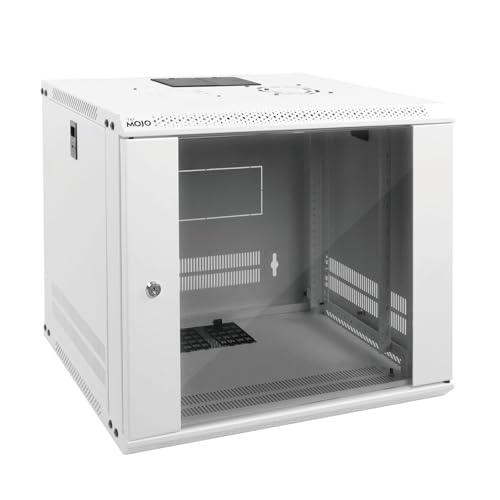
The 9U Tecmojo cabinet combines locking security with a built-in cooling fan to help prevent overheating for IT equipment. The glass front and side panels are lockable, and the mounting rails are fully adjustable with U-position markers for simple installation. Its inner depth is 14.2 inches, making it a solid choice for mid-sized networks needing airflow plus security. Best for: Network devices that generate heat but require compact wall placement. Caution: Ensure your devices fit within the 14.2″ inner depth.
Buying Guide: Key Considerations for In-Wall and Wall-Mount Racks
- Size and weight: Match U capacity and weight rating to your current and anticipated equipment. Larger racks like 12U can handle more gear, while 4–6U units are best for compact spaces.
- Depth and clearance: Check maximum mounting depth and internal clearance. Deeper equipment may not fit in shallower enclosures.
- Security: Consider whether you need lockable doors and side panels. Glass doors offer visibility but require secure access controls.
- Door orientation: Some models allow front-door reversal to fit room layout and swing preferences.
- Ventilation: Look for built-in fans or ventilated shelves to prevent overheating in dense setups.
- Mounting options: Open frame vs. enclosed cabinets affect airflow and security. Wall-mount vs. floor-standing may influence installation flexibility.
- Cable management: Top/bottom punch-outs and side access panels facilitate clean cable routing.
Frequently Asked Questions
- What is an in-wall network rack, and who is it for?
Answer: An in-wall or wall-mounted rack is a compact enclosure designed to house 19″ IT equipment in a wall or wall-adjacent space, ideal for small offices, home labs, and closets that require secure, space-saving gear housing. - How deep should a wall-mount rack be for typical devices?
Answer: Depth varies by model, but common depths range from about 13.78″ to 17.72″. Check your equipment depth and ensure enough clearance for cables and airflow. - Is glass-front security as effective as solid doors?
Answer: Glass doors provide visibility and access control but may be less discreet than solid doors. Lockable glass doors are effective for securing access while still allowing monitoring of equipment. - Are open-frame racks suitable for office networks?
Answer: Open-frame racks offer excellent airflow and expansion potential but less physical security. They’re better for environments where quick access and ventilation are priorities. - Can I mount any 19″ equipment in these racks?
Answer: Most 19″ equipment with standard rack ears will fit, but verify rail spacing, depth, and weight limits to ensure compatibility.