Best Fiber Optic Splicing Box Solutions for Neat Cable Management
Answering the most common questions buyers have: choose a fiber optic splicing box that matches core capacity, weather exposure, and adapter compatibility for your network type. This guide highlights five solid options and explains who they’re best for, with practical reasons and clear tradeoffs. Ideal buyers include FTTH installers, small business networks, outdoor fiber runs, and anyone prioritizing durable, organized cabling.
| Product | Core Capacity | Best For | Key Benefit |
|---|---|---|---|
| PNGKNYOCN 6 Core FTTH Box | 6 | Residential/Small Business FTTH | Six ports with robust enclosure |
| ETS 2 Core Box | 2 | Compact, indoor/outdoor setups | IP65/UV protection |
| ETS 4 Core Box | 4 | Mid-size runs | Weatherproof with secure cable management |
| Eardion 12 Core Box | 12 | Longer routes, higher capacity | Rotatable flap for easy access |
| PNGKNYOCN 12 Core FTTH Box | 12 | Outdoor/industrial FTTH | Large splice area & corrosion-resistant |
PNGKNYOCN 6 Core FTTH Fiber Distribution Box

The 6-core distribution box is designed for fusion splicing, splitting, and wiring in optical networks. It terminates and protects optical cables while providing organized management at the terminal. This is best for small networks in residential or small business setups requiring six FTTH branch cables. It supports multiple adapters (SC, FC, E2000) and is wall-mounted for space efficiency. A potential limitation is its 6-port capacity, which may require an upgrade for larger deployments.
ETS Fiber Optic Distribution Box 2 Core

The 2-core box is compact yet rugged, offering IP65/IP66-rated protection for indoor and outdoor installations. It is ideal for tight spaces or simple FTTH/FTTx setups where minimal core capacity is sufficient. It supports SC/LC/FC adapters and includes cable management features. Best for small projects; avoid this if you need higher port counts or more fusion splices.
ETS Fiber Optic Distribution Box 4 Core
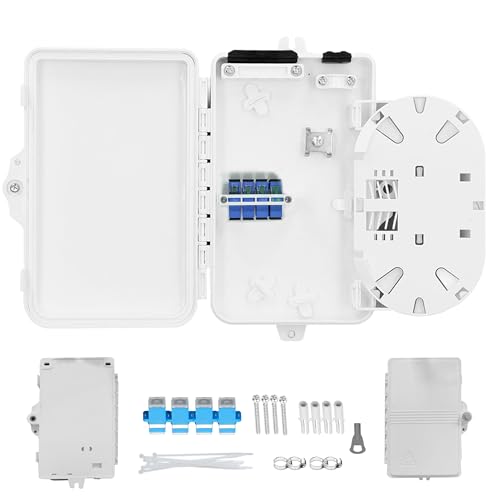
The 4-core version offers a balance of capacity and protection. It hosts SC/LC/FC adapters and includes integrated splice trays for up to eight fusion splices, along with routing guides to prevent excessive bending. Best for mid-range FTTH/FTTx deployments or industrial networks needing reliable cable management. Consider upgrading if you anticipate future expansion beyond four cores.
Eardion 12 Core Fiber Distribution Box

This 12-core distribution box is designed for larger networks, offering extensive fusion splicing and terminal capabilities. It features an 180° rotatable flap for easy access and efficient operation during installation. Best for longer runs or scenarios requiring high capacity and ease of access; caution is that larger boxes may require more wall or pedestal space and careful routing planning.
PNGKNYOCN 12 Core FTTH Fiber Distribution Box

The 12-core FTTH distribution box is built for indoor or outdoor use with a large internal splice area. It provides robust termination, protection, and management for high-volume networks. Best for outdoor installations or industrial environments where weatherproof materials and larger core capacity are required. A potential limitation is the size, which may necessitate more mounting space.
Buying Guide
What core capacity do I need?
Choose a box that matches your current network needs and allows room for future expansion. Core counts range from 2 to 12; select a model that minimizes replacements as your network grows.
Indoor vs outdoor use and weatherproofing
For external deployments, prioritize IP65/IP66-rated housings and UV-resistant plastics to withstand dust, moisture, and sun exposure. Indoor models may be lighter but should still offer solid cable management and protection.
Adapter compatibility and splice capacity
Verify supported adapters (SC/LC/FC) and the number of fusion splices the tray can hold. If you plan frequent reconfigurations, a box with easy-access flaps and ample splice space saves time.
Cable management and routing features
Look for integrated cable clamps, routing guides, and bend-radius protection. Boxes with rotatable flaps or removable trays simplify installation and maintenance.
Material quality and durability
High-quality ABS or PC+ABS plastics offer durability and chemical resistance. Durable construction reduces risk during outdoor deployments and high-traffic environments.
Installation considerations
Check mounting options (wall, pole, or cabinet) and installation torque guidelines. Ensure the selected box has compatible entry points for your ingress cables and pigtails.
Questions buyers frequently ask
- Which box is best for outdoor FTTH deployments? Consider the 12-core FTTH boxes for higher capacity and weatherproofing.
- Can I mix adapters in a single box? Most boxes support common SC/LC/FC adapters, but verify compatibility before purchase.
- Is a larger box worth the extra space? If you foresee future expansion, a larger core capacity now can prevent upgrades later.
- What about installation ease? Boxes with rotatable flaps and removable trays typically require less effort and time.
Summary of key considerations
- Core capacity: 2, 4, 6, or 12 cores depending on needs.
- Weatherproofing: IP65/IP66 for outdoor, UV resistance for sun exposure.
- Adapter support: SC/LC/FC compatibility matters for fiber networks.
- Cable management: Splice trays, clamps, routing guides prevent bending damage.
- Installation: Wall/pole mounting, rotatable flaps, and removable trays ease setup.
Frequently Asked Questions
- What is a fiber optic distribution box used for? It terminates, protects, and organizes fiber cables at a network terminal, enabling splicing and routing.
- How do I choose the right core capacity? Align with current needs and plan for growth; larger capacity boxes reduce future replacements.
- Are outdoor boxes weatherproof? Yes, many are designed with IP65/IP66 ratings and UV-resistant plastics for harsh environments.
- What adapters are commonly supported? SC, LC, and FC adapters are typical; verify compatibility with your existing connectors.
- Can I install these boxes myself? Many are designed for straightforward wall or pedestal installation; check mounting options and local codes.
- Do these boxes allow easy maintenance? Look for rotatable flaps and accessible splice trays to simplify servicing.