Best Extension Cords With Lots of Plugs for Busy Desks and Workspaces
Finding the right extension cord with many outlets helps simplify power needs for computers, gaming setups, or home offices. This guide highlights five top options that balance outlet count, build quality, and convenience. Best for multi-device desks, studios, dorm rooms, and home offices where power needs are high and spaces are tight.
| Product | Outlets | Specialty | Best For |
|---|---|---|---|
| 18 Outlets Surge Protector Power Strip — 6 Ft | 18 AC + 4 USB | Flat plug, high joules | Gamers and desks with many peripherals |
| QINLIANF Surge Protector Power Strip — 6 Ft | 24 AC + 4 USB (2 USB-C) | 4100J surge protection | Heavy multi-device setups |
| 18 Outlets Surge Protector Power Strip — 15 Ft | 18 AC + 4 USB | Long reach, organized | Large rooms or stages |
| LeZone Surge Protector Power Strip — 10 Ft | 12 AC + 2 USB | Wall mountable | Home offices with hidden wiring |
| TenTrend Power Strip Tower — 16 Outlets + USB | 16 AC + 5 USB (2 USB-C) | Tower design | College dorms and desks needing space-saving |
18 Outlets Surge Protector Power Strip — 6 Ft
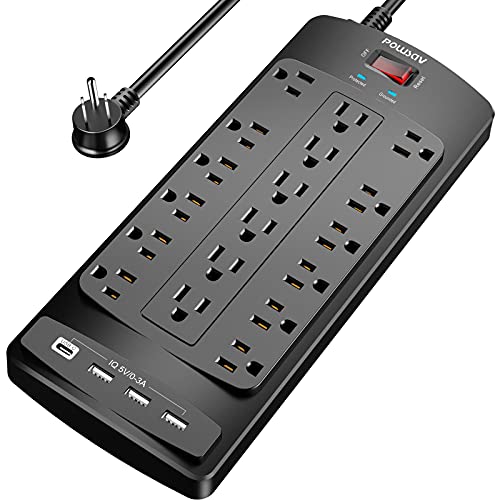
POWSAV’s six-foot extension with 18 outlets and four USB ports is designed for busy computer desks and gaming setups. The device uses a 2100-joule surge protector with overload protection to guard electronics from spikes and fluctuations. The flat 6-foot plug helps fit behind furniture, and included cable ties keep excess cord neatly organized.
Best for: A multi-device workspace with many peripherals and limited space behind furniture. The flat plug and cable management flexibility help maintain a clean setup.
Why selected: High outlet density on a single strip minimizes the need for multiple adapters and reduces clutter. The 2100J protection and dual USB ports add value for a compact, heavy-use workstation.
Caution: The surge protection relies on a two-level circuit design; ensure placement where the surge protection can work effectively and avoid daisy-chaining power strips.
QINLIANF Surge Protector Power Strip — 6Ft

QINLIANF offers a 24-outlet surge protector with four USB ports, including USB-C fast charging. The 6-foot flat plug extension cord provides a compact footprint for desks and dorm rooms. Its surge protection rating of 4100 joules supports protection against power fluctuations for many devices at once.
Best for: People who power many devices at a single desk and need USB-C charging along with traditional outlets.
Why selected: The combination of 24 outlets and multiple USB ports makes it a strong all-around choice for power-hungry setups in smaller spaces.
Caution: The USB-C port does not support devices requiring higher voltage than standard USB-C charging; plan accessory charging accordingly.
18 Outlets Surge Protector Power Strip — 15 Ft

This POWSAV model extends to 15 feet with the same 18 outlets and four USB ports, offering a longer reach for larger rooms or stages. The 2100 joule surge protection remains, with a flat plug and cable ties for organization. The extended cord can reduce the need to place a power strip in the middle of a workspace.
Best for: Large rooms, studios, or stages where outlets are far from devices and cable management matters.
Why selected: Long reach in a compact, consumer-friendly design helps maintain a tidy space while powering many devices.
Caution: Longer cords can introduce voltage drop over very long runs; ensure your devices do not rely on precise voltage-sensitive performance at extreme distances.
LeZone Surge Protector Power Strip — 10 Ft

LeZone’s 12-outlet strip with two USB ports sits on a 10-foot extension cord. The unit is designed to be wall-mountable, which helps keep desks free of clutter. While it offers a strong number of outlets, the device emphasizes mountable versatility for home offices and workspaces with fixed layouts.
Best for: Home offices or workstations where the power strip can be mounted under a desk or on a wall to stay out of the way.
Why selected: The wall-mountability feature provides a space-saving option for organized power delivery in tighter rooms.
Caution: With a longer cord, be mindful of cable length in safety-critical or fire-risk areas; ensure the strip is not overloaded near walls or furniture edges.
TenTrend Power Strip Tower — 16 Outlets
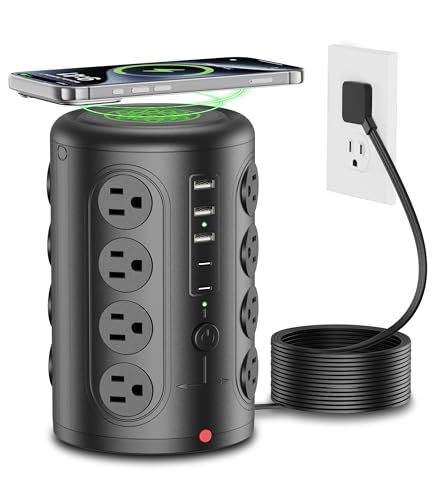
TenTrend’s tower design concentrates 16 AC outlets plus five USB ports (including USB-C) in a compact vertical setup. The 6-foot flat plug extension cord provides flexibility for desk layouts, dorm rooms, and shared offices. The unit includes an 1875W circuit breaker to safeguard connected devices.
Best for: Dorm rooms and shared spaces where a vertical tower saves desk space and offers ample charging options.
Why selected: A tower form factor makes it easy to distribute outlets across a wide area in tight spaces, reducing clutter and improving accessibility.
Caution: Tower devices can be top-heavy; ensure stable placement to prevent tipping or accidental unplugging of cords.
Buying Guide: Key Considerations For Choosing An Outlet-Rich Extension Cord
- Outlet density versus space: Higher outlet counts are useful, but ensure the unit fits your desk or room layout. Flat plugs help fit behind furniture, while tower designs save surface space.
- Surge protection rating: Look for joule ratings (e.g., 2100–4100J) and multiple protection stages. Higher joules generally offer stronger protection for sensitive equipment.
- Cord length and flexibility: Choose the length you actually need. Longer cords reduce convenience if they clutter floors; consider flat plugs for behind furniture.
- USB ports and USB-C: If charging tablets, phones, or accessories is a priority, USB ports add value. USB-C ports give faster charging for compatible devices.
- Safety features: Overload protection, circuit breakers, and weatherproofing (for outdoor or damp locations) improve reliability in various environments.
- Mounting and organization: Wall-mountable options or included cable ties help keep cables tidy and reduce trip hazards.
- Compatibility and rating: Check total wattage and amperage. Avoid plugging devices that collectively exceed the strip’s rating.
Frequently Asked Questions
- What is the difference between 2100J and 4100J surge protection?
- Is it safe to daisy-chain power strips?
- Do extension cords provide enough power for gaming setups?
- Should I choose longer cords for a cleaner look?
- Are USB-C ports necessary on power strips?
- Can a power strip be mounted under a desk?
Joule rating measures energy absorption capacity; higher joules mean more protection against surges. For many devices, 2100J is sufficient, but 4100J provides extra headroom for power-hungry equipment.
No. Connecting multiple strips in series can overload circuits and create fire hazards. Use a single multi-outlet strip when possible.
Yes, when paired with a dense outlet strip and proper surge protection. Check total wattage and ensure the strip can handle gaming consoles, PCs, and peripherals.
Long cords offer reach but may create clutter. Prefer built-in organization features like cable ties or wall mounting to maintain a tidy space.
USB-C ports are useful for charging devices that support fast USB-C charging. If your devices use USB-A or standard outlets, a USB-C‑inclusive strip adds convenience but is not strictly required.
Yes, many models offer wall-mount or under-desk mounting. This reduces clutter and keeps cords off the floor, improving safety and accessibility.