Best Desk Extension Cords for a Clean, Flexible Workspace
Choosing the right extension cord or power strip for your desk can improve organization, reduce outlet clutter, and keep devices powered safely. Below are five highly rated options that balance outlet density, USB charging, and space-saving design. A quick summary table follows to help you compare at a glance.
| Product | Outlets / USB | Key Benefit |
|---|---|---|
| Addtam Surge Protector Power Strip | 12 outlets, 3 USB | Wide spacing; long 10 ft cord; flat plug |
| HANYCONY 8 Outlets + 4 USB | 8 outlets, 4 USB (2 USB-C) | Smart charging; dual USB-C ports; overload protection |
| YISHU 8 Outlets + 4 USB | 8 outlets, 4 USB | Three-side design; wide spacing; strong surge protection |
| Anker 10-in-1 Flat Plug | 6 outlets, 2 USB-A, 2 USB-C | Slim, clutter-free; flat plug; compact hub |
| SUPERDANNY 12 In 1 Flat Power Strip | 8 outlets, 4 USB (2 USB-C) | Flat 10 ft cord; wide spacing; multiple protection features |
Addtam Surge Protector Power Strip With 12 Outlets
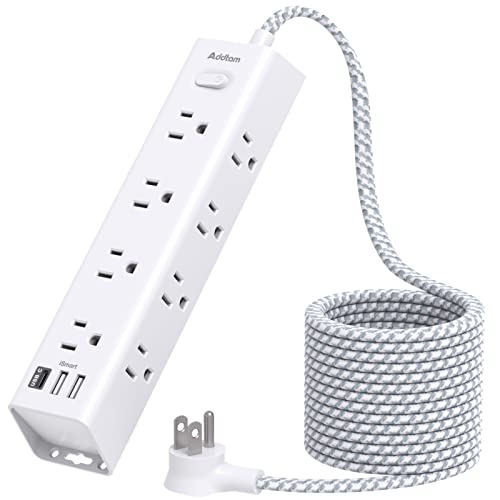
The 15-in-1 design from Addtam provides 12 widely spaced AC outlets and 3 USB ports. Its 10-foot extension cord offers flexibility for desks placed away from outlets, and the 45-degree right-angle plug helps minimize obstruction on dense power strips. The flat plug profile is useful for placing the strip behind furniture or flush against walls, while the overload protection and 1050 Joules of energy absorption help guard connected devices.
HANYCONY 8 Outlets Plus USB-C Power Strip

HANYCONY combines 8 AC outlets with 4 USB ports (including 2 USB-C) in a compact, 3-sided design. The USB ports deliver up to 5V/3A on USB-C and 5V/2.4A on USB-A, with a total 15.5W combined output and smart charging that adapts to devices. Overload protection and a visible surge indicator enhance safety for a busy desk setup that powers phones, tablets, and peripherals.
YISHU 8 Outlets + 4 USB Desk Power Strip

YISHU offers a three-sided design with 8 AC outlets and 4 USB ports, delivering broad spacing between outlets to accommodate larger adapters. The unit emphasizes safety with RoHS, FCC, and ETL certifications and a surge protection rating that helps safeguard electronics from spikes. It’s a solid choice for multi-device charging at a shared desk or dorm setup.
Anker 10-In-1 Flat Plug Power Strip

This Anker unit emphasizes a slim profile without sacrificing power. It provides 6 AC outlets along with 2 USB-A and 2 USB-C ports, all arranged to minimize cable clutter on desks or in small workspaces. Its flat plug is designed to tuck tight against walls, helping keep desks clear for monitors, keyboards, and other essentials while maintaining reliable power delivery.
SUPERDANNY 10 Ft Flat Power Strip With USB

SUPERDANNY combines 8 AC outlets and 4 USB ports in a flat 10-foot cord configuration, designed to reduce desk clutter and expand reach. The flat plug and 45-degree angle help maximize space behind desks or beds, while the device protection system combines surge protection (1050 Joules) with over-current, over-voltage, and short-circuit safeguards, making it suitable for a multi-device desk setup.
HANYCONY Flat Plug 5ft Power Strip With USB-C

This HANYCONY model emphasizes compact, wall-closer power delivery with 8 outlets and USB-C charging. The slim 5-foot cord and flat plug design make it ideal for desks tucked against walls, offering USB-C fast charging alongside USB-A options. It is well-suited for students or home offices needing efficient use of limited desk space.
Addtam 10 Ft Extension Cord With 6 Outlets

Another Addtam option focuses on a 10-foot extension with 6 outlets and 4 USB ports, including USB-C. The 3-side design keeps plugs accessible, while the smart charging detects devices for efficient power delivery. It’s a practical choice for larger desks that require flexible reach without sacrificing outlet space.
Buying Guide: Key Purchase Considerations And Comparisons
When evaluating desk extension cords and power strips, consider outlet configuration, cord length, and safety features. A few important factors:
- Outlet spacing: Wide spacing helps accommodate bulky adapters without blocking adjacent outlets. Look for “3-sided” or “4-side” designs when you have many large plugs.
- USB charging: USB-A and USB-C ports with smart charging ensure devices charge efficiently without overloading the strip. USB-C ports are increasingly common and can support higher power delivery for laptops and tablets.
- Cord length: Long cords add flexibility for desks positioned far from outlets. However, ensure the space isn’t cluttered with excess cable; a balanced length is preferable.
- Surge and overload protection: A Joule rating (e.g., 600–1050J or higher) indicates protection capability. Look for automatic shutdown on overload for added safety.
- Flat plug design: Flat or low-profile plugs help fit behind furniture and prevent blocked outlets on duplex walls.
- Certifications: ETL, FCC, and RoHS certifications indicate adherence to safety and environmental standards.
- Wall-mount compatibility: If you want to mount the strip under a desk or on a wall, ensure the unit supports mounting and includes mounting options.
- Build quality and brand reputation: Higher-quality materials and reliable companies reduce heat buildup and fatigue over time, especially for devices that stay plugged in all day.
For desk use, prioritize models offering multiple outlets with good spacing, reliable USB charging, and a slim profile. If you frequently rearrange devices or move between rooms, a longer cord with a flat plug can help you reconfigure without cable clutter. Finally, consider a model with clear indicator lights and a robust surge rating to protect sensitive equipment like laptops, monitors, and external drives.