Best Extension Boards With USB Ports for Home, Office, and Dorms
Extension boards with USB ports simplify charging and device management across desks, bedsides, and study areas. This guide highlights five top options featuring multiple outlets and USB charging, designed to cover a range of power needs from compact dorm setups to busy home offices. Each model combines surge protection, space-saving design, and smart charging to help keep devices safe and organized.
Summary of chosen products:
| Product | Outlets | USB Ports | Key Benefit |
|---|---|---|---|
| Yintar 6Ft Power Strip Surge Protector | 6 AC | 3 (USB-A/C) | 1680J protection, Widely Spaced Outlets |
| YISHU 6 Ft Surge Protector Power Strip | 8 AC | 4 (USB-A/C) | 3-side design, good space between outlets |
| olcorife 12-in-1 USB-C Power Strip | 8 AC | 4 USB (A/C) | 12-in-1 with USB-C |
| Bawmwim Surge Protector Power Strip | 8 AC | 6 (USB-A/C) | 14-in-1 with high Joule rating |
| BESHON 10-in-1 Power Strip | 6 AC | 4 USB (C + A) | 3-sided design, compact travel-friendly |
Yintar 6Ft Power Strip Surge Protector

6 AC outlets plus 3 USB ports (two USB-A and one USB-C) provide flexible charging for a range of devices. The outlets include a widely spaced configuration to accommodate larger adapters. The 6-foot cord supports up to 1250W/10A, and the unit includes 1680 Joules of surge protection with a fast-acting TVS and MOV-based protection. USB ports deliver up to 15W total (5V/3A), with 2.4A available on each USB-A port and 3A on USB-C. A surge-protector indicator helps verify active protection.
Ideal for home desks, entertainment centers, and shared dorm spaces where multiple devices need simultaneous charging without clutter. The design emphasizes quick protection against spikes and a compact footprint suitable for power-hungry setups involving monitors, laptops, and USB peripherals.
YISHU 6 Ft Surge Protector Power Strip
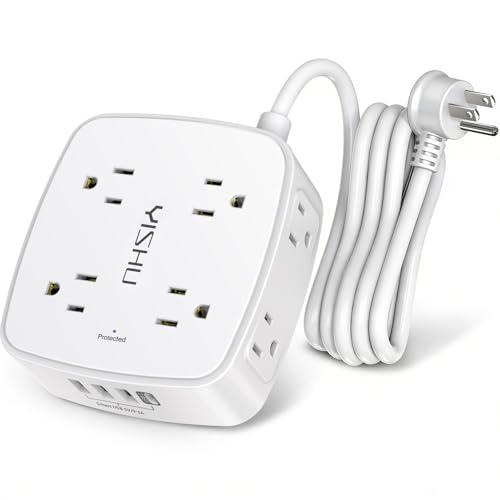
The three-sided design fits easily around furniture and prevents outlets from being obstructed by bulky adapters. This unit features 8 widely spaced AC outlets and 4 USB ports (4.2A total across USB ports), including USB-C at up to 3A. It supports 100V–240V operation, enabling usage in various regions. Protection features include overload protection, short-circuit protection, over-current/over-voltage safeguards, and overheating protection with a minimum energy absorption of 600 Joules. The compact form factor makes it suitable for home, office, and dorm rooms.
With generous spacing and multiple charging ports, it supports a busy charging station for laptops, tablets, and phones, helping maintain a tidy workspace while reducing outlet congestion.
Bawmwim Surge Protector Power Strip

This 14-in-1 device offers 8 outlets and 6 USB ports (4 USB-A, 2 USB-C). The 1250W/10A capacity and 1.2-inch outlet spacing help accommodate bulky adapters. USB ports provide generous power for smartphones, tablets, and other USB devices, and the unit includes built-in surge protection to guard sensitive electronics against spikes. The design emphasizes a balance between abundant outlets and practical space usage, making it suitable for busy workstations or student dorms with multiple charging needs.
Overall, the Bawmwim model targets users who need a robust USB-inclusive hub to streamline a charging center without sacrificing outlet availability for larger power adapters.
BESHON 5Ft Extension Cord Power Strip
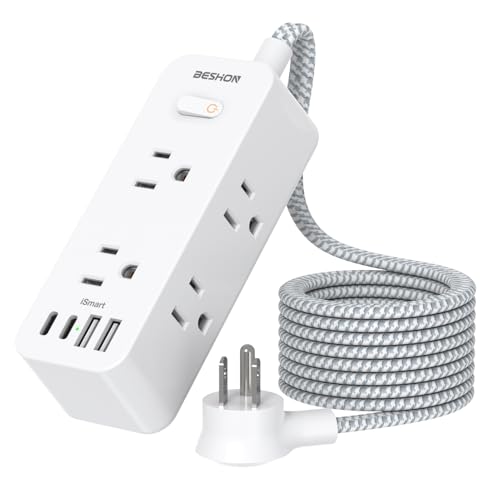
The 10-in-1 configuration includes 6 AC outlets and 4 USB ports (2 USB-C). A 3-sided design and 1.6-inch outlet spacing help fit larger adapters without blocking adjacent sockets. The USB ports feature a combination of USB-A and USB-C with smart charging capabilities to optimize charge speeds. The unit supports travel and dorm-use scenarios where compactness and versatile charging are essential, while maintaining a focus on safe operation and organized cable management.
Power Board Surge Protector With 16 Sockets

This model expands with 16 outlets and 6 USB ports (3 USB-A, 3 USB-C). The vertical/horizontal socket arrangement is designed for space-saving versatility in larger desks or media centers. Included surge protection helps guard multiple devices against power surges, with USB-C ports supporting fast charging for modern devices, making it a strong option for mixed device environments where both high AC load and USB charging are required.
Tower Power Strip Surge Protector

This 16-outlet tower power strip includes 5 USB ports (2 USB-C) and a 6-foot extension cord to reach distant outlets. The design is a compact charging tower that minimizes desk clutter while offering substantial capacity for office or dorm use. The USB-C ports support modern devices, while the AC outlets handle a wide range of electronics. The unit emphasizes organized vertical space and centralized charging to support a busy multi-device setup.
Buying Guide: Key Factors When Choosing an Extension Board With USB
When selecting an extension board with USB, consider these factors to match your needs:
- Outlets and USB ports: Count both AC outlets and USB ports. More USB ports reduce wall-wart adapters and clutter, while sufficient AC outlets handle bulky devices.
- Surge protection rating: Look for Joule rating (the higher, the better) and fast-acting protection (TVS/MOV). Ensure the device is ETL-listed or equivalent for safety.
- Cord length and plug design: Longer cords improve reach; flat or low-profile plugs save space and reduce obstruction on crowded strips or behind furniture.
- Outlet spacing: Wider spacing minimizes crowding and allows larger adapters to fit side-by-side without blocking adjacent outlets.
- Voltage compatibility: For international setups or regional use, ensure the unit supports 100–240V input if needed.
- Build quality and materials: Fire-retardant housing and robust connectors increase durability in busy environments like dorms and offices.
- Mounting options: Wall-mount or desk-mount capabilities help keep spaces tidy and wires organized.
- Smart charging features: USB ports with smart charging automatically tailor output to devices, improving charging efficiency and reducing heat.
- Port configuration: USB-A versus USB-C preferences depend on device needs; USB-C tends to support higher power delivery for newer devices.
Consider your typical device mix (laptops, monitors, phones, tablets, smart devices) and space constraints to pick a model that balances outlets, USB ports, and protection. For shared spaces, prioritize models with robust surge protection and clearly spaced outlets. For compact dorm rooms, flat-plug designs and vertical towers help maximize usable space while maintaining accessibility. Always verify safety certifications and warranty terms to ensure long-term reliability in high-use environments.