Best Energy Meter Testing Equipment for Home and Workshop Use
The right energy meter testing equipment helps you monitor power usage, improve efficiency, and diagnose electrical issues safely. This guide highlights five reliable options, each suited to different buyers—from DIY homeowners to professional electricians. You’ll learn who each product is best for, why it was selected, and practical usage tips. A concise comparison table at the end of the introduction summarizes key specs to help you decide faster.
| Product | Primary Use | Display | Overload | Notes |
|---|---|---|---|---|
| MECHEER Upgraded Watt Meter | Home appliances, energy tracking | 8 display modes | Overload warning | Backlit, ABS body |
| MECHEER Upgraded Watt Power Meter (7 modes) | Usage & cost tracking | 7 display modes | Overload warning | Large LCD, adjustable backlight |
| AstroAI Digital Multimeter | Electrical diagnostics | 3½ digits | N/A | Voltage, current, resistance |
| Klein Tools 69149P Kit | Professional multimeter + testers | Standard meters | N/A | Non-contact voltage, outlet tester |
| YEREADW USB C Tester | USB-C device charging analysis | Digital readouts | N/A | PD/QC protocols |
Buyer profiles: the first two MECHEER meters are ideal for straightforward energy monitoring of home appliances. The AstroAI multimeter suits general electrical troubleshooting. The Klein Tools bundle targets professionals needing durable testing tools and voltage detection. The YEREADW USB C tester is best for tech enthusiasts and device charging optimization.
Upgraded Watt Meter Power Meter Plug Home Energy Monitor

Best for measuring real-time power, energy, voltage, current, and cost for typical household appliances. This MECHEER monitor supports eight display modes, including a cost calculator and overload alert. The overload feature flashes “OVERLOAD” when a device draws more than the threshold, encouraging quick safety action. The unit uses a standard US socket and ABS housing for durability and fire resistance. Ideal for homeowners wanting a simple, all-in-one energy view of plug-in devices.
- Monitors: watts, kWh, voltage, frequency, amps, PF, unit price, total cost
- Display modes: 8 options for quick parameter reading
- Overload protection: 1800W threshold
- Build: ABS housing, US plug compatibility
Caution: When overload occurs, stop using the device and unplug the appliance to prevent potential hazards. Best for single-appliance testing and basic energy tracking.
Upgraded Watt Power Meter Plug Home Electrical Usage Monitor
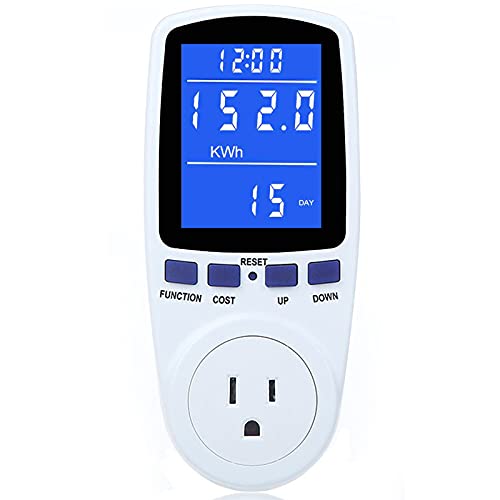
Best for detailed energy budgeting and cost estimation for multiple devices across a household. This MECHEER model features seven display modes, including minimum/maximum power and cumulative time, helping you compare device efficiency over days or weeks. The 2.36″ LCD backlit display remains legible in bright or dim conditions. It’s a strong choice for users who want clearer data when reading from different angles.
- Parameters: watts, kWh, volts, amps, Hz, PF, cost, min/max power
- Display: 7 modes; large backlit LCD; 180° viewing angles
- Backlight: adjustable timing
- Best for: energy budgeting and long-term usage comparisons
Caution: The unit’s backlight timing feature requires button combinations to adjust; consult the manual for exact steps. Suitable for plugging into standard US outlets for common electronics and appliances.
AstroAI Digital Multimeter Tester 2000 Counts
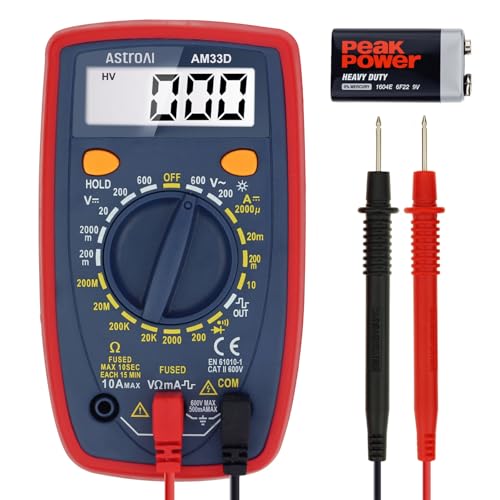
Best for versatile electrical troubleshooting beyond energy meters. This multimeter measures AC/DC voltage, DC current, resistance, and diode checks. It supports automotive and home use, including testing outlets, fuses, and batteries. Data accuracy relies on proper probe insertion and correct measurement modes, with a backlit display for reading in various lighting conditions.
- Measures: AC/DC voltage, DC current, resistance, diode, and continuity
- Display: 1999 counts with backlight
- Safety: CAT III 600V safety rating; remember proper probe placement
- Best for: general electrical diagnostics and quick troubleshooting
Limitation: Not a dedicated power meter for long-term energy tracking; primarily a general-purpose multimeter. Use alongside a separate energy meter for comprehensive consumption data.
Klein Tools 69149P Electrical Test Kit

Best for professional electricians needing a robust testing toolkit. This kit bundles a digital multimeter, a non-contact voltage tester, and an electrical outlet tester with handy leads and batteries. It offers voltage and current measurement, resistance checks, and continuous testing indicators. The non-contact tester provides quick voltage detection with visual and audible alerts, helping to avoid live-conductive surprises.
- Multimeter specs: up to 600V AC/DC, 10A DC, 2 MΩ
- Non-contact tester: bright LED indicators and audible alerts
- Outlet tester: checks wiring health of outlets
- Best for: field technicians needing a complete, portable test kit
Caution: Use proper safety procedures; CAT ratings apply to the tools, not the tested circuit. The kit focuses on measurement and detection rather than prolonged energy monitoring alone.
YEREADW USB C Tester Power Meter

Best for device charging analysis and USB-C power flow testing. This meter measures voltage and current (4V-30V and 0-12A), supports PD2.0/3.0, QC2.0/3.0, and other fast-charging protocols. It’s well suited for testers optimizing charging performance on phones, laptops, and power banks. The compact design makes it easy to carry for on-the-go diagnostics.
- Accurate measurements: ±(1%+5)
- Wide current range: 0-12A; voltage range: 4-30V
- Protocols: PD2.0/3.0, QC2.0/3.0, and more
- Best for: USB-C charging analysis and protocol compatibility checks
Limitation: Focuses on USB-C devices; not a general energy meter for mains-powered appliances.
Buying Guide: Key Considerations For Choosing Energy Meter Testing Equipment
- Purpose: Are you monitoring a single appliance, tracking entire home energy, or diagnosing electrical issues? Choose a dedicated energy meter for ongoing consumption data, or a multifunction multimeter for broader electrical testing.
- Display and readability: Look for backlit, large, and clearly labeled displays. Consider viewing angles if you’ll read it from different positions.
- Safety and ratings: For professional use, ensure CAT ratings and UL listings (or equivalent) align with your local codes. Do not exceed device limits.
- Data capabilities: Some meters offer cost calculations, daily/weekly totals, or min/max readings. If you need long-term comparisons, prioritize data logging features.
- Ease of use: 1-meter setups should be plug-and-play for everyday appliances. More complex kits cater to electricians with a broader feature set.
- Portability: For on-site testing, compact meters with durable housings are advantageous. For home use, a larger display may be preferable.
- Compatibility: Ensure your device plugs fit your outlet types (US standard sockets in this guide) and that the meter supports the voltage and current ranges you expect to measure.
Frequently Asked Questions
What is the main difference between an energy meter and a digital multimeter?
An energy meter primarily tracks power usage, energy consumption (kWh), and cost over time for appliances. A digital multimeter measures electrical parameters such as voltage, current, resistance, and continuity, and is used for diagnosing circuits and components.
Which device is best for home energy monitoring?
For straightforward home energy monitoring, a dedicated watt meter or plug-in energy monitor is typically best, as it provides direct measurements of watts, kWh, and cost for individual devices.
Do these meters require professional installation?
Most plug-in meters are user-friendly and do not require professional installation. More advanced kits for electrical troubleshooting should be used with proper safety precautions and knowledge of electrical work.
Can a USB-C tester replace a full energy meter?
No. USB-C testers are specialized for charging protocols and device-specific measurements. They supplement energy meters but do not replace full home or appliance-level energy monitoring.
What should I look for in an overload warning?
Check the overload threshold and how the device indicates an overload (visual flashing, audible alert, or backlight change). This helps prevent overheating or risk to outlets and appliances.