Best Desk Clamp Power Strips With USB-C for a Neat, High-Power Desk Setup
If you’re seeking a practical desk clamp power strip with USB-C, this guide highlights five top options that balance power, mounting ease, and device charging. Each product is suited to different workspaces—beyond-compact setups, large desks, dorm rooms, and home offices. Read on to find the best fit for your charging needs and desk thickness, edge-mount constraints, and device mix.
| Product | Best For | Key Benefit |
|---|---|---|
| Jgstkcity DesK Clamp USB C 40W (White) | Small to medium desks | Solid power with 5 outlets and 4 USB-C ports |
| Acozvin Flat Plug Desk Clamp 10FT | Large setups | High outlet count and flexible USB-C fast charging |
| Mifaso PD30W Desk Clamp | MacBooks and high-speed USB-C devices | 30W USB-C PD fast charging |
| Jgstkcity 45W Desk Clamp | Power-hungry accessories | 45W fast USB-C charging with multiple ports |
| Anker Nano Desk Clamp | Minimalist, organized desks | 70W total power with advanced USB-C/USB-A ports |
Jgstkcity Desk Clamp Power Strip USB C, 40W, White

Best for compact desks with moderate power needs. This desk-edge clamp supports a total 40W fast charging with 4 USB-C Power Delivery ports (PD 20W max each) and 2 USB-A ports, along with 5 outlets. Its 6-foot flat plug helps reduce cord clutter while a 1200 joule rating adds basic surge protection. Best for users who want a clean, semi-permanent edge-mount solution on thinner desktops. Caution: total output is shared; plan devices with higher USB-C needs accordingly.
Flat Plug Desk Clamp Power Strip 10FT, 40W

Best for larger workstations needing more outlets. This 17-in-1 power strip features 9 AC outlets and 8 USB ports (4 USB-C, 4 USB-A), plus a 40W total fast-charging capability distributed across ports. It includes a clamp mount for secure edge installation on desks up to 1.7″ thick. Choose this if you regularly charge multiple devices at once and want flexible USB-C charging alongside ample socket access. Limitation: some users may find the port layout dense for tight spaces.
PD30W Desk Clamp Power Strip, 5Ft Cord

Best for high-speed USB-C charging on MacBooks, tablets, and phones. This 8-in-1 design provides 4 outlets, 2 USB-A ports, 1 USB-C port, and a 30W USB-C PD charger. The USB-C PD port supports multiple voltage outputs up to 30W, suitable for laptops and other PD devices. The 5-foot cord and right-angled plug help maximize desk space. Caution: When using multiple USB ports, peak total output is managed to distribute power efficiently.
Jgstkcity Desk Clamp Power Strip, 45W

Best for power-dense desks, this unit offers 45W total fast charging with 4 USB-C ports and 4 USB-A ports along with 5 outlets. Its 6-foot flat plug and 1.96″ desk edge compatibility make it suitable for medium to thicker edges. Advantage: high USB-C throughput supports fast charging across multiple devices. Limitation: PD delivery is optimized when fewer devices draw power simultaneously.
Anker Nano Power Strip, Desk Clamp
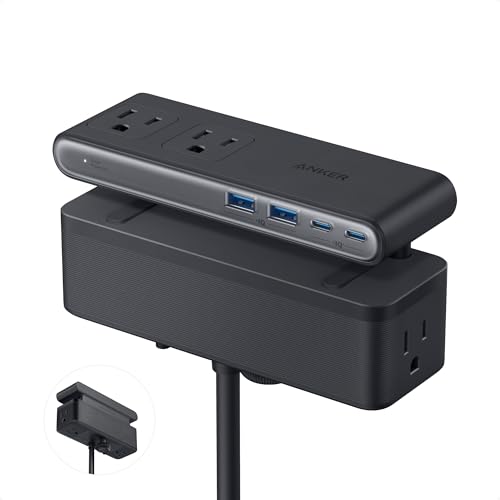
Best for minimalists seeking organization with high-speed capability. The Anker Nano Desk Clamp delivers a dual-zone layout of 6 AC outlets, 2 USB-C, and 2 USB-A ports across top and bottom zones, totaling 70W max with GaN technology. It supports a clean desk with efficient cable management and a 5-foot extension cord. Caution: Larger devices may require careful port assignment to avoid overloading, given the total 70W cap.
Buying Guide
What to consider when choosing a desk clamp power strip with USB-C:
- Power needs: Match total wattage and PD output to your devices. Higher wattage is better for laptops and MacBooks.
- USB-C PD ports: Determine if you need multiple PD ports or just one. Note the max PD per port and the total among all ports.
- Desk edge fit: Check the maximum desk thickness supported and whether your desk edge supports clamp mounting.
- Outlets vs. USB ports: Balance the number of AC outlets with USB-A and USB-C ports to support all devices without adapters.
- Cable management: Look for flat or right-angle plugs to minimize cord clutter and keep the setup tidy.
- Safety: Seek units with proper surge protection ratings and fire-resistant materials when possible.
Frequently Asked Questions
- What is the difference between USB-C PD and USB-C charging without PD?
PD support enables higher power delivery for laptops and fast-charging devices; non-PD USB-C ports charge smaller devices at standard rates. - Is a desk clamp power strip secure for standing desks?
Yes, most clamps are designed to grip desk edges up to about 1.7″–2.16″ thick, depending on model. - Can I mount these under a desk or only on the edge?
Most are designed for edge-m mounting; some can be mounted under certain desk configurations with different brackets. - Do these have surge protection?
Many include surge protection ratings (e.g., 1200–1500 joules) to guard connected devices; verify per model. - How many devices can I charge at once?
It depends on the total wattage and outlets. High-capacity models can support multiple USB-C, USB-A, and AC devices concurrently. - What is the typical installation time?
Most take just a few minutes to clamp onto the desk and secure with minimal hardware.