Best Desk Clamp Power Outlets for Clean, Powerful on-Desk Charging
This guide helps buyers find the best desk clamp power outlets that mount securely on the edge of a desk and provide multiple outlets and USB charging options. It’s ideal for home offices, dorm rooms, and cluttered workspaces where cable management matters. The featured picks balance number of outlets, fast charging on USB-C, ease of installation, and safety features. Suitable for people who want a semi-permanent edge-mount solution that keeps cables away from the floor and out of the way of chair wheels.
Summary table of selected products
| Product | Best For | Why Picked |
|---|---|---|
| Jgstkcity Desk Clamp Power Strip (40W, ETL) | Modern desks; USB-C fast charging | 4 PD USB-C ports, 2 USB-A, 5 outlets; compact edge mount |
| Anker Nano Power Strip | Minimalist setups; laptop charging | Dual-zone layout, 70W USB-C, 6 AC outlets |
| Mifaso PD30W Desk Clamp | Multi-device charging | 8-in-1; 30W USB-C PD, smart distribution |
| Acozvin 17-in-1 Desk Clamp | High device density | 40W total, 8 USB ports, 9 AC outlets |
| TenTrend Desk Clamp 8-in-1 | Balanced power and USB charging | PD 20W USB-C, 4 USB-A, 2 USB-C, 4 AC outlets |
Jgstkcity Desk Clamp Power Strip, 40W

Best for users who want a compact edge-mount surge protector with a total 40W charging capacity. It provides 4 USB-C PD ports (each up to 20W) and 2 USB-A ports, plus five widely spaced outlets, all secured via a desk-edge clamp. The unit uses a fireproof plastic housing and includes a 6-foot flat plug. It’s suited for modern workstations that need fast USB-C charging on the go and a semi-permanent desk attachment.
- Best for: People who need fast PD charging on USB-C and tidy cable management on small to medium desks.
- Why selected: Balanced number of outlets with strong USB-C PD support and a secure edge-mount design.
Caution: The total 40W output is shared across ports; do not expect full PD power on every USB-C port if multiple ports are in use simultaneously.
Anker Nano Power Strip, Desk Clamp
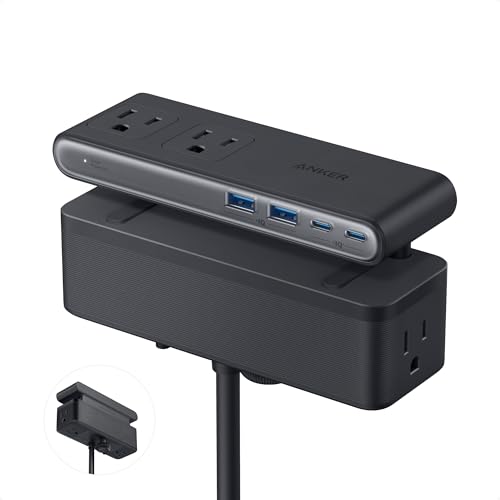
This model is best for cluttered desks that still need robust power distribution and laptop-ready charging. It features a dual-zone layout with six AC outlets, two USB-C ports, and two USB-A ports. The USB-C port supports up to 70W fast charging using GaN technology, allowing laptops and tablets to charge efficiently without a bulky adapter. The long 5-foot cord helps reach distant outlets, making it ideal for larger desks or setups near a wall outlet.
- Best for: Users who want strong USB-C charging and a clean, organized desk with fewer visible cables.
- Why selected: High-power USB-C capability in a compact form with practical cord length.
Caution: The 70W peak on USB-C is shared across ports when multiple devices are charging; plan port use accordingly to maximize charging speed.
Mifaso PD30W Desk Clamp Power Strip

Best for multi-device households or compact home offices that demand a versatile charging station. This 8-in-1 setup converts one socket into four outlets, two USB-A, one USB-C, and a 30W PD USB-C charger. It supports multiple voltage outputs and intelligently distributes power when several USB ports are used at once. The 5-foot cord, 45-degree right-angle design, and a clamp for edge mounting make it a practical choice for desks that require extra space and easy reach to outlets.
- Best for: Dorm rooms or small offices with a high device count and mixed USB-C/USB-A needs.
- Why selected: Clear PD charging on USB-C, plus a flexible layout for devices that use USB-A.
Caution: When using multiple USB-C ports, ensure total output does not exceed the PD limits and reduce simultaneous high-watt charging if needed.
Flat Plug Desk Clamp Power Strip 10FT

Best for larger desks that benefit from a longer reach and a high outlet count. This 17-in-1 desk clamp power strip includes 9 AC outlets and 8 USB ports (4 USB-C, 4 USB-A) across a 40W total charging capability with two PD 20W USB-C ports. The clamp mounts securely on edges up to about 1.7 inches thick, and the unit ships with a six-foot extension cord. It supports simultaneous charging for multiple devices while keeping cables organized away from the floor.
- Best for: Users with many devices and a need for a broad mix of USB-A, USB-C, and AC outlets.
- Why selected: High port density and versatile USB-C PD charging in a single unit.
Caution: The setup is size-heavy; ensure your desk edge can accommodate the 1.7 inch clamp without interfering with legs or drawers.]
TenTrend Desk Clamp Power Strip

Best for users seeking a balanced mix of USB-C PD charging and multiple outlets without excessive bulk. It features 8 ports: 2 USB-C PD ports, 2 USB-C ports, 2 USB-A ports, and 4 AC outlets. The PD-C ports deliver up to 20W each, and the 6-foot cord helps reach distant sockets. The clamp is designed to fit desks up to about 1.7 inches thick, making it suitable for common office furniture.
- Best for: Clean setups that need dependable PD charging and moderate outlet options.
- Why selected: Solid PD performance with a straightforward, easy install design.
Caution: The total power budget should be monitored when using high-wattage devices across multiple USB-C ports.
Buying Guide: Desk Clamp Power Outlets
What to consider when choosing a desk clamp power outlet
- Power and ports: Determine total wattage, the number of outlets, USB-A vs USB-C, and whether USB-C PD is required for devices like laptops.
- Desk compatibility: Check the maximum edge thickness the clamp supports and the distance from the wall to avoid obstruction.
- Safety certifications: Look for ETL or UL listings and fire-retardant materials to reduce risk in busy workspaces.
- Cord length and routing: A longer cord helps reach distant outlets; consider flat or right-angle designs to minimize space usage behind the desk.
- Port distribution: Some devices use higher wattage when PD is engaged. Consider models with smart distribution that prevents overloading.
- Installation: Edge-mount clamps should be simple to install and secure without damaging the desk surface.
Frequently Asked Questions
- What is a desk clamp power strip?
A desk clamp power strip attaches to the edge of a desk with a clamp, providing outlets and USB charging without occupying floor space.
- Do USB-C PD ports require a specific desk thickness?
Most desk clamp strips specify a maximum edge thickness for secure mounting, typically around 1.6 to 1.96 inches.
- Will multiple USB-C ports charge at full speed simultaneously?
Often no. Total PD power is shared; using many PD ports at once can reduce the per-port speed.
- Is a longer cord better for a desk clamp power strip?
A longer cord makes reach easier, especially for desks far from wall outlets, but consider cable management to avoid clutter.
- Are desk clamp power strips safe for high-powered devices?
Choose models with robust surge protection and appropriate wattage ratings to safeguard devices and the desk setup.
- Should I buy a model with a lot of USB-A or USB-C ports?
USB-C PD ports are essential for fast charging laptops and newer devices; USB-A ports are useful for phones and accessories.